> ## Documentation Index
> Fetch the complete documentation index at: https://docs.textql.com/llms.txt
> Use this file to discover all available pages before exploring further.
# Model Management
> Configure which AI models are available in your organization, set defaults, and control per-role access
TextQL supports a range of AI models from Anthropic, OpenAI, and other providers. Organization administrators can control which models are available, set defaults, and decide whether users can switch models themselves.
Model settings are found under **Settings → Models**, which has three tabs: **Model Catalog**, **Role Access**, and **Analytics**.
***
## Available Models
TextQL's model catalog includes models across several providers:
### Anthropic (Claude)
| Model | Best For | Context Window |
| ----------------- | ------------------------------------------------------------------------------------------------------------------------------------------------------------------------------------------------------------------------- | -------------- |
| Claude Fable 5 | Anthropic's most capable widely released model. Demanding reasoning and long-horizon agentic work. Requires the "Allow LLM Data Retention" security setting to be enabled — not available under zero data retention. | 1M\* |
| Claude Opus 4.8 | Most capable Anthropic model. Complex analysis, advanced reasoning, demanding agentic tasks. Higher cost than Sonnet. Supports [Fast Mode](/core/admin/pricing#inference) (2× ACU cost). | 1M\* |
| Claude Opus 4.7 | Complex analysis, advanced reasoning, demanding agentic tasks. Higher cost than Sonnet. Supports [Fast Mode](/core/admin/pricing#inference) (6× ACU cost). | 1M\* |
| Claude Sonnet 5 | Latest Sonnet. Near Opus 4.8 quality for most tasks — SQL generation, dashboards, agentic workflows — at a fraction of the cost. Currently on [introductory pricing](/core/admin/pricing#inference) through Aug 31, 2026. | 1M\* |
| Claude Sonnet 4.6 | Most tasks — SQL generation, dashboards, agentic workflows. | 1M\* |
| Claude Haiku 4.5 | Simple Q\&A and quick lookups. Fastest and lowest cost. | 200K |
\* 1M token context window available in beta. Standard pricing applies up to 200K input tokens; tokens beyond 200K are billed at a higher rate. See [Pricing](/core/admin/pricing#inference) for details.
### OpenAI (GPT)
| Model | Best For | Context Window |
| ------------- | ---------------------------------------------------------------------------------------------- | -------------- |
| GPT-5.6 Sol | OpenAI's newest flagship. Advanced coding, research, and the most demanding agentic workflows. | 1M |
| GPT-5.6 Terra | GPT-5.5-level performance at roughly half the cost. Good OpenAI default for most tasks. | 1M |
| GPT-5.6 Luna | High-throughput, routine tasks. Fastest and most cost-efficient GPT-5.6 tier. | 1M |
| GPT-5.5 | Complex reasoning, dashboards, and agentic workflows. | 1M\* |
| GPT-5.4 | Complex reasoning, dashboards, data analysis. Strong alternative to Sonnet. | 1M\* |
| GPT-5.4 Mini | Simple, well-defined tasks. Fast and cost-effective. | 1M\* |
### Google (Gemini)
| Model | Best For | Context Window |
| ---------------- | -------------------------------------------------------------------------------- | -------------- |
| Gemini 3.1 Pro | Google's most advanced reasoning model. Complex reasoning and agentic workflows. | 1M\* |
| Gemini 3.5 Flash | Frontier coding and agentic performance at Flash latency and cost. | 1M\* |
### Meta
| Model | Best For | Context Window |
| -------------- | ---------------------------------------------------------------------------------------------------- | -------------- |
| Muse Spark 1.1 | Meta's first frontier model. Tool use and multi-step work with always-on reasoning. US-only preview. | 1M |
### Moonshot (via Fireworks)
| Model | Best For | Context Window |
| --------- | ------------------------------------------------------------------------------------------- | -------------- |
| Kimi K2.7 | Latest Kimi frontier model. Long-horizon coding, agentic execution, long-context reasoning. | 256K |
### Zhipu / GLM (via Fireworks)
| Model | Best For | Context Window |
| ------- | ---------------------------------------------------------------------- | -------------- |
| GLM 5.2 | Frontier GLM model. Complex reasoning and very-long-document analysis. | 1M |
### Qwen (via Fireworks)
| Model | Best For | Context Window |
| ------------ | ------------------------------------------------------------------------------- | -------------- |
| Qwen3.7 Plus | Cost-effective coding and general analytical tasks with a large context window. | 256K |
For ACU pricing on each model, see the [Pricing page](/core/admin/pricing#inference).
***
## Model Catalog
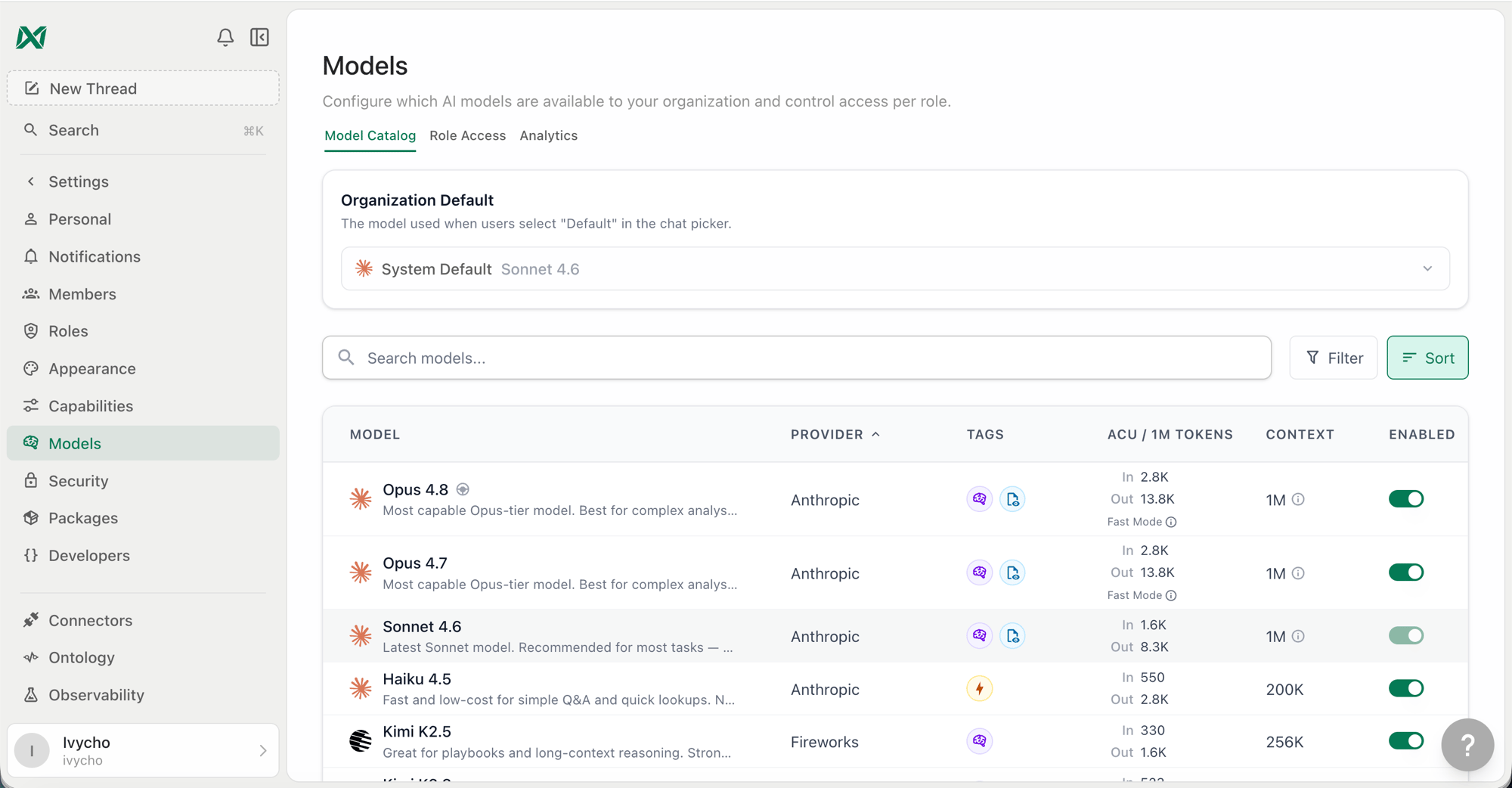
The **Model Catalog** tab is where administrators enable or disable models for the organization and set the organization-wide default.
 ### Enabling and Disabling Models
By default, all models in the catalog are available to your organization. You can disable any model to prevent it from appearing in the model picker for all users.
A disabled model cannot be selected by any user regardless of their role settings. If a role has a disabled model set as its default, the system default takes over.
### Setting the Organization Default
The organization default is the model Ana uses when no specific model has been selected for a conversation. It appears as **"Org Default"** in role settings and is distinct from the **System Default**.
* **System Default** — TextQL's platform-level default, currently Claude Sonnet 5 for Anthropic organizations and GPT-5.6 Sol for OpenAI organizations. This automatically updates as the platform evolves.
* **Org Default** — An explicit model your organization has pinned. Overrides the System Default for all roles that inherit from the org.
If no org default is set, all roles fall back to the System Default.
***
## Role Access
The **Role Access** tab gives fine-grained control over which models each role can use, what their default is, and whether users in that role can switch models mid-conversation.
### Enabling and Disabling Models
By default, all models in the catalog are available to your organization. You can disable any model to prevent it from appearing in the model picker for all users.
A disabled model cannot be selected by any user regardless of their role settings. If a role has a disabled model set as its default, the system default takes over.
### Setting the Organization Default
The organization default is the model Ana uses when no specific model has been selected for a conversation. It appears as **"Org Default"** in role settings and is distinct from the **System Default**.
* **System Default** — TextQL's platform-level default, currently Claude Sonnet 5 for Anthropic organizations and GPT-5.6 Sol for OpenAI organizations. This automatically updates as the platform evolves.
* **Org Default** — An explicit model your organization has pinned. Overrides the System Default for all roles that inherit from the org.
If no org default is set, all roles fall back to the System Default.
***
## Role Access
The **Role Access** tab gives fine-grained control over which models each role can use, what their default is, and whether users in that role can switch models mid-conversation.
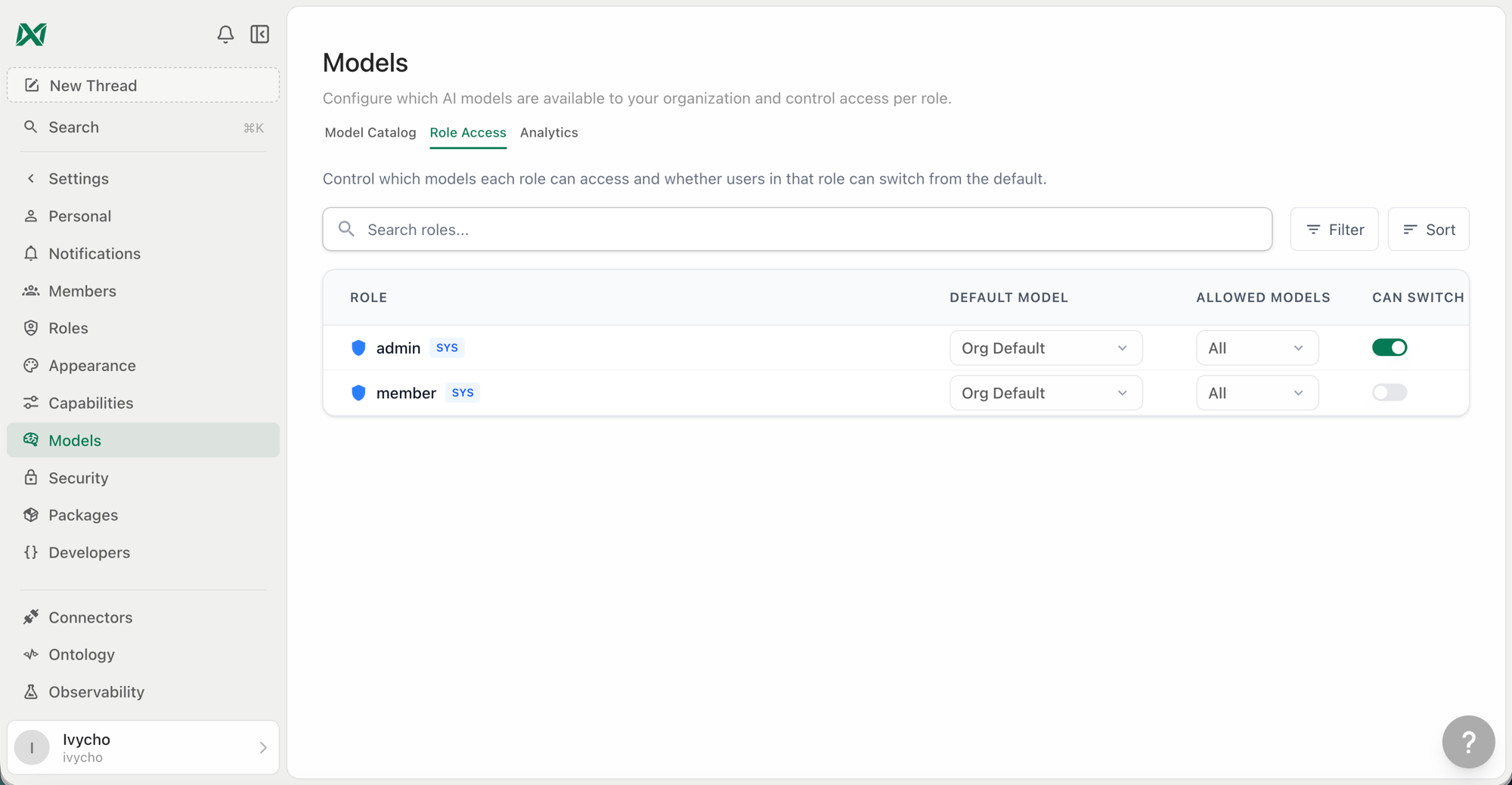 Each role has three configurable settings:
### Default Model
The model Ana starts a new conversation with for users in this role. Options are:
* **Org Default** — Inherits whatever the organization default is set to (recommended for most roles)
* **System Default** — Pins to TextQL's platform default, auto-updating with the platform
* **Specific model** — Pins to an explicit model regardless of org or system defaults
### Allowed Models
The subset of org-enabled models that users in this role can see in the model picker. Defaults to all enabled models. Restricting this is useful if you want certain roles to only access lower-cost or specific provider models.
> **Note:** A role's default model is always included in its allowed list. You cannot remove a model from the allowed list if it is set as that role's default — change the role default first.
### Can Switch
Controls whether users in this role see the model picker in the chat interface at all. When disabled, users in this role cannot change the model — they always use the role's default.
| Can Switch | Behavior |
| ---------- | ------------------------------------------------------------------------- |
| On | Users see the model picker and can choose any model in their allowed list |
| Off | Model picker is hidden; the role's default model is used silently |
***
## Model Picker (User-Facing)
When model switching is enabled for a role, users see a model picker in the top right of the chat interface. It shows:
* **Default** — The system/org/role default, auto-updating with the platform
* All models the role is allowed to access, grouped with provider icons
Hovering over a model for \~1 second expands its description. The currently selected model is highlighted with a checkmark. Models approaching deprecation show a warning icon with the deprecation date.
Each role has three configurable settings:
### Default Model
The model Ana starts a new conversation with for users in this role. Options are:
* **Org Default** — Inherits whatever the organization default is set to (recommended for most roles)
* **System Default** — Pins to TextQL's platform default, auto-updating with the platform
* **Specific model** — Pins to an explicit model regardless of org or system defaults
### Allowed Models
The subset of org-enabled models that users in this role can see in the model picker. Defaults to all enabled models. Restricting this is useful if you want certain roles to only access lower-cost or specific provider models.
> **Note:** A role's default model is always included in its allowed list. You cannot remove a model from the allowed list if it is set as that role's default — change the role default first.
### Can Switch
Controls whether users in this role see the model picker in the chat interface at all. When disabled, users in this role cannot change the model — they always use the role's default.
| Can Switch | Behavior |
| ---------- | ------------------------------------------------------------------------- |
| On | Users see the model picker and can choose any model in their allowed list |
| Off | Model picker is hidden; the role's default model is used silently |
***
## Model Picker (User-Facing)
When model switching is enabled for a role, users see a model picker in the top right of the chat interface. It shows:
* **Default** — The system/org/role default, auto-updating with the platform
* All models the role is allowed to access, grouped with provider icons
Hovering over a model for \~1 second expands its description. The currently selected model is highlighted with a checkmark. Models approaching deprecation show a warning icon with the deprecation date.
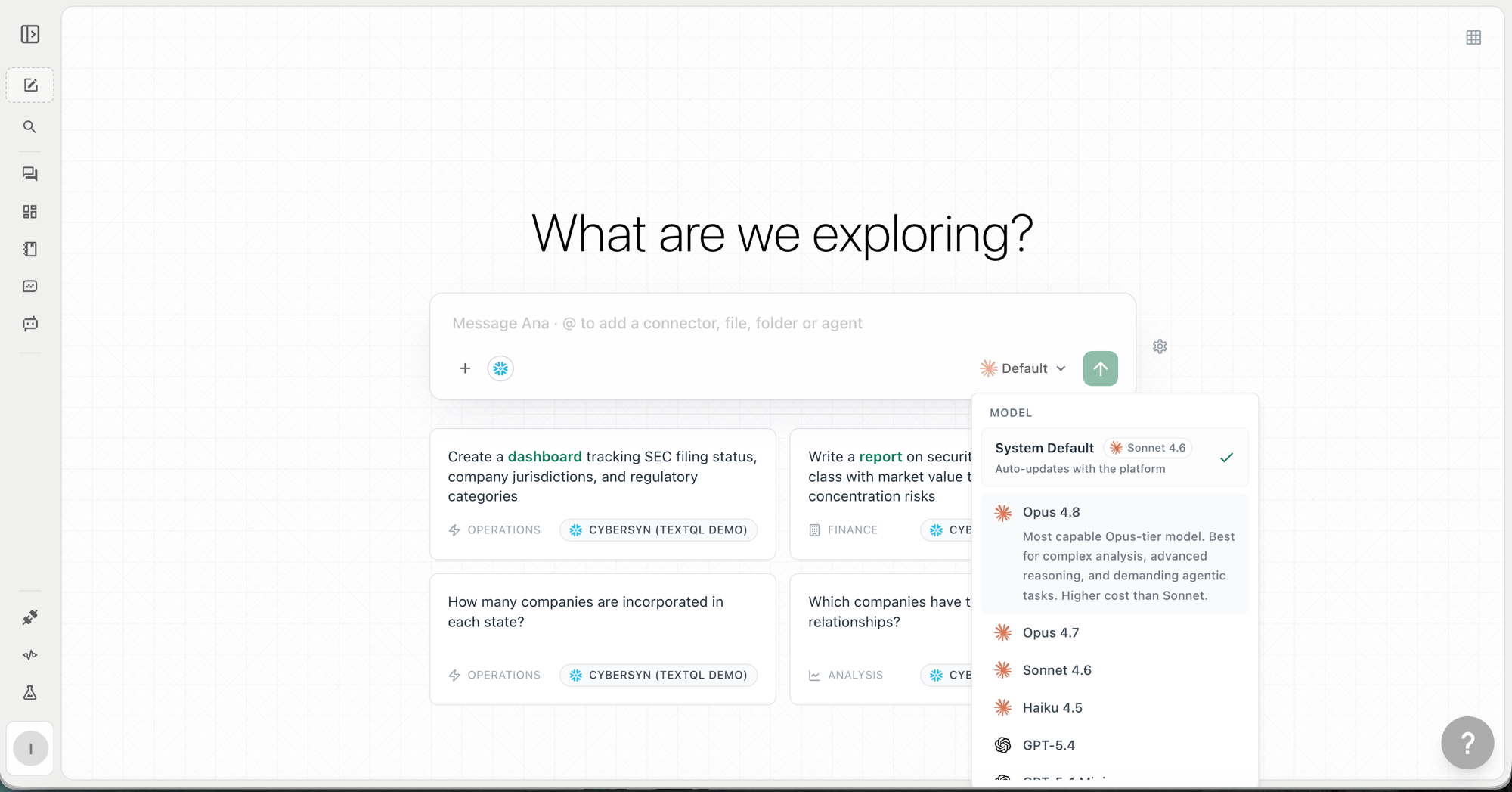 A model selection is scoped to that conversation — switching models in one chat does not affect other chats.
***
## Model Deprecations
When a model is scheduled for deprecation, a warning appears in the model picker next to that model's name, showing the deprecation date. Administrators should update any role defaults that point to a deprecating model before the deprecation date to avoid disruption.
After deprecation, requests to a deprecated model are automatically routed to the nearest equivalent current model.
***
## Frequently Asked Questions
**Can different roles use different providers (Anthropic vs OpenAI)?**
Yes. You can configure one role to default to Claude Sonnet and another to GPT-5.2 by setting explicit role defaults and restricting allowed models per role.
**What happens if a user's role default model is disabled at the org level?**
The system falls back to the org default, then the system default. Disabled models are never served to users even if a role still references them.
**Does model selection affect Playbooks?**
Playbooks use the organization's default model unless a specific model has been configured for that playbook. Role-level model restrictions do not apply to Playbook runs.
**Can I restrict users to only Anthropic models?**
Yes — set the allowed models for a role to only include Claude models. Users in that role will not see OpenAI or other provider options in the picker.
A model selection is scoped to that conversation — switching models in one chat does not affect other chats.
***
## Model Deprecations
When a model is scheduled for deprecation, a warning appears in the model picker next to that model's name, showing the deprecation date. Administrators should update any role defaults that point to a deprecating model before the deprecation date to avoid disruption.
After deprecation, requests to a deprecated model are automatically routed to the nearest equivalent current model.
***
## Frequently Asked Questions
**Can different roles use different providers (Anthropic vs OpenAI)?**
Yes. You can configure one role to default to Claude Sonnet and another to GPT-5.2 by setting explicit role defaults and restricting allowed models per role.
**What happens if a user's role default model is disabled at the org level?**
The system falls back to the org default, then the system default. Disabled models are never served to users even if a role still references them.
**Does model selection affect Playbooks?**
Playbooks use the organization's default model unless a specific model has been configured for that playbook. Role-level model restrictions do not apply to Playbook runs.
**Can I restrict users to only Anthropic models?**
Yes — set the allowed models for a role to only include Claude models. Users in that role will not see OpenAI or other provider options in the picker.