> ## Documentation Index
> Fetch the complete documentation index at: https://docs.textql.com/llms.txt
> Use this file to discover all available pages before exploring further.
# TextQL Pricing and Consumption Table
> Understand TextQL’s Pricing
Effective: March 19, 2026
## Consumption
The TextQL Virtual Sandcastle Service is a cloud data platform that consumes resources for distinct functions. The service provides agentic capabilities for data-intensive workloads through Ana, and is available in different service tiers and deployment options. Workloads are processed using virtual compute resources and AI inference, charged based on Agent Compute Units (ACUs).
## Agent Compute Units (ACUs)
**Compute (Virtual Sandcastle Service).**
TextQL bills for compute resources using purchasable Agent Compute Units ("ACUs").
Virtual compute instances consume ACUs at a rate of 500 ACUs per instance-hour.
When you start a workload (such as starting a conversation with Ana or running a playbook), a dedicated sandbox is provisioned for your work. This sandbox remains warm and available for 1 hour after your last activity, consuming ACUs continuously during this time. After 1 hour of inactivity, the sandbox is automatically released.
**Dashboards.** Published dashboards run on the same sandbox-backed compute. A dashboard's sandbox is provisioned the first time it is viewed or refreshed after being released, and that provisioning is the only event that starts a billing period. Once the sandbox is warm, additional viewers, page refreshes, and manual or scheduled data refreshes do not provision new compute and do not incur additional cost. Unlike chat and playbook sandboxes, which release after 1 hour of inactivity, a dashboard's sandbox stays warm for 24 hours after it was last viewed before it is automatically released — after which the next view or refresh provisions a new sandbox and starts a new billing period. The longer window reflects how dashboards are typically used: viewed repeatedly throughout the day, often by multiple people on a recurring daily cadence, so a 24-hour window keeps a normal day of viewing to a single provisioning instead of re-billing on each visit.
**AI Inference.**
TextQL offers AI inference capabilities powered by industry-leading large language models from Anthropic, OpenAI, Google, and other providers.
Inference charges are based on the number of input and output tokens processed during your interactions with Ana. Input tokens represent the context provided to the model (your questions, relevant data, and conversation history), while output tokens represent Ana's generated responses.
Token consumption is calculated precisely and converted to ACUs based on the rates in the AI Inference Pricing table below.
Different models offer varying capabilities and price points — from cost-efficient models optimized for simple queries to advanced reasoning models for complex analytical tasks.
Cache features (where available) provide significant cost savings by reusing previously processed context across related queries.
## ACU Consumption Pricing
### Subscription Tier Pricing
**Features Include:**
• Up to 3 seats
• Unlimited connectors
• Secrets manager
• Ontology builder
• All integrations (Slack, dbt, Tableau, Teams, etc.)
**Everything in Analyst, plus:**
• Unlimited seats
• Role Based Access Control
• Single Sign On
• Priority support (1-hour response)
**Everything in Team, plus:**
• Dedicated infrastructure
• Embed or white-label TextQL
• On-prem & VPC deployments
• Dedicated account manager
| Tier | Base Price | Monthly Credit | Overage Rate (per 1,000 ACUs) |
| ---------- | ----------- | -------------- | ----------------------------- |
| Analyst | \$0/month | 50,000 ACU | \$2.00 |
| Team | \$250/month | 216,666 ACU | \$3.00 |
| Enterprise | Custom | Custom | Custom |
**Enterprise Deployment Options:**
Embedded, white-label and on-prem solutions are available for Enterprise clients. [Contact our sales team](https://textql.com/request-demo) to learn more.
### Billing Controls
Since usage varies based on your actual needs, we provide two flexible payment options to match your organization's preferences:
#### 1. Auto-Invoice (Invoicing in Arrears)
Receive two invoices every month for predictable billing cycles:
* **Overage Invoice**: Any usage beyond your subscription allotment from the previous month
* **Subscription Invoice**: Your upcoming month's subscription allotment
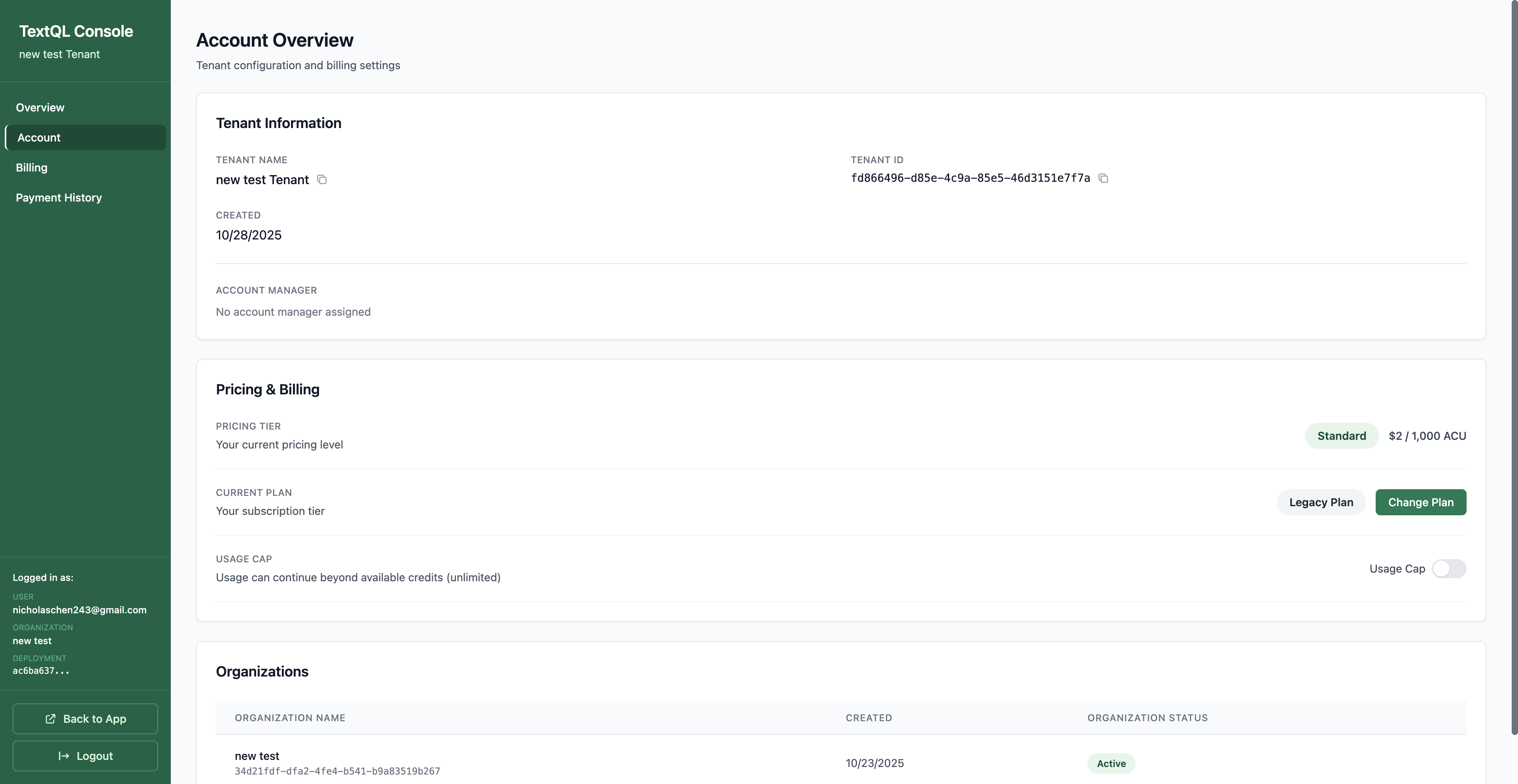 When Auto-Invoice is selected, you'll see a **Change Plan** button in your **Account Overview** under Pricing & Billing. From there, you can view your subscription billing details and overage billing information. See [Changing Your Plan](#changing-your-plan) for more details, and [Payment History & Invoices](#payment-history--invoices) to view your invoices and receipts.
**Optional Controls:**
* **Enable Overages**: Continue using ACUs beyond your monthly allotment. You'll be invoiced for any overages at the end of the month.
* **Enable Auto-Payment**: Add a credit card to automatically charge both your subscription and overages, eliminating manual invoice processing
When Auto-Invoice is selected, you'll see a **Change Plan** button in your **Account Overview** under Pricing & Billing. From there, you can view your subscription billing details and overage billing information. See [Changing Your Plan](#changing-your-plan) for more details, and [Payment History & Invoices](#payment-history--invoices) to view your invoices and receipts.
**Optional Controls:**
* **Enable Overages**: Continue using ACUs beyond your monthly allotment. You'll be invoiced for any overages at the end of the month.
* **Enable Auto-Payment**: Add a credit card to automatically charge both your subscription and overages, eliminating manual invoice processing
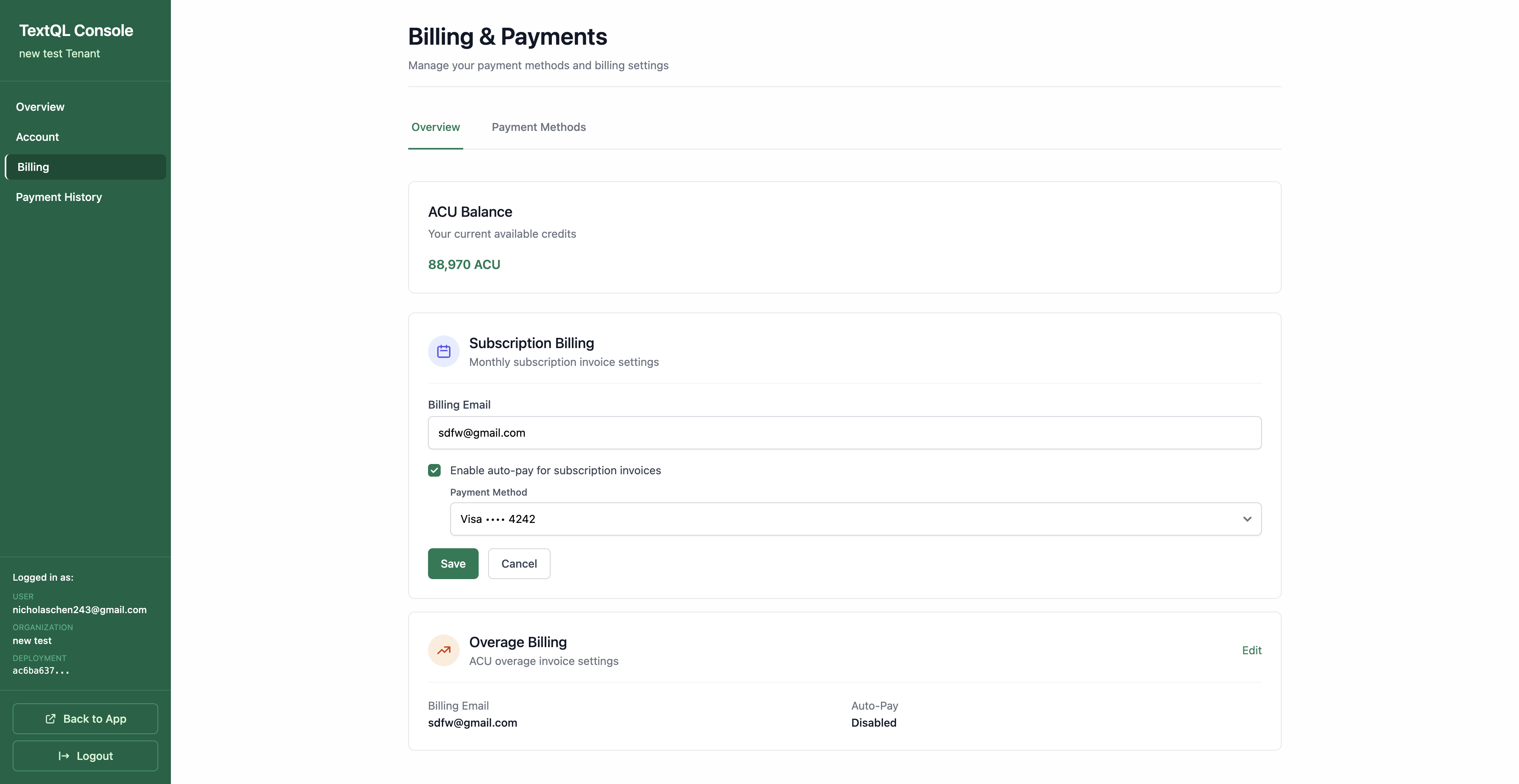 You can enable auto-pay for either subscription or overage billing and add your payment method directly.
**Best for:** Organizations that prefer traditional monthly billing cycles with predictable payment schedules.
#### 2. Managed Invoice
For organizations with dedicated account management, your TextQL account manager handles all invoice details and administration through the platform.
You can enable auto-pay for either subscription or overage billing and add your payment method directly.
**Best for:** Organizations that prefer traditional monthly billing cycles with predictable payment schedules.
#### 2. Managed Invoice
For organizations with dedicated account management, your TextQL account manager handles all invoice details and administration through the platform.
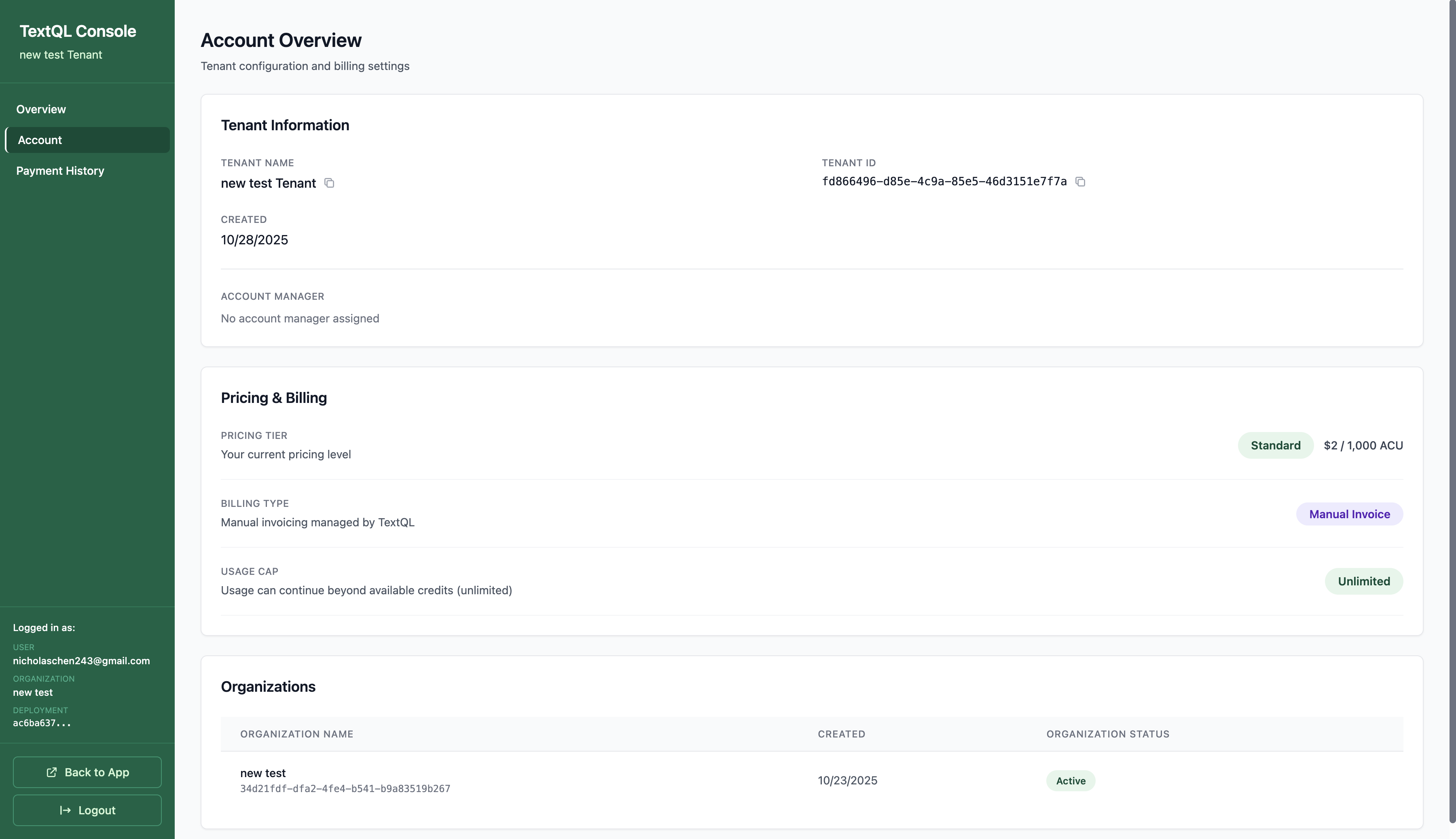 When Managed Invoice is selected, you'll see **Manual Invoice** as your billing type in the **Account Overview** under Pricing & Billing. See [Payment History & Invoices](#payment-history--invoices) to view your invoices and receipts.
**Features:**
* **Managed Administration**: Your account manager inputs invoice details and manages billing
* **Platform-Delivered Invoices**: All invoices are issued through the TextQL platform
* **Dedicated Support**: Direct relationship with your account management team
* **Self-Service Credit Card Purchases**: Optionally add a credit card to purchase ACU credits directly
* **Automatic Top-Up**: Configure automated credit purchases when your balance drops below a threshold
**Optional Self-Service Controls:**
To use self-service features with Managed Invoice, add a credit card first. See [Credit Card Payments](#credit-card-payments) for step-by-step instructions. Once your card is saved, you can:
1. **Purchase Credits**: Click **Billing** in the sidebar, then click the **Add ACU Credits** button to purchase more credits at any time.
2. **Enable Automated Top-Up**:
* In the Billing & Payments page, click the **Add ACU Credits** tab
* Scroll to **Automatic Top-Up** and click **Set Up Automatic Top-Up**
* Configure your balance threshold, top-up amount, payment method, and safety limits (max charges per day)
* Click **Enable Automatic Top-Up**
**Best for:** Enterprise organizations that require hands-on account management and prefer working with a dedicated TextQL representative, with optional self-service credit card purchases.
### Credit Card Payments
TextQL accepts all major credit cards for convenient and secure payment processing.
**Accepted Cards:**
* Visa
* Mastercard
* American Express
* Discover
**How to Pay with Credit Card:**
1. Click **Billing** in the sidebar
2. Click **Add Payment Methods**
When Managed Invoice is selected, you'll see **Manual Invoice** as your billing type in the **Account Overview** under Pricing & Billing. See [Payment History & Invoices](#payment-history--invoices) to view your invoices and receipts.
**Features:**
* **Managed Administration**: Your account manager inputs invoice details and manages billing
* **Platform-Delivered Invoices**: All invoices are issued through the TextQL platform
* **Dedicated Support**: Direct relationship with your account management team
* **Self-Service Credit Card Purchases**: Optionally add a credit card to purchase ACU credits directly
* **Automatic Top-Up**: Configure automated credit purchases when your balance drops below a threshold
**Optional Self-Service Controls:**
To use self-service features with Managed Invoice, add a credit card first. See [Credit Card Payments](#credit-card-payments) for step-by-step instructions. Once your card is saved, you can:
1. **Purchase Credits**: Click **Billing** in the sidebar, then click the **Add ACU Credits** button to purchase more credits at any time.
2. **Enable Automated Top-Up**:
* In the Billing & Payments page, click the **Add ACU Credits** tab
* Scroll to **Automatic Top-Up** and click **Set Up Automatic Top-Up**
* Configure your balance threshold, top-up amount, payment method, and safety limits (max charges per day)
* Click **Enable Automatic Top-Up**
**Best for:** Enterprise organizations that require hands-on account management and prefer working with a dedicated TextQL representative, with optional self-service credit card purchases.
### Credit Card Payments
TextQL accepts all major credit cards for convenient and secure payment processing.
**Accepted Cards:**
* Visa
* Mastercard
* American Express
* Discover
**How to Pay with Credit Card:**
1. Click **Billing** in the sidebar
2. Click **Add Payment Methods**
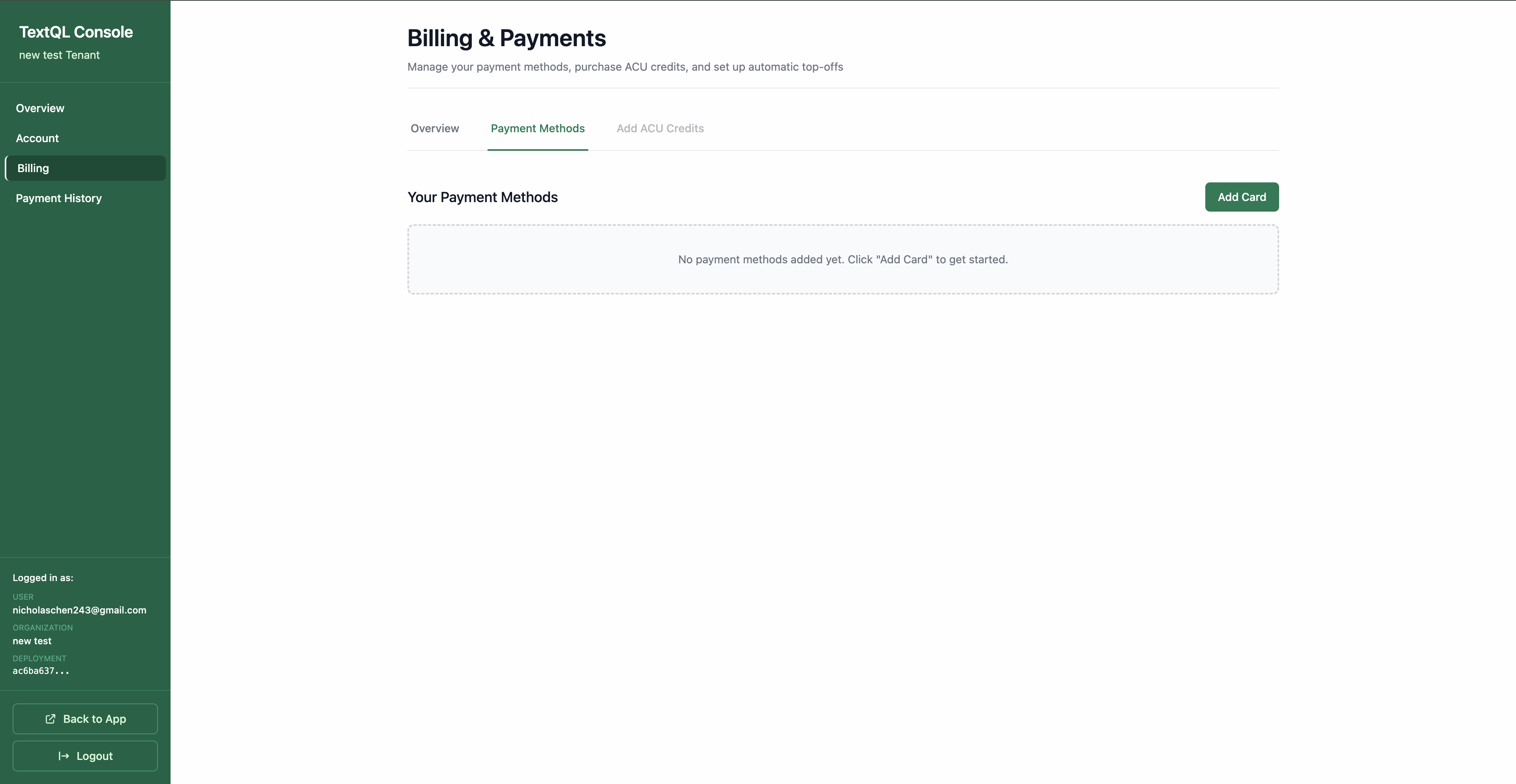 3. Click **Add Card** (if no other payment method is currently saved)
4. Enter your card details:
* Card number
* Expiration date (MM/YY)
* CVV/security code
* Billing address (must match the address on file with your card issuer)
3. Click **Add Card** (if no other payment method is currently saved)
4. Enter your card details:
* Card number
* Expiration date (MM/YY)
* CVV/security code
* Billing address (must match the address on file with your card issuer)
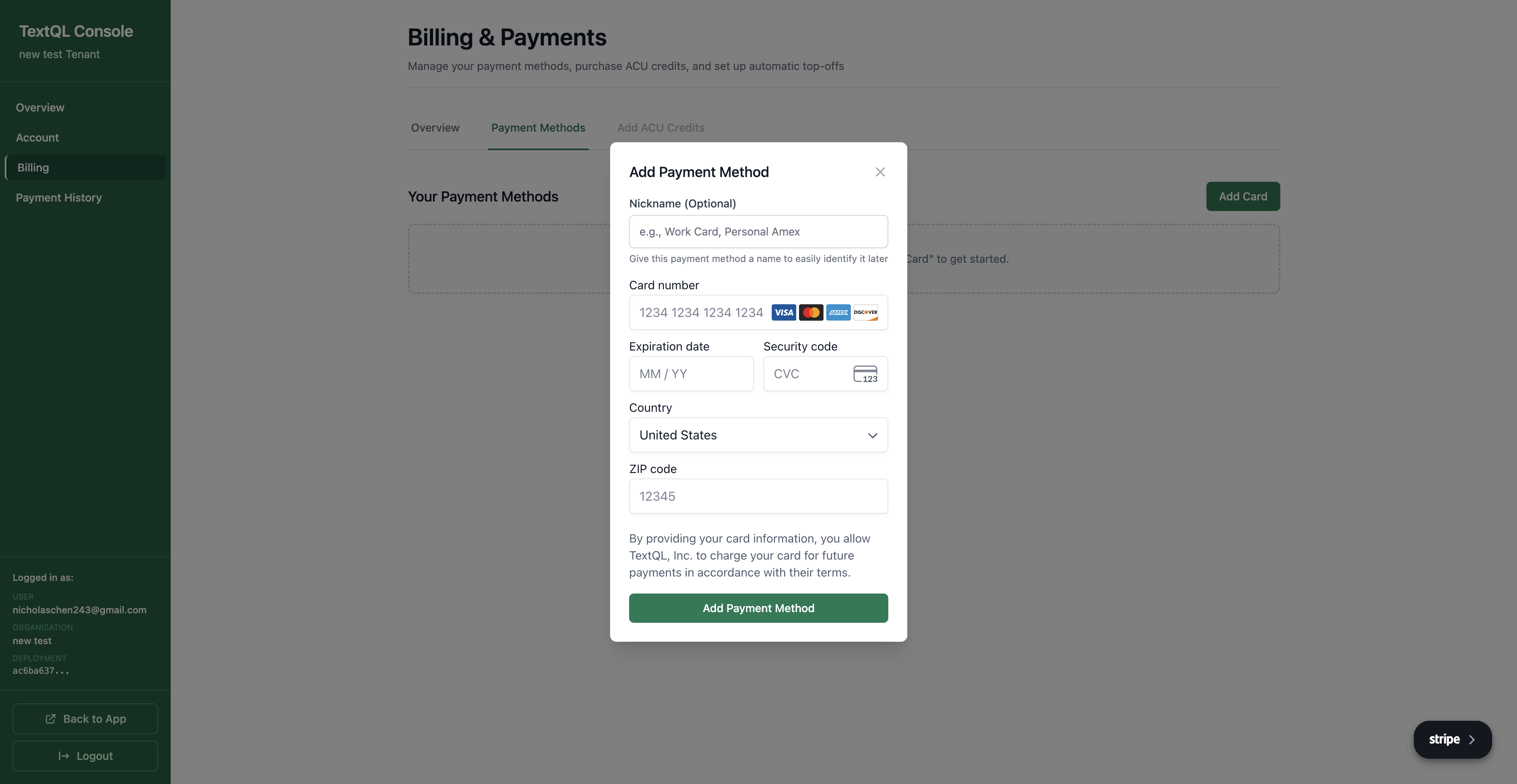 5. Click **Save Card** to securely store your payment method — your card will now appear in the payment methods list
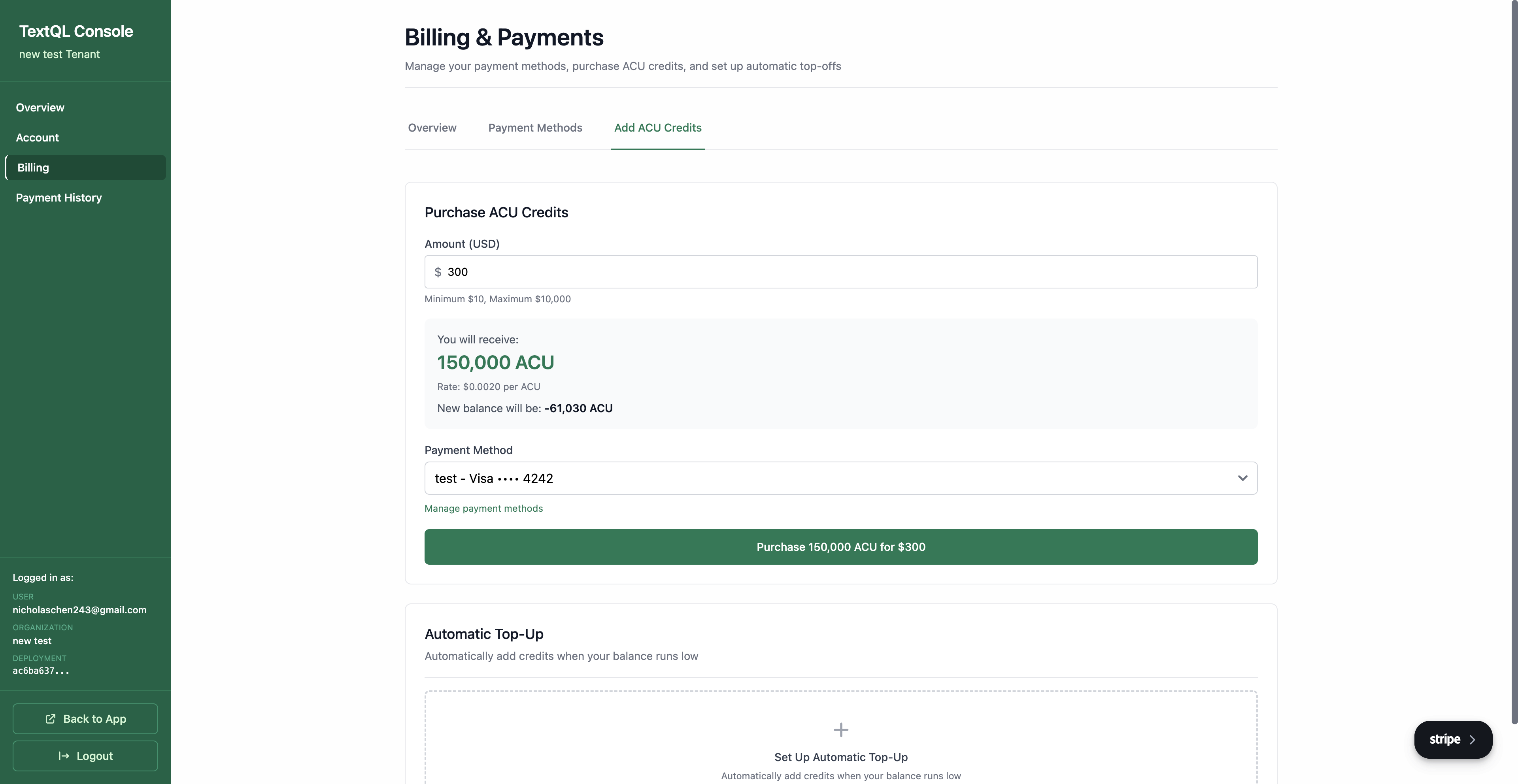
6. Click the **Add ACU Credits** tab
7. Enter the **Amount (USD)** you want to purchase (min \$10, max \$10,000)
8. The system will display:
* How many ACUs you will receive
* The rate per ACU
* Your new balance after purchase
9. Select your **Payment Method** from the dropdown
10. Click **Purchase \[X] ACU for \$\[amount]** to complete the transaction
5. Click **Save Card** to securely store your payment method — your card will now appear in the payment methods list
6. Click the **Add ACU Credits** tab
7. Enter the **Amount (USD)** you want to purchase (min \$10, max \$10,000)
8. The system will display:
* How many ACUs you will receive
* The rate per ACU
* Your new balance after purchase
9. Select your **Payment Method** from the dropdown
10. Click **Purchase \[X] ACU for \$\[amount]** to complete the transaction
 ### Payment History & Invoices
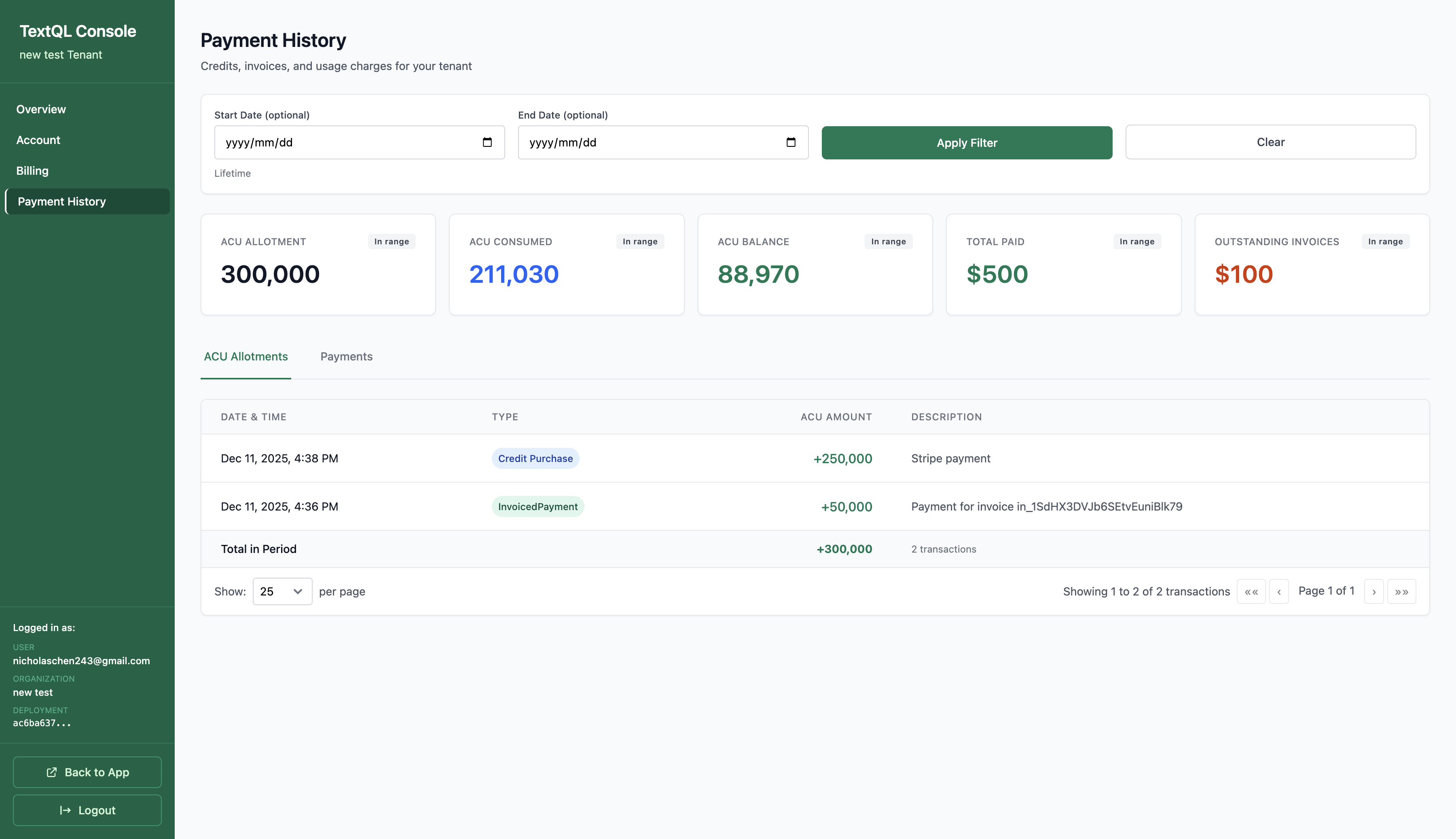
You can view your complete payment history and invoices by clicking **Payment History** in the sidebar.
### Payment History & Invoices
You can view your complete payment history and invoices by clicking **Payment History** in the sidebar.
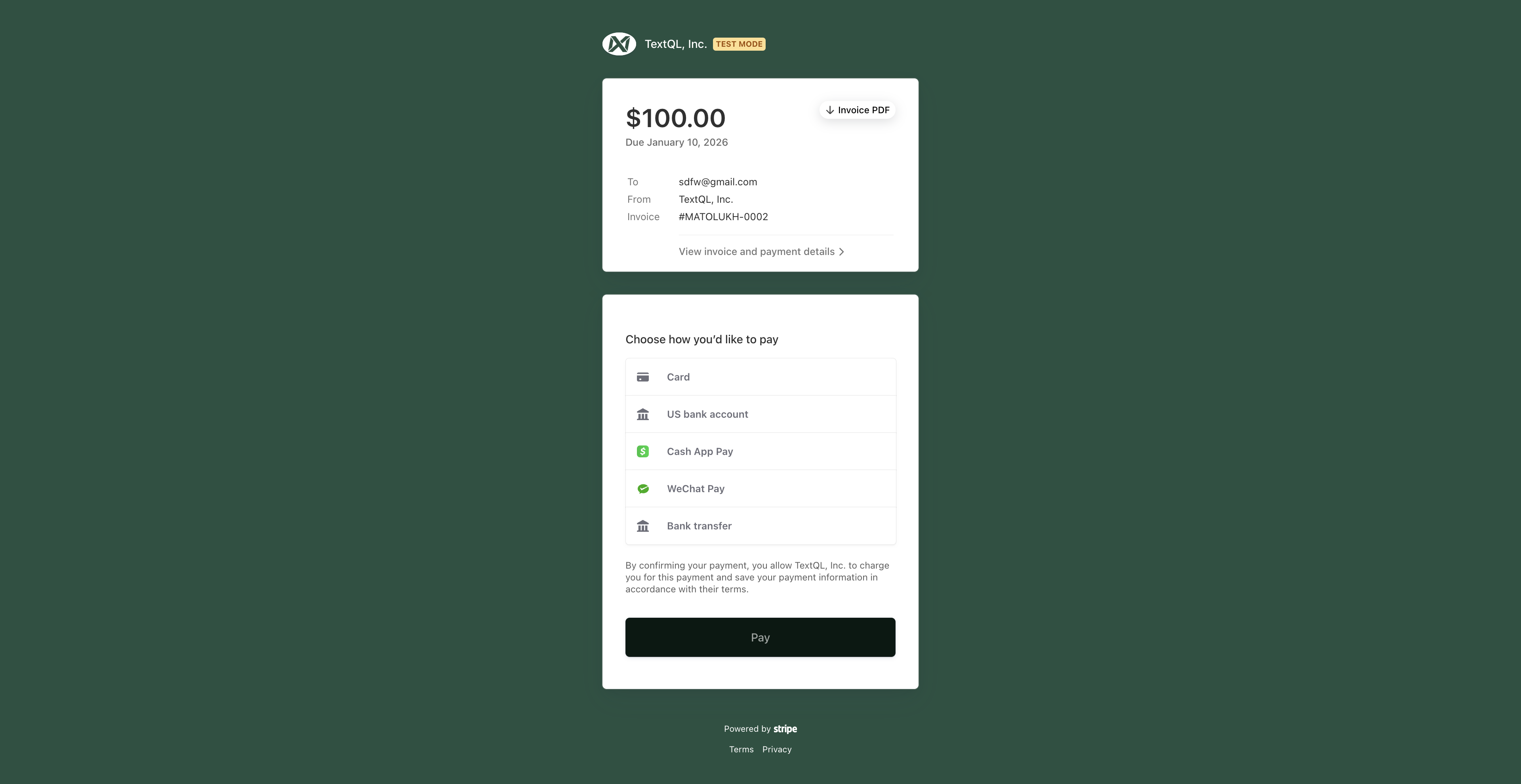
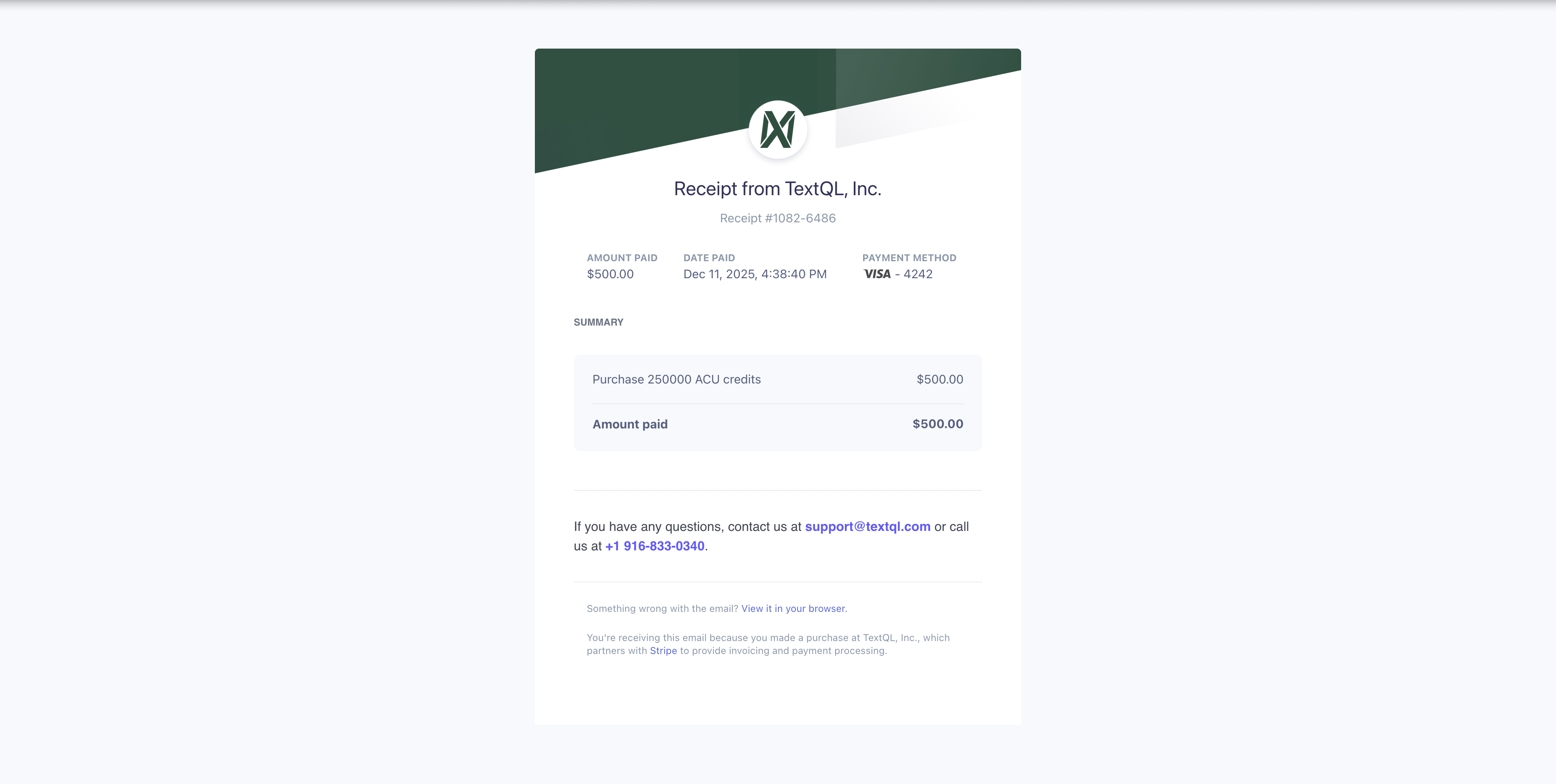
 **Viewing Invoices:**
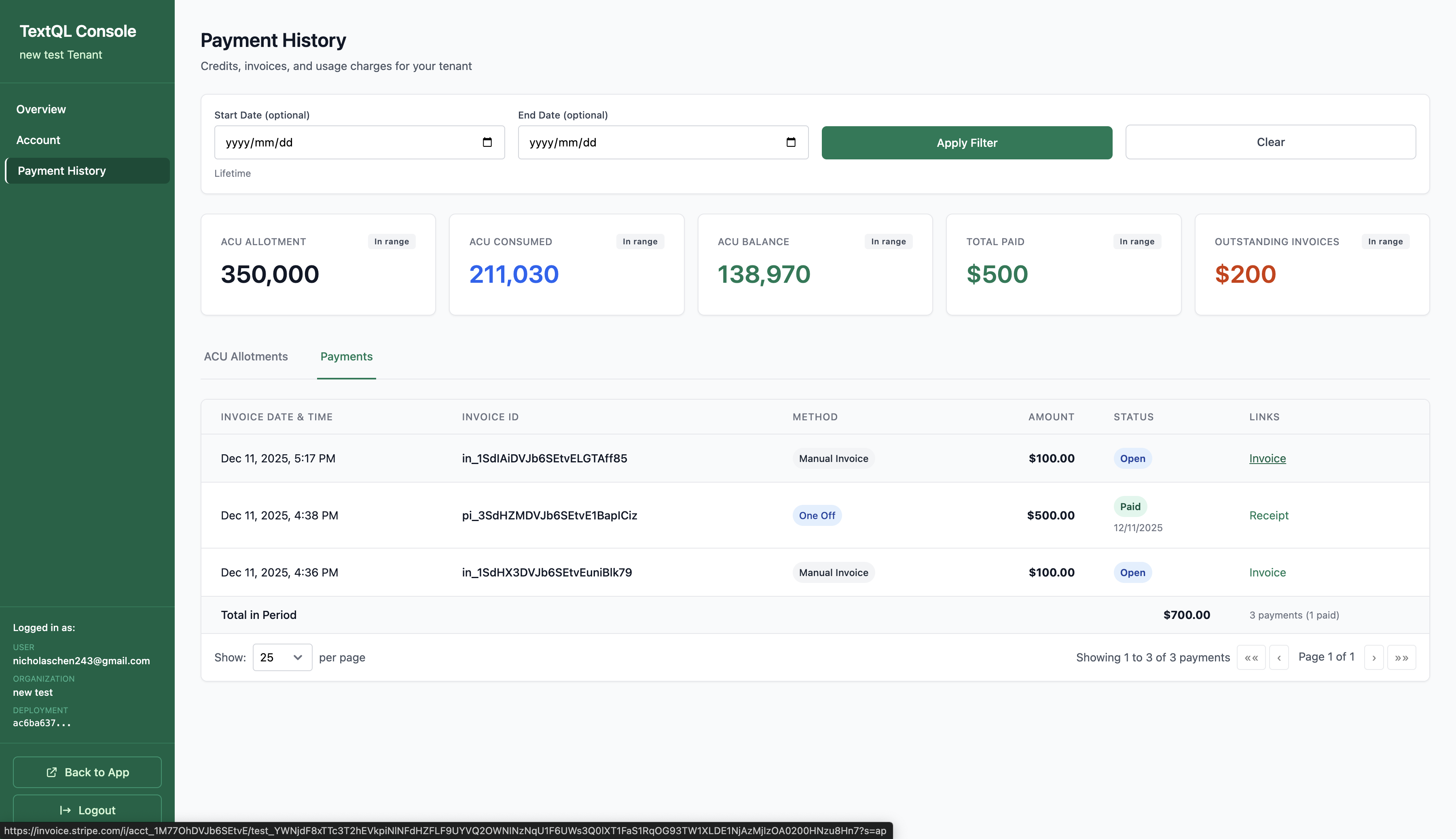
Click the **Payments** tab in Payment History to see your invoices and receipts. Click on **Invoice** or **Receipt** links to view the details — you can see the full information and download them for your records.
**Viewing Invoices:**
Click the **Payments** tab in Payment History to see your invoices and receipts. Click on **Invoice** or **Receipt** links to view the details — you can see the full information and download them for your records.
 **Stripe Invoices & Receipts:**
All payments are processed through Stripe. You'll receive invoices and receipts via email, and can also access them directly from your payment history.
**Stripe Invoices & Receipts:**
All payments are processed through Stripe. You'll receive invoices and receipts via email, and can also access them directly from your payment history.
 ### Changing Your Plan
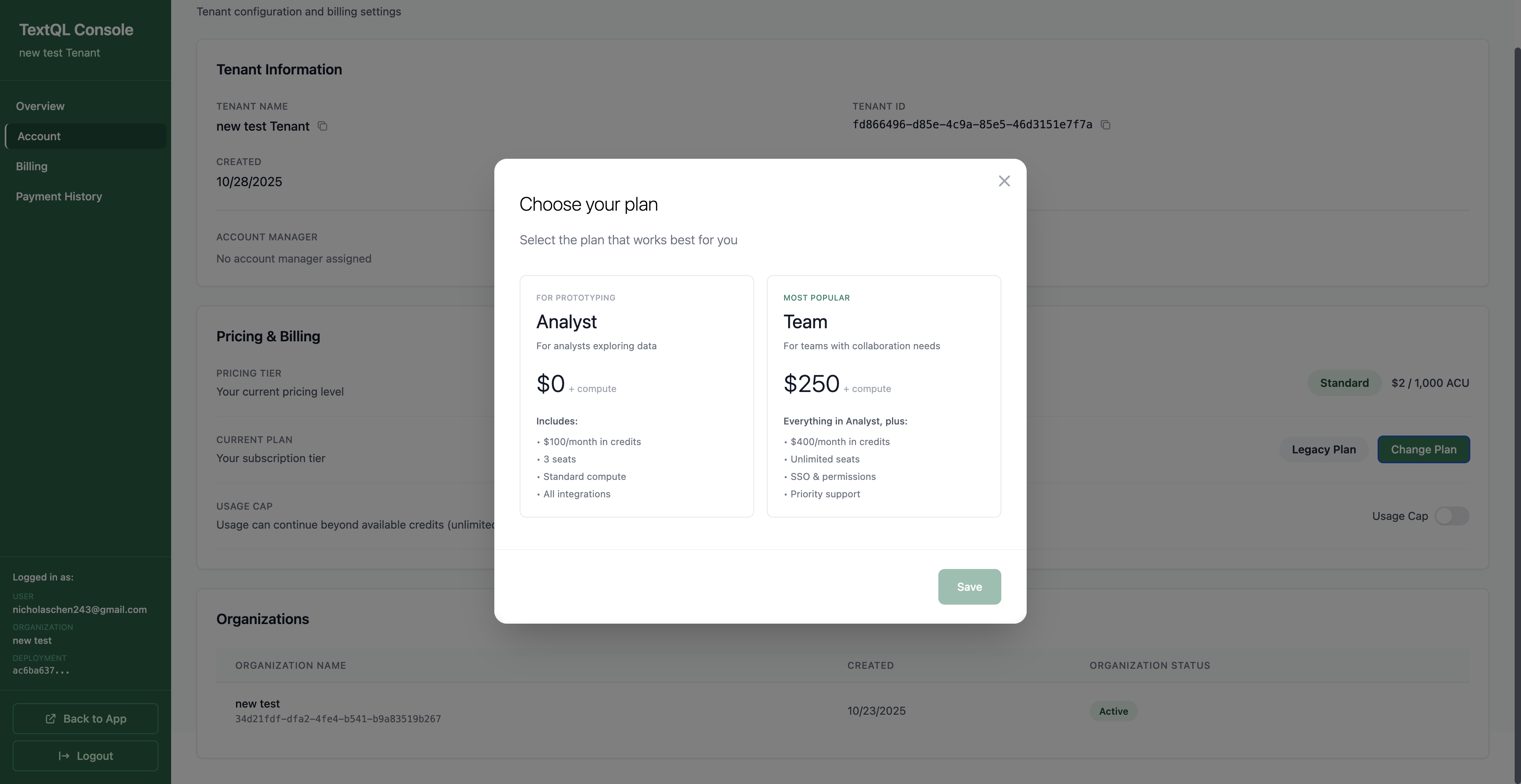
To change your subscription plan, go to **Account** and click the **Change Plan** button under Pricing & Billing.
### Changing Your Plan
To change your subscription plan, go to **Account** and click the **Change Plan** button under Pricing & Billing.
 ### Compute
**Instance Consumption Rate**
| Instance-Hour | ACUs Consumed |
| ------------- | ------------- |
| 1 hour | 500 |
### Inference
**AI Inference Pricing (ACUs per 1M Tokens)**. All inference pricing is denominated in ACUs per 1 million tokens processed.
#### Anthropic Models
| Model | Input | Cache Read | Ephemeral Cache | Persistent Cache | Output |
| -------------------- | ------ | ---------- | --------------- | ---------------- | ------ |
| Opus 4.7 | 2,800 | 280 | 3,500 | 5,600 | 14,000 |
| Opus 4.6 | 2,750 | 275 | 3,437.5 | 5,500 | 13,750 |
| Opus 4.6 (Fast Mode) | 16,500 | 1,650 | 20,625 | 33,000 | 82,500 |
| Sonnet 4.6 | 1,650 | 165 | 2,062.5 | 3,300 | 8,250 |
| Sonnet 4.5 | 1,650 | 165 | 2,062.5 | 3,300 | 8,250 |
| Haiku 4.5 | 550 | 55 | 687.5 | 1,100 | 2,750 |
**Fast Mode** is available for Opus 4.6 and provides significantly faster inference at 6× the standard ACU rates. Fast mode can be enabled per-organization by an administrator.
#### OpenAI Models
| Model | Token Range | Input | Cache Read | Output |
| ------------ | ----------- | ----- | ---------- | ------ |
| GPT-5.4 | ≤272K | 1,375 | 137.5 | 8,250 |
| GPT-5.4 | >272K | 2,750 | 275 | 12,375 |
| GPT-5.4 Mini | ≤272K | 220 | 22 | 1,760 |
| GPT-5.4 Mini | >272K | 440 | 44 | 2,640 |
| GPT-5.5 | N/A | 2,750 | 275 | 16,500 |
| GPT-5.2 | N/A | 962.5 | 96.25 | 7,700 |
| GPT-5 Mini | N/A | 137.5 | 13.75 | 1,100 |
#### Google Gemini Models
| Model | Token Range | Input | Cache Read | Output |
| ---------------- | ----------- | ----- | ---------- | ------ |
| Gemini 3.5 Flash | N/A | 825 | 82.5 | 4,950 |
| Gemini 3.1 Pro | ≤200K | 1,100 | 110 | 6,600 |
| Gemini 3.1 Pro | >200K | 2,200 | 220 | 9,900 |
#### Other Models
| Model | Input | Cache Read | Output |
| --------- | ----- | ---------- | ------ |
| Kimi K2.5 | 330 | 55 | 1,650 |
| Kimi K2.6 | 522.5 | 88 | 2,200 |
### Inference Endpoint Management
Ana routes inference requests through a model serving endpoint, which is either provisioned and managed by TextQL or operated externally by your organization. The endpoint configuration available to your deployment depends on your subscription and deployment type.
#### TextQL-Managed Endpoints
TextQL-managed endpoints are the default for all deployments. TextQL provisions, operates, and maintains the model serving infrastructure, and ACU consumption is metered at the full token rates listed in the inference tables above.
#### Customer-Managed Endpoints
Customer-managed endpoints are available to non-SaaS deployments (VPC and on-prem configurations) as an alternative configuration. When a customer-managed endpoint is active, inference requests are routed through model serving infrastructure operated by your organization rather than TextQL. Under this configuration, TextQL's platform role is scoped to session orchestration, credential routing, request lifecycle management, and observability instrumentation — excluding the inference compute layer, which is provisioned and billed independently by you through your model provider.
Because the underlying token costs are borne directly by you through your independent provider agreement, and TextQL's metered cost basis excludes inference compute, network egress to the model provider, and provider-side capacity charges, the platform-operations cost basis applied to customer-managed endpoint requests is 0.25× the token rates listed in the inference tables above.
The modified cost basis is applied prior to ACU aggregation and is reflected directly in your usage dashboard and billing statements. It is not listed separately from standard inference consumption.
### Additional Services
**Included Services**. TextQL includes several essential services at no additional ACU cost to ensure seamless platform operations.
| Service Category | Type | ACUs / Unit | Notes |
| ---------------- | ---------- | -------------- | --------------------------------------------------------- |
| Storage | Standard | 0 / GB / month | Persistent storage for your data and configurations |
| Connectivity | Ingress | 0 / GB | Data transfer into TextQL |
| Connectivity | Egress | 0 / GB | Data transfer out of TextQL |
| Tools | Web Search | 50 / search | Ana's ability to search the web for real-time information |
***
*Note: Pricing and consumption rates are subject to change. Updates will be announced when they take effect.*
### Compute
**Instance Consumption Rate**
| Instance-Hour | ACUs Consumed |
| ------------- | ------------- |
| 1 hour | 500 |
### Inference
**AI Inference Pricing (ACUs per 1M Tokens)**. All inference pricing is denominated in ACUs per 1 million tokens processed.
#### Anthropic Models
| Model | Input | Cache Read | Ephemeral Cache | Persistent Cache | Output |
| -------------------- | ------ | ---------- | --------------- | ---------------- | ------ |
| Opus 4.7 | 2,800 | 280 | 3,500 | 5,600 | 14,000 |
| Opus 4.6 | 2,750 | 275 | 3,437.5 | 5,500 | 13,750 |
| Opus 4.6 (Fast Mode) | 16,500 | 1,650 | 20,625 | 33,000 | 82,500 |
| Sonnet 4.6 | 1,650 | 165 | 2,062.5 | 3,300 | 8,250 |
| Sonnet 4.5 | 1,650 | 165 | 2,062.5 | 3,300 | 8,250 |
| Haiku 4.5 | 550 | 55 | 687.5 | 1,100 | 2,750 |
**Fast Mode** is available for Opus 4.6 and provides significantly faster inference at 6× the standard ACU rates. Fast mode can be enabled per-organization by an administrator.
#### OpenAI Models
| Model | Token Range | Input | Cache Read | Output |
| ------------ | ----------- | ----- | ---------- | ------ |
| GPT-5.4 | ≤272K | 1,375 | 137.5 | 8,250 |
| GPT-5.4 | >272K | 2,750 | 275 | 12,375 |
| GPT-5.4 Mini | ≤272K | 220 | 22 | 1,760 |
| GPT-5.4 Mini | >272K | 440 | 44 | 2,640 |
| GPT-5.5 | N/A | 2,750 | 275 | 16,500 |
| GPT-5.2 | N/A | 962.5 | 96.25 | 7,700 |
| GPT-5 Mini | N/A | 137.5 | 13.75 | 1,100 |
#### Google Gemini Models
| Model | Token Range | Input | Cache Read | Output |
| ---------------- | ----------- | ----- | ---------- | ------ |
| Gemini 3.5 Flash | N/A | 825 | 82.5 | 4,950 |
| Gemini 3.1 Pro | ≤200K | 1,100 | 110 | 6,600 |
| Gemini 3.1 Pro | >200K | 2,200 | 220 | 9,900 |
#### Other Models
| Model | Input | Cache Read | Output |
| --------- | ----- | ---------- | ------ |
| Kimi K2.5 | 330 | 55 | 1,650 |
| Kimi K2.6 | 522.5 | 88 | 2,200 |
### Inference Endpoint Management
Ana routes inference requests through a model serving endpoint, which is either provisioned and managed by TextQL or operated externally by your organization. The endpoint configuration available to your deployment depends on your subscription and deployment type.
#### TextQL-Managed Endpoints
TextQL-managed endpoints are the default for all deployments. TextQL provisions, operates, and maintains the model serving infrastructure, and ACU consumption is metered at the full token rates listed in the inference tables above.
#### Customer-Managed Endpoints
Customer-managed endpoints are available to non-SaaS deployments (VPC and on-prem configurations) as an alternative configuration. When a customer-managed endpoint is active, inference requests are routed through model serving infrastructure operated by your organization rather than TextQL. Under this configuration, TextQL's platform role is scoped to session orchestration, credential routing, request lifecycle management, and observability instrumentation — excluding the inference compute layer, which is provisioned and billed independently by you through your model provider.
Because the underlying token costs are borne directly by you through your independent provider agreement, and TextQL's metered cost basis excludes inference compute, network egress to the model provider, and provider-side capacity charges, the platform-operations cost basis applied to customer-managed endpoint requests is 0.25× the token rates listed in the inference tables above.
The modified cost basis is applied prior to ACU aggregation and is reflected directly in your usage dashboard and billing statements. It is not listed separately from standard inference consumption.
### Additional Services
**Included Services**. TextQL includes several essential services at no additional ACU cost to ensure seamless platform operations.
| Service Category | Type | ACUs / Unit | Notes |
| ---------------- | ---------- | -------------- | --------------------------------------------------------- |
| Storage | Standard | 0 / GB / month | Persistent storage for your data and configurations |
| Connectivity | Ingress | 0 / GB | Data transfer into TextQL |
| Connectivity | Egress | 0 / GB | Data transfer out of TextQL |
| Tools | Web Search | 50 / search | Ana's ability to search the web for real-time information |
***
*Note: Pricing and consumption rates are subject to change. Updates will be announced when they take effect.*