> ## Documentation Index
> Fetch the complete documentation index at: https://docs.textql.com/llms.txt
> Use this file to discover all available pages before exploring further.
# What is Context?
> Learn how context helps Ana understand your organization and provide more relevant, accurate responses
## Understanding Context
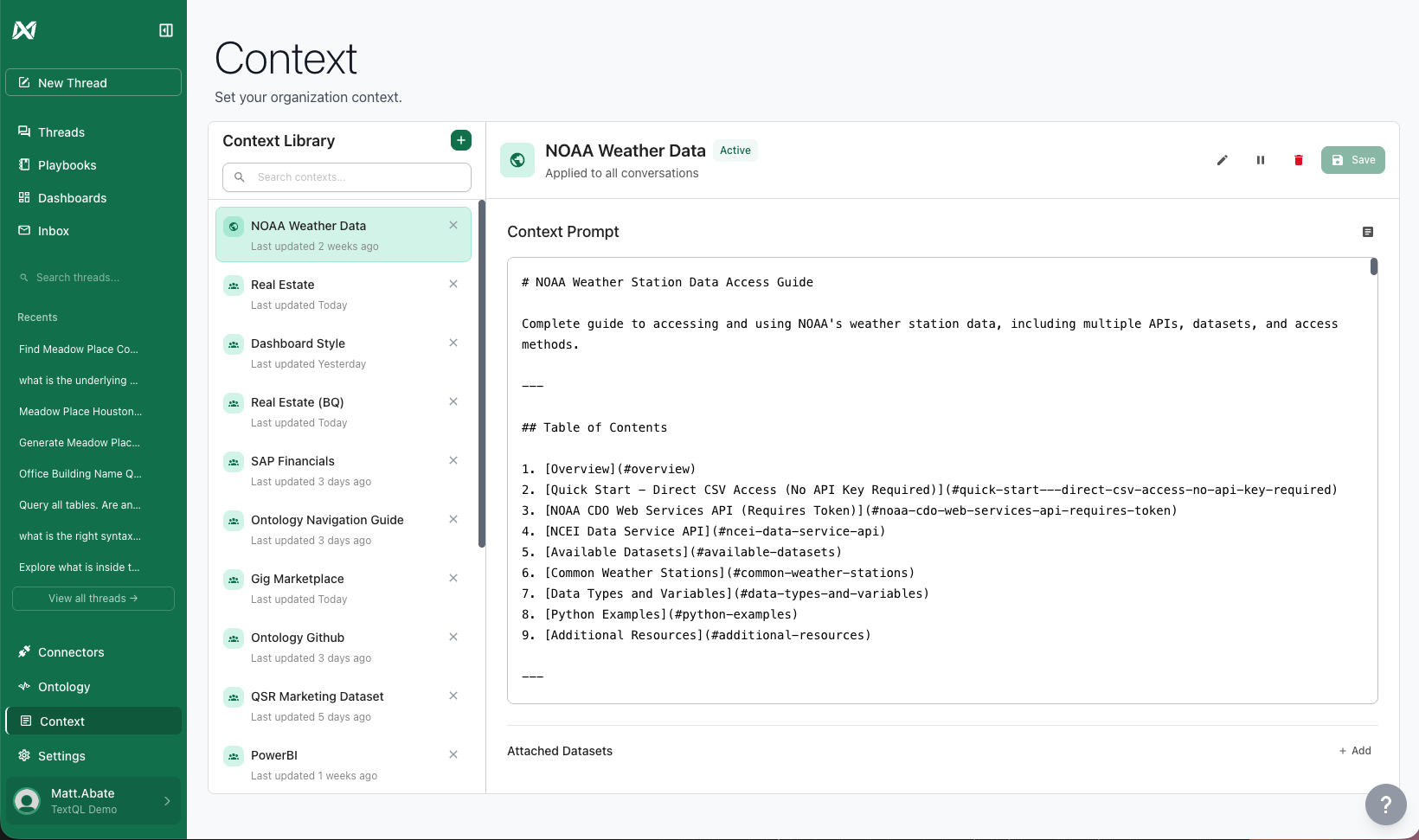
When you send a message to Ana, that message is called your **prompt**. But Ana doesn't just read your prompt—she reads a bunch of other information relevant to your data and organization. That additional information is called **context**.
**Think of it this way:** Your prompt is what you ask. Context is everything Ana knows about your organization, data, and preferences that helps her answer better.
Context is the information you don't need to include in every single message, but that shapes Ana's understanding and behavior. It's the background knowledge that makes Ana's responses more relevant, accurate, and aligned with your organization's needs.
## Why Context Matters
Without context, you'd need to explain your business rules, data structure, and preferences in every conversation. Context allows you to:
* **Set it once, use it everywhere**: Define organizational knowledge that applies across all conversations
* **Customize Ana's behavior**: Shape how Ana responds based on roles, data sources, or your entire organization
* **Maintain consistency**: Ensure everyone in your organization gets responses aligned with your standards
* **Save time**: Avoid repeating the same information in every chat
## Types of Context
TextQL supports multiple types of context content:
Write context directly in the editor using plain text or markdown formatting for structure and clarity.
Upload PDF files containing documentation, reports, or reference materials that Ana should understand.
Share slide decks with business context, processes, or organizational information.
Provide reference data, lookup tables, or example datasets that inform Ana's analysis.
## How Ana Uses Context
When you chat with Ana, she automatically incorporates relevant context based on:
1. **Your organization's context**: Applies to everyone in your organization
2. **Your role**: Specific context for users with your assigned role
3. **Your active connector**: Context specific to the data source you're querying
4. **Role + Connector combination**: Highly targeted context for specific role-connector pairs
Ana seamlessly weaves this context into her understanding, so you get responses that feel personalized and informed without having to explain everything each time.
 ## Context vs. Other Features
TextQL offers several ways to customize Ana's behavior. Here's when to use each:
| Feature | Best For | Example Use Case |
| ------------------ | -------------------------------------------------- | ------------------------------------------------------------------- |
| **Context** | Business knowledge, processes, organizational info | "Our fiscal year starts in July" or "Always format currency in EUR" |
| **Ontology** | Standardized metrics and business logic | Defining "Total Revenue" calculation that everyone uses |
| **Datasets** | Actual data files for analysis | Uploading a CSV of sales data to analyze |
| **System Prompts** | Advanced customization of Ana's personality | Changing Ana's communication style organization-wide |
**Getting Started:** Most organizations start with organization-level context to establish basic business knowledge, then add role-specific context as needs arise.
## What's Next?
Ready to create your first context document? Learn how to use the context editor:
Learn how to create, edit, and manage context documents in TextQL's native editor
Or explore how context scoping works:
Understand how to apply context at different levels: organization, role, and connector
## Related Features
Connect Ana to a GitHub repository for version-controlled, reviewable context management
Advanced customization of Ana's behavior through system prompt configuration
## Context vs. Other Features
TextQL offers several ways to customize Ana's behavior. Here's when to use each:
| Feature | Best For | Example Use Case |
| ------------------ | -------------------------------------------------- | ------------------------------------------------------------------- |
| **Context** | Business knowledge, processes, organizational info | "Our fiscal year starts in July" or "Always format currency in EUR" |
| **Ontology** | Standardized metrics and business logic | Defining "Total Revenue" calculation that everyone uses |
| **Datasets** | Actual data files for analysis | Uploading a CSV of sales data to analyze |
| **System Prompts** | Advanced customization of Ana's personality | Changing Ana's communication style organization-wide |
**Getting Started:** Most organizations start with organization-level context to establish basic business knowledge, then add role-specific context as needs arise.
## What's Next?
Ready to create your first context document? Learn how to use the context editor:
Learn how to create, edit, and manage context documents in TextQL's native editor
Or explore how context scoping works:
Understand how to apply context at different levels: organization, role, and connector
## Related Features
Connect Ana to a GitHub repository for version-controlled, reviewable context management
Advanced customization of Ana's behavior through system prompt configuration