> ## Documentation Index
> Fetch the complete documentation index at: https://docs.textql.com/llms.txt
> Use this file to discover all available pages before exploring further.
# Queries
> How the ontology is used to make AI-generated queries
TextQL uses an **Ontology** to generate AI-assisted database queries.
This page explores the two main types of queries—**Object Queries** and **Metric Queries**.

 ## Object vs. Metric Queries
TextQL supports two main categories of queries:
1. [Object Queries](/core/how-it-works/ontology/queries#object-queries)
2. [Metric Queries](/core/how-it-works/ontology/queries#metric-queries)
When you begin a chat or analysis, you must start with a query (even if “Ana” creates it automatically).
It’s crucial to recognize whether you need an **Object Query** or a **Metric Query** for your question.
### Object Queries
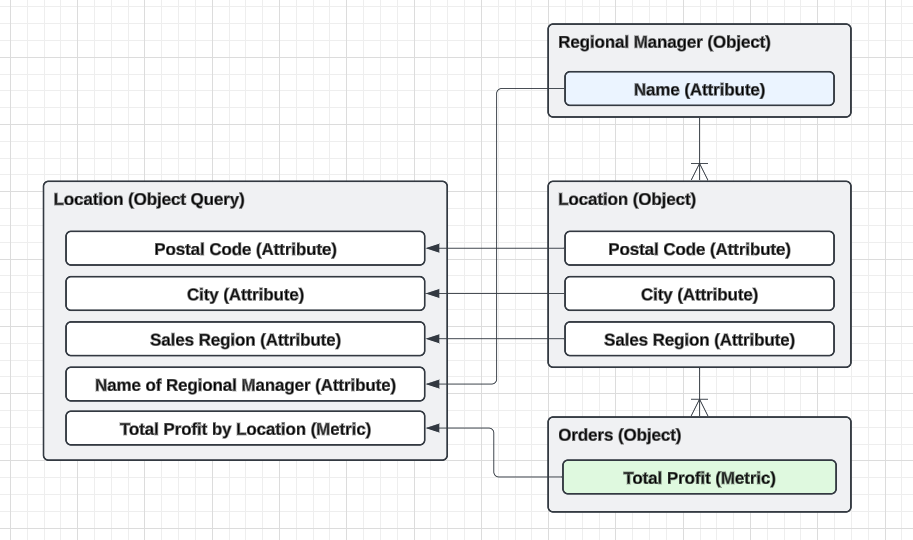
Object queries are designed to surface **all information about a specific object** in your business.
Every row of the resulting table will correspond to a unique instance of that object.
Examples of questions that fit Object Queries:
* **Which store has the most revenue?**\
(You want a table where each row represents a unique store, possibly including a revenue metric.)
* **How many orders were shipped to Canada?**\
(You want a table where each row represents a unique order. If you have location data, you might also see attributes like “country” attached to each row.)
**Key Characteristics:**
* The query returns rows corresponding to a **single object**—for example, “Store” or “Order.”
* Attributes from **related objects** can be joined in automatically.
For example, if every store has a regional manager, then the name of the regional manager can be included when the store object is queried.
* Aggregated metrics from “downstream” objects can be included. (If each store has multiple orders, total profit from the “Order” object can be aggregated by store.)
Because object queries focus on one entity, they do **not** automatically break down metrics by every possible dimension. If you need a fully broken-down metric (e.g., total profit by quarter, region, etc.), you will want to use a **Metric Query**.
## Object vs. Metric Queries
TextQL supports two main categories of queries:
1. [Object Queries](/core/how-it-works/ontology/queries#object-queries)
2. [Metric Queries](/core/how-it-works/ontology/queries#metric-queries)
When you begin a chat or analysis, you must start with a query (even if “Ana” creates it automatically).
It’s crucial to recognize whether you need an **Object Query** or a **Metric Query** for your question.
### Object Queries
Object queries are designed to surface **all information about a specific object** in your business.
Every row of the resulting table will correspond to a unique instance of that object.
Examples of questions that fit Object Queries:
* **Which store has the most revenue?**\
(You want a table where each row represents a unique store, possibly including a revenue metric.)
* **How many orders were shipped to Canada?**\
(You want a table where each row represents a unique order. If you have location data, you might also see attributes like “country” attached to each row.)
**Key Characteristics:**
* The query returns rows corresponding to a **single object**—for example, “Store” or “Order.”
* Attributes from **related objects** can be joined in automatically.
For example, if every store has a regional manager, then the name of the regional manager can be included when the store object is queried.
* Aggregated metrics from “downstream” objects can be included. (If each store has multiple orders, total profit from the “Order” object can be aggregated by store.)
Because object queries focus on one entity, they do **not** automatically break down metrics by every possible dimension. If you need a fully broken-down metric (e.g., total profit by quarter, region, etc.), you will want to use a **Metric Query**.
 ### Metric Queries
Metric queries are designed to surface **quantitative measures (metrics) broken down by dimensions**. The result table has each row corresponding to a specific slice of a metric along a dimension or category.
### Metric Queries
Metric queries are designed to surface **quantitative measures (metrics) broken down by dimensions**. The result table has each row corresponding to a specific slice of a metric along a dimension or category.
Examples of questions that fit Metric Queries
* **How much profit was made each quarter?**\
(You want a table where each row is a quarter, and one column shows the total profit for that quarter.)
* **What are the total sales by regional manager?**\
(You want rows for each manager with a “total sales” metric. If managers belong to a different object than sales, the ontology will still handle the join behind the scenes.)
**Key Characteristics:**
* Direct focus on **numerical measurements**, such as revenue, profit, or quantity.
* Rows represent **slices** or **groups** of these metrics across defined dimensions (e.g., time, geography, product category).
* Ideal for **pivot-table-style** breakdowns (e.g., total sales per city per month).

 ## Technical Deep Dive
The below section is rather intricate and technical, and deals mainly with how TextQL generates queries and not how to work with them. Feel free to skip it.
### Structure of an Ontology Query
In TextQL, each ontology query is composed of up to five major parts. Regardless of whether it’s an **Object Query** or a **Metric Query**, these elements guide how data is retrieved and displayed:
1. **Core Fact Object**
* **Definition**: The primary object around which the query is centered.
* **Purpose**: Determines the main data source and how other entities join.
* **Example**: "Sale" as the core fact object in a sales analysis.
2. **Metrics**
* **Definition**: The quantifiable measurements (e.g., sum, count, average) you want to analyze.
* **Purpose**: Provide numerical insights, often aggregated.
* **Example**: “Total Sales” or “Average Order Value.”
3. **Dimensions**
* **Definition**: Attributes or fields that categorize your metrics.
* **Purpose**: Break down metrics into slices (e.g., time, region, product category).
* **Example**: “Store Location,” “Order Date,” or “Product Type.”
4. **Filters**
* **Definition**: Criteria that include or exclude data from the query.
* **Purpose**: Narrow down your dataset to the most relevant subset.
* **Example**: Sales in the last quarter or orders above a certain dollar amount.
5. **Orders**
* **Definition**: The sorting or ordering applied to the results.
* **Purpose**: Make it easier to see trends, top performers, or chronological sequences.
* **Example**: Sorting by descending “Total Sales” to identify best-selling products first.
### Object Queries
Object queries are fully implemented in TextQL through the **Object Explorer** interface. The Object Explorer allows you to:
* Select a core fact object (e.g., "Orders", "Customers")
* Join relevant attributes from related objects
* Include aggregated metrics from downstream objects
* Apply filters and sorting to your results
* View results in an interactive table
The Object Explorer intelligently identifies join paths and optimizes query performance across large datasets.
### Metric Queries
Metric queries are fully implemented in TextQL through the **Metric Explorer** interface. The Metric Explorer allows you to:
* Select one or more metrics from your ontology
* Choose dimensions to slice and group your data
* Apply filters to narrow down results
* View aggregated metrics broken down by dimensions
* Perform pivot-table-style analysis
The Metric Explorer handles complex aggregations and supports intelligent grouping across multiple objects.
***
## Next Steps
You should now have a basic understanding of how **object queries** differ from **metric queries** and the fundamental structure of any ontology query. In subsequent sections, we will dive deeper into the **technical details** and **best practices** for setting up your own business ontology in TextQL.
## Technical Deep Dive
The below section is rather intricate and technical, and deals mainly with how TextQL generates queries and not how to work with them. Feel free to skip it.
### Structure of an Ontology Query
In TextQL, each ontology query is composed of up to five major parts. Regardless of whether it’s an **Object Query** or a **Metric Query**, these elements guide how data is retrieved and displayed:
1. **Core Fact Object**
* **Definition**: The primary object around which the query is centered.
* **Purpose**: Determines the main data source and how other entities join.
* **Example**: "Sale" as the core fact object in a sales analysis.
2. **Metrics**
* **Definition**: The quantifiable measurements (e.g., sum, count, average) you want to analyze.
* **Purpose**: Provide numerical insights, often aggregated.
* **Example**: “Total Sales” or “Average Order Value.”
3. **Dimensions**
* **Definition**: Attributes or fields that categorize your metrics.
* **Purpose**: Break down metrics into slices (e.g., time, region, product category).
* **Example**: “Store Location,” “Order Date,” or “Product Type.”
4. **Filters**
* **Definition**: Criteria that include or exclude data from the query.
* **Purpose**: Narrow down your dataset to the most relevant subset.
* **Example**: Sales in the last quarter or orders above a certain dollar amount.
5. **Orders**
* **Definition**: The sorting or ordering applied to the results.
* **Purpose**: Make it easier to see trends, top performers, or chronological sequences.
* **Example**: Sorting by descending “Total Sales” to identify best-selling products first.
### Object Queries
Object queries are fully implemented in TextQL through the **Object Explorer** interface. The Object Explorer allows you to:
* Select a core fact object (e.g., "Orders", "Customers")
* Join relevant attributes from related objects
* Include aggregated metrics from downstream objects
* Apply filters and sorting to your results
* View results in an interactive table
The Object Explorer intelligently identifies join paths and optimizes query performance across large datasets.
### Metric Queries
Metric queries are fully implemented in TextQL through the **Metric Explorer** interface. The Metric Explorer allows you to:
* Select one or more metrics from your ontology
* Choose dimensions to slice and group your data
* Apply filters to narrow down results
* View aggregated metrics broken down by dimensions
* Perform pivot-table-style analysis
The Metric Explorer handles complex aggregations and supports intelligent grouping across multiple objects.
***
## Next Steps
You should now have a basic understanding of how **object queries** differ from **metric queries** and the fundamental structure of any ontology query. In subsequent sections, we will dive deeper into the **technical details** and **best practices** for setting up your own business ontology in TextQL.