> ## Documentation Index
> Fetch the complete documentation index at: https://docs.textql.com/llms.txt
> Use this file to discover all available pages before exploring further.
# GitHub Connector
> Query your GitHub repos, pull requests, issues, and code activity in natural language and join engineering data with your warehouse for cross-source insights.
### **1. Overview**
The GitHub connector gives Ana direct access to your organization's repositories, pull requests, issues, and code activity via the GitHub REST and GraphQL APIs. Once configured, Ana can answer engineering questions in natural language, surface trends across your codebase, and join GitHub data with your connected data warehouse for cross-source analysis.
Connect your GitHub organization to Ana via GitHub App or OAuth 2.0 to enable natural language querying of repos, PRs, and issues alongside your warehouse data.
### **2. Prerequisites**
You'll need:
* A GitHub account with access to the repositories you want Ana to query
* Owner or admin access to your GitHub organization if you are setting up an org-level integration via GitHub App
* A TextQL account with permission to add API connectors
### Which type of connection should I use?
| | Personal Access Token (PAT) | OAuth (Org-level) | OAuth (Per-member) |
| --------------------- | ------------------------------------------ | -------------------------------------------------------- | --------------------------------------------------------- |
| **Best for** | Individual use, scripts, or quick setup | Team or company-wide GitHub access under org policies | Multi-user SaaS where each user connects their own GitHub |
| **Scope** | Single user's GitHub permissions | Organization-controlled access + user permissions | Individual user's GitHub permissions |
| **Authentication** | Fine-grained or classic PAT (manual token) | OAuth 2.0 user authentication (may require org approval) | OAuth 2.0 per user consent |
| **Access model** | Fixed to one GitHub account | Controlled by org policy, still per-user tokens | Fully user-isolated tokens |
| **Admin involvement** | None | Sometimes required (org approval) | None (unless org restricts apps) |
### **3. Capabilities**
Once configured, Ana can:
* Fetch and search repositories, branches, files, and commit history
* Query open and closed pull requests, filter by author, status, label, date, or reviewer
* Surface code review patterns, such as PR cycle times, review bottlenecks, and merge rates
* Join GitHub activity data with your data warehouse for cross-source analysis, like correlating deploy frequency with business metrics
* Load live files from your repo dynamically as context for each conversation
* Answer engineering questions in natural language, like "Which PRs have been open the longest?" or "How many issues were closed last month by team?"
### **4. Setup Instructions**
### Step 1: Generate your GitHub credentials
1. Go to [github.com](https://github.com) and sign in.
2. Navigate to settings by clicking on your profile icon in the top right corner.
3. On the left sidebar of your settings, scroll to the bottom and click **Developer Settings**.
4. Click **Personal Access Tokens**. There are two types of Personal Access Tokens that GitHub offers:
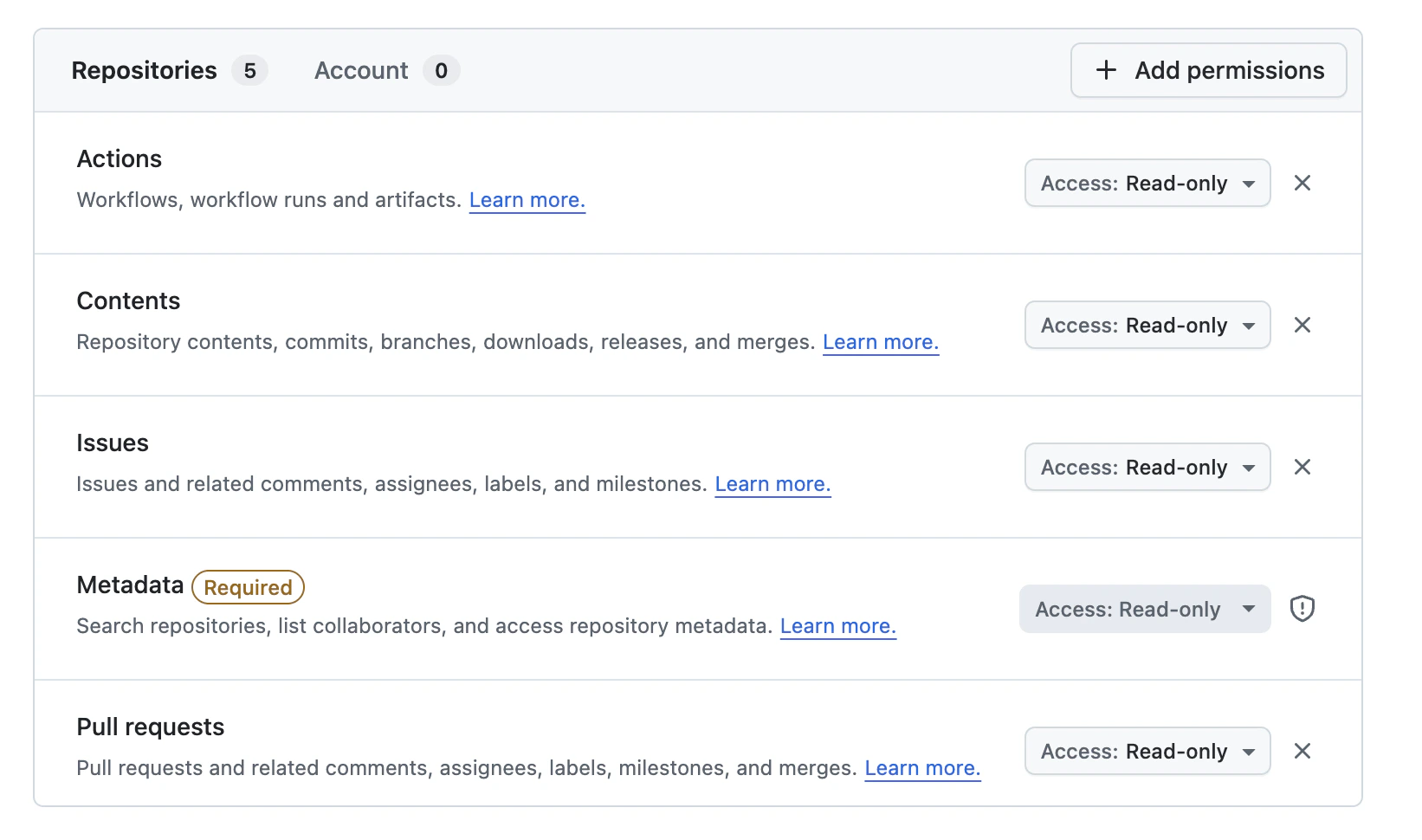
* **Fine-grained tokens (recommended):** Scoped to specific repositories you select — Ana will only be able to access those repositories and nothing else. Use this if you want to limit Ana to one or a few repos. Each permission can be set to No access, Read-only, or Read and write. For Ana, we recommend enabling Read-only access for: Contents, Issues, Pull Requests, and Metadata.
* **Tokens (classic):** Grant Ana access to all repositories available to your GitHub user or organization — Ana is not limited to specific repos. Use only if fine-grained tokens are not supported for your workflow.
**Which token type should I use?** Use a **fine-grained token** if you want Ana to connect only to specific repositories. Use a **classic token** if you want Ana to have access to all repositories available to the user or organization.
5. Click **Generate new token**.
6. Enter a name (e.g. `TextQL` or `Ana Integration`) and set an expiration date.
* Choose your resource owner. Select your personal GitHub account or an organization you belong to. This defines the scope boundary of the token — only repositories and resources owned by the selected account or organization will be accessible.
7. Choose your repository access.
8. Under permissions, grant the minimum necessary access. For more information on permissions, visit [GitHub's official API documentation](https://docs.github.com/en/rest).
* Permissions will not appear until repository access (All or Selected repositories) is chosen.
* Once repository access is set, GitHub will display available permissions. For TextQL, we recommend enabling read-only access where applicable: **Contents**, **Issues**, **Pull Requests**, and **Metadata**.
 9. Click **Generate token** and copy the value immediately.
PATs expire on the date you set. 90 days is a reasonable default. Store the expiry date somewhere you will remember so you can rotate it before it lapses.
1. Go to [github.com](https://github.com) and sign in.
2. Navigate to **Settings** — scroll to the bottom of the left sidebar and click **Developer Settings**.
3. Click **OAuth Apps**, then click **New OAuth App**.
4. Enter a name (e.g. `textql` or `ana-integration`).
5. Under **Homepage URL**, enter `https://app.textql.com`.
6. Under **Authorization callback URL**, enter `https://app.textql.com/auth/api-oauth/callback`.
7. Click **Register application**.
8. On the app page, locate **Client secrets** and click **Generate a new client secret**.
9. Copy both your **Client ID** and **Client Secret**.
You must be a GitHub organization owner to set up an org-level OAuth app. If you don't have this role, ask your GitHub admin to complete this step and share the credentials with you securely.
In GitHub, OAuth is a single unified system. The difference between org-level and per-member connections is determined by how TextQL manages authentication:
* **Org-level connection**: one workspace member authorizes GitHub once, and TextQL stores a shared workspace-level token for that organization.
* **Per-member connection**: each user in TextQL completes OAuth individually, and TextQL stores separate tokens per user, preserving identity and permissions.
Both use the same GitHub OAuth application — only the authorization behavior and token storage differ.
### Step 2: Add GitHub as an API connector in TextQL
9. Click **Generate token** and copy the value immediately.
PATs expire on the date you set. 90 days is a reasonable default. Store the expiry date somewhere you will remember so you can rotate it before it lapses.
1. Go to [github.com](https://github.com) and sign in.
2. Navigate to **Settings** — scroll to the bottom of the left sidebar and click **Developer Settings**.
3. Click **OAuth Apps**, then click **New OAuth App**.
4. Enter a name (e.g. `textql` or `ana-integration`).
5. Under **Homepage URL**, enter `https://app.textql.com`.
6. Under **Authorization callback URL**, enter `https://app.textql.com/auth/api-oauth/callback`.
7. Click **Register application**.
8. On the app page, locate **Client secrets** and click **Generate a new client secret**.
9. Copy both your **Client ID** and **Client Secret**.
You must be a GitHub organization owner to set up an org-level OAuth app. If you don't have this role, ask your GitHub admin to complete this step and share the credentials with you securely.
In GitHub, OAuth is a single unified system. The difference between org-level and per-member connections is determined by how TextQL manages authentication:
* **Org-level connection**: one workspace member authorizes GitHub once, and TextQL stores a shared workspace-level token for that organization.
* **Per-member connection**: each user in TextQL completes OAuth individually, and TextQL stores separate tokens per user, preserving identity and permissions.
Both use the same GitHub OAuth application — only the authorization behavior and token storage differ.
### Step 2: Add GitHub as an API connector in TextQL
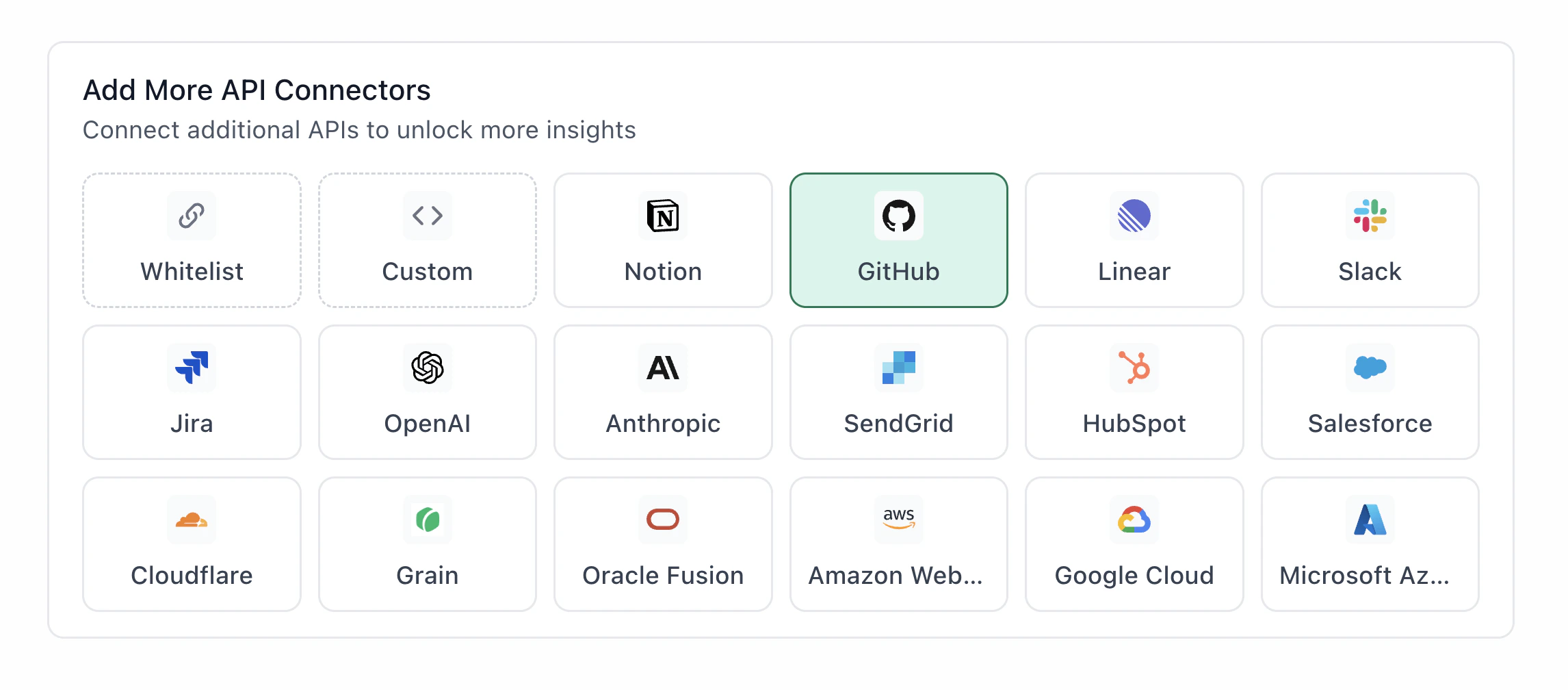 1. Go to [app.textql.com](https://app.textql.com) and sign in.
2. In the bottom left sidebar, click **Connectors > APIs** and select **GitHub**.
3. In the configuration panel, fill in the fields depending on your connection type:
* **Personal Access Token (PAT)**
* Name (e.g. `GitHub Personal Access`)
* Authentication type: select **API Token**
* Token: paste the PAT copied from Step 1
* **OAuth (Org-level or Per-member)**
* Name (e.g. `GitHub OAuth`)
* Authentication type: select **OAuth (org-level)** or **OAuth (per-member)**
* Client ID and Client Secret: paste the values copied from Step 1
* OAuth Authentication: click **Authenticate** — a popup will appear asking for permissions to access your GitHub account. Click **Allow**.
4. Click **Save**.
### Step 3: Verify the connection
Once saved, confirm the connector is active:
1. Click on the GitHub connector and select Test Connection at the bottom of the panel.
* A successful setup will return Connection successful (200).
* If the test fails, refer to the [Troubleshooting](#6-troubleshooting) section for next steps.
If Ana returns no results rather than an error, your token may not have access to the repositories you expect. Double-check the repository access scope and permissions set in Step 1.
***
### **5. Usage Examples**
Once configured, you can ask Ana:
* "How many issues were closed last month, broken down by repository?"
* "Who are the most active contributors to this repo over the past 90 days?"
* "Summarize the open bugs labeled `critical` across all our repositories."
* "What is the average PR cycle time for the engineering team this quarter?"
* "Show me all PRs that were merged without a review in the last 30 days."
* "Which repositories have had no commits in the past 6 months?"
* "Join our GitHub deploy frequency with revenue data from the warehouse — is there a correlation between release cadence and weekly revenue?"
### **6. Troubleshooting**
| **Symptom** | **Likely Cause** | **Fix** |
| ----------------------------------------------------- | ---------------------------------------------------------- | ---------------------------------------------------------------------------------------------------------------------------------------------------------------------------------------------------------------------------------------------- |
| 401 Bad Credentials Error (Personal Access Token) | Token hasn't been configured or expired | Confirm the token was pasted correctly in Connectors → APIs → GitHub with no extra spaces. If the token has expired, generate a new one in GitHub → Settings → Developer Settings → Personal access tokens and update the connector in TextQL. |
| Authentication failed (OAuth org-level or per-member) | Incorrect redirect URL | In your GitHub integration settings, make sure `https://app.textql.com/auth/api-oauth/callback` is listed exactly as a redirect URL. |
| Ana returns no results for repos (no error message) | Personal account selected as resource owner instead of org | Go to GitHub → Settings → Developer Settings → Personal Access Tokens, regenerate the token and select your organization as the resource owner, then update the connector in TextQL. |
### **7. Security Notes**
* Personal Access Tokens expire on the date set at creation. Rotate them before expiry in GitHub > Settings > Developer Settings > Personal access tokens. OAuth tokens do not have a fixed expiration date but can be revoked or invalidated at any time by the user or organization.
* The integration uses GitHub App or OAuth 2.0 — tokens are injected at the network boundary and never stored directly by Ana. Ana cannot modify your GitHub repositories, branches, or settings.
* Do not share API keys, client secrets, or OAuth credentials in email, chat, tickets, or other unsecured locations.
* To revoke access, go to GitHub > Settings > Developer Settings and delete the relevant Personal Access Token or OAuth App. In TextQL, remove the connector under Connectors > APIs > GitHub.
* For more details on how GitHub handles API authentication and permissions, refer to [GitHub's official API documentation](https://docs.github.com/en/rest).
***
### **Need Help?**
For further assistance, please contact [support@textql.com](mailto:support@textql.com).
### **Privacy Policy**
For information about how we handle your data and protect your privacy, please review our [Privacy Policy](https://textql.com/privacy).
1. Go to [app.textql.com](https://app.textql.com) and sign in.
2. In the bottom left sidebar, click **Connectors > APIs** and select **GitHub**.
3. In the configuration panel, fill in the fields depending on your connection type:
* **Personal Access Token (PAT)**
* Name (e.g. `GitHub Personal Access`)
* Authentication type: select **API Token**
* Token: paste the PAT copied from Step 1
* **OAuth (Org-level or Per-member)**
* Name (e.g. `GitHub OAuth`)
* Authentication type: select **OAuth (org-level)** or **OAuth (per-member)**
* Client ID and Client Secret: paste the values copied from Step 1
* OAuth Authentication: click **Authenticate** — a popup will appear asking for permissions to access your GitHub account. Click **Allow**.
4. Click **Save**.
### Step 3: Verify the connection
Once saved, confirm the connector is active:
1. Click on the GitHub connector and select Test Connection at the bottom of the panel.
* A successful setup will return Connection successful (200).
* If the test fails, refer to the [Troubleshooting](#6-troubleshooting) section for next steps.
If Ana returns no results rather than an error, your token may not have access to the repositories you expect. Double-check the repository access scope and permissions set in Step 1.
***
### **5. Usage Examples**
Once configured, you can ask Ana:
* "How many issues were closed last month, broken down by repository?"
* "Who are the most active contributors to this repo over the past 90 days?"
* "Summarize the open bugs labeled `critical` across all our repositories."
* "What is the average PR cycle time for the engineering team this quarter?"
* "Show me all PRs that were merged without a review in the last 30 days."
* "Which repositories have had no commits in the past 6 months?"
* "Join our GitHub deploy frequency with revenue data from the warehouse — is there a correlation between release cadence and weekly revenue?"
### **6. Troubleshooting**
| **Symptom** | **Likely Cause** | **Fix** |
| ----------------------------------------------------- | ---------------------------------------------------------- | ---------------------------------------------------------------------------------------------------------------------------------------------------------------------------------------------------------------------------------------------- |
| 401 Bad Credentials Error (Personal Access Token) | Token hasn't been configured or expired | Confirm the token was pasted correctly in Connectors → APIs → GitHub with no extra spaces. If the token has expired, generate a new one in GitHub → Settings → Developer Settings → Personal access tokens and update the connector in TextQL. |
| Authentication failed (OAuth org-level or per-member) | Incorrect redirect URL | In your GitHub integration settings, make sure `https://app.textql.com/auth/api-oauth/callback` is listed exactly as a redirect URL. |
| Ana returns no results for repos (no error message) | Personal account selected as resource owner instead of org | Go to GitHub → Settings → Developer Settings → Personal Access Tokens, regenerate the token and select your organization as the resource owner, then update the connector in TextQL. |
### **7. Security Notes**
* Personal Access Tokens expire on the date set at creation. Rotate them before expiry in GitHub > Settings > Developer Settings > Personal access tokens. OAuth tokens do not have a fixed expiration date but can be revoked or invalidated at any time by the user or organization.
* The integration uses GitHub App or OAuth 2.0 — tokens are injected at the network boundary and never stored directly by Ana. Ana cannot modify your GitHub repositories, branches, or settings.
* Do not share API keys, client secrets, or OAuth credentials in email, chat, tickets, or other unsecured locations.
* To revoke access, go to GitHub > Settings > Developer Settings and delete the relevant Personal Access Token or OAuth App. In TextQL, remove the connector under Connectors > APIs > GitHub.
* For more details on how GitHub handles API authentication and permissions, refer to [GitHub's official API documentation](https://docs.github.com/en/rest).
***
### **Need Help?**
For further assistance, please contact [support@textql.com](mailto:support@textql.com).
### **Privacy Policy**
For information about how we handle your data and protect your privacy, please review our [Privacy Policy](https://textql.com/privacy).