> ## Documentation Index
> Fetch the complete documentation index at: https://docs.textql.com/llms.txt
> Use this file to discover all available pages before exploring further.
# Your First Chat
> A step-by-step walkthrough of your first conversation with Ana.
## Step 1: Log In
Go to [app.textql.com/login](https://app.textql.com/login) and sign in with Google Authentication or a magic link sent to your email.
Having trouble? Your company may use an on-premises setup that requires specific network access. Contact your system administrator or email [support@textql.com](mailto:support@textql.com).
## Step 2: Start a New Thread
Click **New Thread** in the left sidebar, then attach your data.
Press **⌘K** (Mac) or **Ctrl+K** (Windows/Linux) to open the command palette. From there you can search for recent threads, dashboards, playbooks, connectors, and settings — all from the keyboard.
## Step 3: Connect Your Data
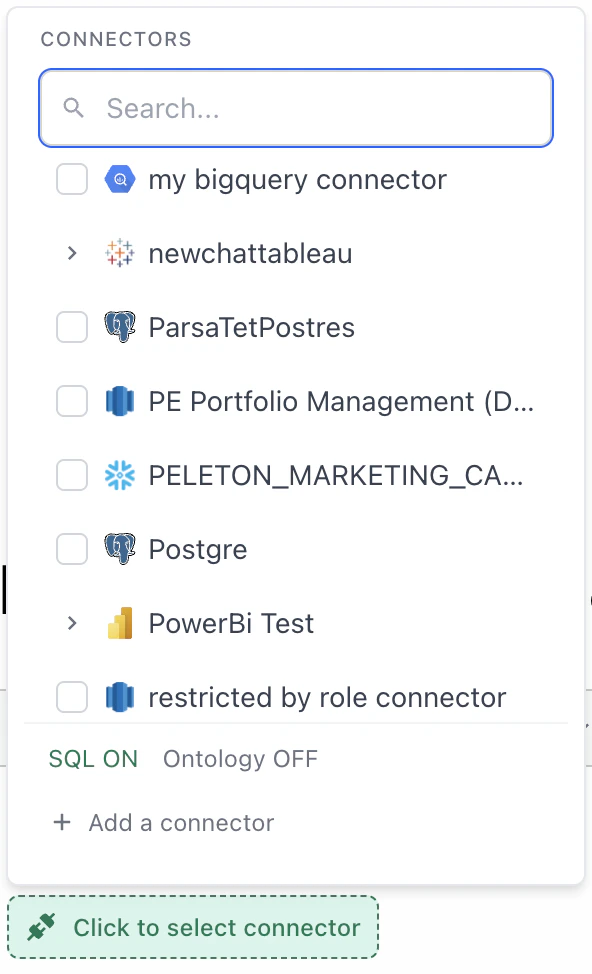
You need at least one data source for Ana to work with:
* **[Connect your warehouse](/core/get-started/connect-your-data)** — For live access to Snowflake, BigQuery, Redshift, and more, head to the [Connectors page](/core/datasources/the-connectors-page)
* **Upload a file** — Attach a CSV file in a new thread to start chatting instantly. No setup needed
* **Web Search** — Ana can also pull in public data and current events on her own, no configuration required
## Step 4: Select Tools
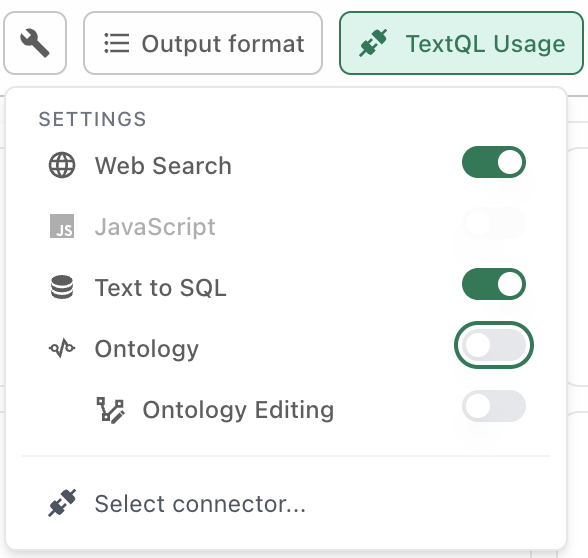
Make sure Ana has the right tools turned on for your use case:
* **[Text-to-SQL](/core/how-it-works/tools/text-to-sql)** — Ana writes SQL to query your data warehouse directly
* **[Ontology](/core/how-it-works/tools/ontology)** — Ana uses your semantic layer for more accurate answers. Enable **[Ontology Editing](/core/how-it-works/tools/ontology-editing)** too if you want Ana to help build or edit the ontology
* **[Web Search](/core/how-it-works/tools/web-search)** — Ana searches the web to enrich answers with public data and news
* **[Python](/core/how-it-works/tools/python)** — Always on. Ana writes Python for calculations, visualizations, and file outputs (CSV, PDF, charts)
## Step 5: Ask Your Question
Start a thread and type your question. You can be as **specific** or as **exploratory** as you want:
* **Specific:** "What was our revenue last year?"
* **Exploratory:** "Can you analyze the ROI of each marketing campaign given the data available?"
From there, keep the conversation going:
* Ask follow-ups to drill deeper
* Request a specific visualization or output format (chart, table, PDF, etc.)
* Try a complex analysis — multi-table joins, segmentation, cohort comparisons
Ana is introspective and knows what she can do — just ask her!
## Take It Further
Set up Playbooks to automatically run recurring analyses and deliver results to Slack or email.
Build dashboards to track and visualize your key metrics over time.
## Tips for Better Results
* **Treat Ana like a coworker** — Have a back-and-forth. Clarify, refine, redirect
* **Break complex asks into steps** — One question at a time gets better results than a wall of instructions
* **Ask follow-up questions** — This is how you get deeper insights and catch misunderstandings early
* **Request charts and visualizations** — They're the fastest way to verify Ana's assumptions
* **If something's off, rephrase or add detail** — Ana may interpret ambiguous questions differently than you intended
* **Start a new thread if things go sideways** — Long threads can get noisy — a fresh start often works better
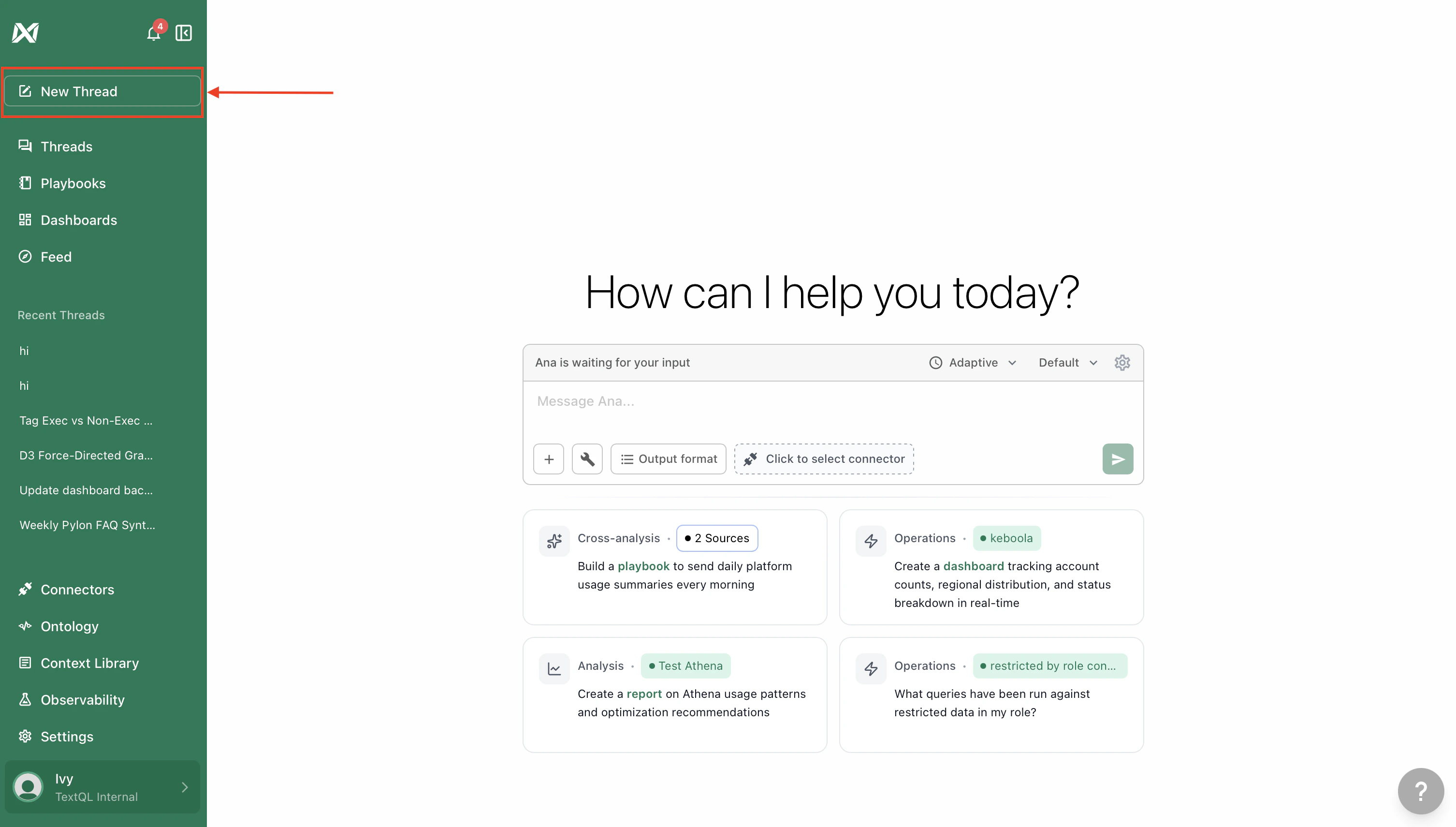 Click **New Thread** in the left sidebar, then attach your data.
 ## Step 4: Select Tools
Make sure Ana has the right tools turned on for your use case:
* **[Text-to-SQL](/core/how-it-works/tools/text-to-sql)** — Ana writes SQL to query your data warehouse directly
* **[Ontology](/core/how-it-works/tools/ontology)** — Ana uses your semantic layer for more accurate answers. Enable **[Ontology Editing](/core/how-it-works/tools/ontology-editing)** too if you want Ana to help build or edit the ontology
* **[Web Search](/core/how-it-works/tools/web-search)** — Ana searches the web to enrich answers with public data and news
* **[Python](/core/how-it-works/tools/python)** — Always on. Ana writes Python for calculations, visualizations, and file outputs (CSV, PDF, charts)
## Step 4: Select Tools
Make sure Ana has the right tools turned on for your use case:
* **[Text-to-SQL](/core/how-it-works/tools/text-to-sql)** — Ana writes SQL to query your data warehouse directly
* **[Ontology](/core/how-it-works/tools/ontology)** — Ana uses your semantic layer for more accurate answers. Enable **[Ontology Editing](/core/how-it-works/tools/ontology-editing)** too if you want Ana to help build or edit the ontology
* **[Web Search](/core/how-it-works/tools/web-search)** — Ana searches the web to enrich answers with public data and news
* **[Python](/core/how-it-works/tools/python)** — Always on. Ana writes Python for calculations, visualizations, and file outputs (CSV, PDF, charts)
 ## Step 5: Ask Your Question
Start a thread and type your question. You can be as **specific** or as **exploratory** as you want:
* **Specific:** "What was our revenue last year?"
* **Exploratory:** "Can you analyze the ROI of each marketing campaign given the data available?"
From there, keep the conversation going:
* Ask follow-ups to drill deeper
* Request a specific visualization or output format (chart, table, PDF, etc.)
* Try a complex analysis — multi-table joins, segmentation, cohort comparisons
## Step 5: Ask Your Question
Start a thread and type your question. You can be as **specific** or as **exploratory** as you want:
* **Specific:** "What was our revenue last year?"
* **Exploratory:** "Can you analyze the ROI of each marketing campaign given the data available?"
From there, keep the conversation going:
* Ask follow-ups to drill deeper
* Request a specific visualization or output format (chart, table, PDF, etc.)
* Try a complex analysis — multi-table joins, segmentation, cohort comparisons