> ## Documentation Index
> Fetch the complete documentation index at: https://docs.textql.com/llms.txt
> Use this file to discover all available pages before exploring further.
# Frequently Asked Questions
> Common issues and how to resolve them.
This page documents commonly reported issues and their recommended solutions, organized by category.
## Threads & Chat
Ana can produce conversational answers with supporting data, SQL query results, charts and visualizations, interactive dashboards, scheduled reports via email or Slack, and downloadable CSVs, PDFs, and PPTs.
To enforce brand colors or chart styles, store a visualization spec in the Ontology and Ana will apply it automatically.
Long threads can fail to load, especially if they contain large file previews or have exceeded the context window.
**Solution:**
* Start a new thread for your next question. Long threads are more expensive and less token-efficient.
* If you need to reference prior work, ask Ana to summarize the key findings and carry them into the new thread.
When similar column names exist across tables and no context has been provided, Ana may select the wrong one.
**Solution:**
* Correct Ana in plain language mid-thread — she will adjust and pull from the right table
* For columns you always want Ana to prioritize, add a one-line instruction to the Ontology specifying the preferred table and column name
* For high-stakes or frequently queried metrics, define the exact table and column path in the Ontology to remove ambiguity entirely
This error means Ana's execution environment is rebuilding and temporarily cannot accept queries, likely an issue from the model provider.
**Solution:** Start a new thread with a fresh chat ID. If the error persists across new threads, contact [support@textql.com](mailto:support@textql.com).
This is a known rendering issue that can occur when charts are generated in certain thread states.
**Solution:** Re-run the query in a new thread. If the issue persists, submit a bug report using the feedback button in the app.
The **Text-to-SQL flag** is turned off for the session. This flag controls whether Ana executes SQL directly or generates it for you to run manually. The flag saves your last setting, so if it was turned off once, new threads will start with it off.
**Solution:**
1. Click the **Text-to-SQL toggle** in the chat interface before sending your message.
2. To enable Text-to-SQL by default for all users, go to **Settings → Capabilities** and turn it on there.
Upload a file containing your list of questions directly into the prompt and instruct Ana to run analysis on each question, then output all SQL queries and results into a CSV. This workflow is commonly used for accuracy testing and validation against a known answer set.
## Playbooks
Playbooks perform best when the request is tightly scoped. Layering too many business requirements (usage trends, revenue, churn, acquisition, etc.) into one playbook can cause inconsistent format or incomplete scope during each playbook run.
**Solution:**
* Workshop with Ana in a thread to get to your desired output format, then ask Ana to build a playbook and retain necessary SQL/Python code to reproduce the desired output format.
* Add in the playbook prompt "look at previous playbook reports and follow the same output format" once you achieve a desired format.
* Break complex reports into multiple focused playbooks, each covering a single domain.
* Consider building a TextQL dashboard for the underlying metrics, then running a playbook that reads from the dashboard for the narrative summary.
If a playbook runs on schedule and results appear in the TextQL console but not in the designated Slack channel, the Slack integration may be misconfigured or the bot may not have channel access.
**Solution:**
1. Confirm the Slack integration is working by tagging **@Ana** in the selected channel.
2. Make sure the playbook has the correct Slack channel configured in its delivery settings and that the playbook is NOT set as "channel context".
3. Verify that the Ana Slack bot has been invited to the channel.
If tagging Ana in Slack produces no response, the Slack integration may need to be re-synced. Contact [support@textql.com](mailto:support@textql.com).
Playbooks currently run on a set schedule — trigger-based delivery is not yet available. As a workaround, set a frequent schedule (e.g., daily) and instruct Ana in the playbook prompt to flag and highlight any metrics that fall outside a defined threshold in the report output. Trigger-based scheduling is on the product roadmap. Contact [support@textql.com](mailto:support@textql.com) for updates on availability.
## Dashboards
If an unpublished dashboard is not edited, it cannot be reverted to the previous version.
**Solution:** Make sure to publish dashboard if you want to potentially revert back to this version while editing. Publish = Save. If you edit a publish dashboard, you will see a red revert button (top right) once changes are made to the dashboard. If you want to revert to a previous unpublished working version, contact [support@textql.com](mailto:support@textql.com) with the dashboard URL. The engineering team can restore the previous working version.
Published dashboards do not have an inline edit button — editing is done by opening a chat session with the dashboard.
**Solution:**
1. On the published dashboard, click **Chat with Dashboard** in the header.
2. Prompt Ana to make your changes (e.g., "Add a bar chart for monthly revenue").
3. Click **Refresh** to preview the updated dashboard.
4. Click **Publish** to save the new version.
Previous versions are preserved in **History** and can be rolled back at any time.
## Ontology
The two modes differ in how much structured guidance Ana is given before running a query.
* **Text-to-SQL mode:** Ana explores your tables and infers the right columns and logic based on schema and any context you have provided. Best for exploratory analysis and teams early in their setup.
* **Ontology mode:** Ana queries against a predefined object and metrics layer. Best for governed use cases — finance teams, official reporting — where specific metric definitions and table paths must be enforced.
**Note:** If the ontology has been built with no additional manual input beyond what Ana inferred, it will not outperform text-to-SQL. Add metric definitions and column specifications to the ontology before switching teams to ontology mode.
It is not always a one-to-one mapping between tables and ontology objects. Think of each ontology object as a logical grouping, not necessarily a single table. One object can be built from a single table, span multiple tables, or be built from a view defined by a specific SQL condition.
Use the ontology map view to visualize how objects are joined and what keys are used to link them.
When importing an ontology via JSON, relationships (joins) between objects may not be created automatically even if they are defined in the file.
**Solution:** After importing, ask Ana to explore the foreign keys in your connector and create links based on matching relationships. Provide a prompt specifying which objects should be linked and on which keys.
If a playbook or a thread was done in Ontology mode only, users need to have access to the ontology to have the permission to run them. If a user has connector access but not ontology access, they will see permission errors when trying to edit the playbook or the thread.
**Solution:** Grant the user access to the relevant ontology, even if it is empty. This can be done in the ontology settings.
When new ontologies are created, client filter rules are not automatically applied to attributes. Without these filters, queries return data across all clients instead of the intended one.
**Solution:**
1. In the ontology editor, select the ontology > select an object > go to the **Attributes** tab.
2. For each attribute that should be filtered by client (e.g., `cid`, `property_id`), click the **filter icon** on the right side of the attribute row.
3. Set the filter rule to restrict results to the appropriate client ID.
4. Repeat for all relevant attributes across all objects in the ontology.
5. Add this as a checklist step in your client onboarding — every new ontology requires filter rules before going live.
1. **AI-assisted:** Make sure the Ontology Editor toggle is switched on before the start of the chat (optional to switch on auto-approve). Ask Ana to explore your connector's foreign keys and create ontology objects and links based on the schema. Provide a prompt with your table list and domain context.
2. **Import/export:** Ontologies can be exported and imported as JSON files, enabling version control via GitHub and programmatic manipulation.
3. **API-based:** Use the TextQL API with a self-issued API key to create and manage ontology objects programmatically.
For large ontology builds, using GitHub for source control between versions is recommended. See [Ontology Overview](/core/ontology/overview).
Contact your TextQL account manager or [support@textql.com](mailto:support@textql.com) to export the ontology as JSON. This can be re-imported into a new connector or a new environment.
There is no self-service ontology version history in the UI. However, TextQL retains snapshots that can be restored on request.
**Solution:**
1. Contact [support@textql.com](mailto:support@textql.com) with your organization name, the ontology name, and the approximate date of the version you want to restore.
2. The TextQL team will locate the closest available snapshot and share the JSON for your review.
3. Once confirmed, the team can re-upload the JSON to revert the ontology. **This will overwrite the current version** — confirm before proceeding.
4. Alternatively, if you have a previously exported JSON of the desired version, you can re-upload it yourself via the ontology editor.
## Organization Context & Ana Behavior
 Organization context is injected into Ana's system prompt at the start of every thread. However, Ana may skip the context step when the prompt contains recognizable table or column names.
**Solution:** To improve adherence:
1. **Use explicit, firm instructions** in your context file:
> `ALWAYS access the GitHub context repo before running any query, EVEN IF you recognize table names in the user's prompt.`
2. **Avoid contradicting instructions** across different context files.
3. **Keep context concise.** Overly long context reduces Ana's ability to follow specific instructions. If threads are hitting the maximum length banner, context size may be a contributing factor.
4. **Use an ontology for critical data routing rules.** Ontologies provide a more structured and reliable way to guide Ana than free-text context. See [Ontology Overview](/core/ontology/overview).
Related docs:
* [GitHub Integration for Context](https://docs.textql.com/core/ontology/build-your-ontology#method-1-github-integration)
* [System Prompt Modification](https://docs.textql.com/core/customization/prompting)
* [Context Scoping](https://docs.textql.com/core/ontology/build-your-ontology)
The Ontology stores business knowledge — metric definitions, table preferences, calculation logic, and visualization standards — that Ana applies to every query.
* Admins can add and edit entries, scoped by role, by connector, or globally
* For teams managing multiple datasets or customers, use the GitHub integration to programmatically assign context at scale with full version control
* See [GitHub Integration for Context](https://docs.textql.com/core/ontology/build-your-ontology#method-1-github-integration) and [What is Context](https://docs.textql.com/core/ontology/overview)
1. Create a GitHub repo for your context files.
2. Generate a Personal Access Token (PAT) with read access.
3. Add the PAT in the **Connectors > Env Vars** section.
4. Add a note in your organization context telling Ana to reference the repo.
For admin-only write access, create two PATs: one read-only for members and one read-write for admins, assigned to different roles.
See [GitHub Integration for Context](https://docs.textql.com/core/ontology/build-your-ontology#method-1-github-integration) and [What is Context](https://docs.textql.com/core/ontology/overview).
## Connectors & Data Sources
TextQL connects to data warehouses (Snowflake, Redshift, BigQuery), SQL databases, REST APIs, and MCP-compatible data sources. Multiple sources can be connected simultaneously and queried within a single thread.
See the [Connectors Page](https://docs.textql.com/core/datasources/the-connectors-page) for the full list of supported connectors.
TextQL enforces the following guardrails by default:
| Guardrail | Default Value |
| -------------------------------- | ---------------------------------------- |
| SQL execution timeout | 3 minutes per query |
| DDL schema introspection timeout | 30 seconds |
| Request lifecycle timeout | 5 minutes |
| Row cap per query | 2 million rows |
| Write protection | SELECT only (all DDL/DML blocked) |
| Query throttling | None (subject to your database's limits) |
These limits are part of the application's internal configuration and are not customer-configurable in cloud deployments.
**Solution:** For VPC deployments, contact your TextQL account manager to customize the row cap and other limits. For connector setup, see [The Connectors Page](https://docs.textql.com/core/datasources/the-connectors-page). For security details, see [Security Whitepaper](https://docs.textql.com/core/admin/compliance/security).
Ana makes assumptions based on schema and column names when no context has been provided.
**Solution:**
* Click into any tool call step to inspect the exact SQL Ana ran and the tables she used
* Correct Ana in plain language in the thread — she will adjust
* Ask Ana to save the corrected logic to the Ontology so it applies to all future queries
If Ana returns results from schemas or tables beyond what the connector should access, the connector's database user may have broader permissions than intended.
**Solution:**
* **Restrict at the database level:** Review the role/user assigned to the connector and revoke access to any schemas or tables Ana should not see.
* **Use Organization Context:** Add instructions in the Ontology specifying which tables Ana should or shouldn't use for certain questions. Note that LLM behavior is non-deterministic — context instructions guide but do not strictly enforce Ana's behavior.
* **Use an ontology for deterministic access control:** Only fields explicitly defined as dimensions or measures are exposed to Ana. See [Ontology Overview](/core/ontology/overview).
This typically means the Personal Access Token (PAT) or credential used by the connector has expired. Many data sources (e.g., Databricks, Snowflake, BigQuery service accounts) issue tokens or keys with a configurable expiry.
**Solution:** Regenerate a new token or credential in your data source, then go to the **Connectors page**, update the credential field with the new value, and save. The connector should resume working immediately.
If the connector test succeeds but Ana fails to return data, the connector metadata may be stale or corrupted. You may also see an error like:
Organization context is injected into Ana's system prompt at the start of every thread. However, Ana may skip the context step when the prompt contains recognizable table or column names.
**Solution:** To improve adherence:
1. **Use explicit, firm instructions** in your context file:
> `ALWAYS access the GitHub context repo before running any query, EVEN IF you recognize table names in the user's prompt.`
2. **Avoid contradicting instructions** across different context files.
3. **Keep context concise.** Overly long context reduces Ana's ability to follow specific instructions. If threads are hitting the maximum length banner, context size may be a contributing factor.
4. **Use an ontology for critical data routing rules.** Ontologies provide a more structured and reliable way to guide Ana than free-text context. See [Ontology Overview](/core/ontology/overview).
Related docs:
* [GitHub Integration for Context](https://docs.textql.com/core/ontology/build-your-ontology#method-1-github-integration)
* [System Prompt Modification](https://docs.textql.com/core/customization/prompting)
* [Context Scoping](https://docs.textql.com/core/ontology/build-your-ontology)
The Ontology stores business knowledge — metric definitions, table preferences, calculation logic, and visualization standards — that Ana applies to every query.
* Admins can add and edit entries, scoped by role, by connector, or globally
* For teams managing multiple datasets or customers, use the GitHub integration to programmatically assign context at scale with full version control
* See [GitHub Integration for Context](https://docs.textql.com/core/ontology/build-your-ontology#method-1-github-integration) and [What is Context](https://docs.textql.com/core/ontology/overview)
1. Create a GitHub repo for your context files.
2. Generate a Personal Access Token (PAT) with read access.
3. Add the PAT in the **Connectors > Env Vars** section.
4. Add a note in your organization context telling Ana to reference the repo.
For admin-only write access, create two PATs: one read-only for members and one read-write for admins, assigned to different roles.
See [GitHub Integration for Context](https://docs.textql.com/core/ontology/build-your-ontology#method-1-github-integration) and [What is Context](https://docs.textql.com/core/ontology/overview).
## Connectors & Data Sources
TextQL connects to data warehouses (Snowflake, Redshift, BigQuery), SQL databases, REST APIs, and MCP-compatible data sources. Multiple sources can be connected simultaneously and queried within a single thread.
See the [Connectors Page](https://docs.textql.com/core/datasources/the-connectors-page) for the full list of supported connectors.
TextQL enforces the following guardrails by default:
| Guardrail | Default Value |
| -------------------------------- | ---------------------------------------- |
| SQL execution timeout | 3 minutes per query |
| DDL schema introspection timeout | 30 seconds |
| Request lifecycle timeout | 5 minutes |
| Row cap per query | 2 million rows |
| Write protection | SELECT only (all DDL/DML blocked) |
| Query throttling | None (subject to your database's limits) |
These limits are part of the application's internal configuration and are not customer-configurable in cloud deployments.
**Solution:** For VPC deployments, contact your TextQL account manager to customize the row cap and other limits. For connector setup, see [The Connectors Page](https://docs.textql.com/core/datasources/the-connectors-page). For security details, see [Security Whitepaper](https://docs.textql.com/core/admin/compliance/security).
Ana makes assumptions based on schema and column names when no context has been provided.
**Solution:**
* Click into any tool call step to inspect the exact SQL Ana ran and the tables she used
* Correct Ana in plain language in the thread — she will adjust
* Ask Ana to save the corrected logic to the Ontology so it applies to all future queries
If Ana returns results from schemas or tables beyond what the connector should access, the connector's database user may have broader permissions than intended.
**Solution:**
* **Restrict at the database level:** Review the role/user assigned to the connector and revoke access to any schemas or tables Ana should not see.
* **Use Organization Context:** Add instructions in the Ontology specifying which tables Ana should or shouldn't use for certain questions. Note that LLM behavior is non-deterministic — context instructions guide but do not strictly enforce Ana's behavior.
* **Use an ontology for deterministic access control:** Only fields explicitly defined as dimensions or measures are exposed to Ana. See [Ontology Overview](/core/ontology/overview).
This typically means the Personal Access Token (PAT) or credential used by the connector has expired. Many data sources (e.g., Databricks, Snowflake, BigQuery service accounts) issue tokens or keys with a configurable expiry.
**Solution:** Regenerate a new token or credential in your data source, then go to the **Connectors page**, update the credential field with the new value, and save. The connector should resume working immediately.
If the connector test succeeds but Ana fails to return data, the connector metadata may be stale or corrupted. You may also see an error like:
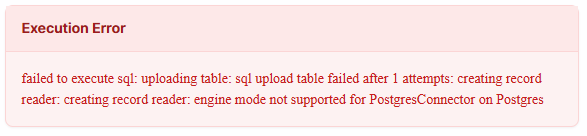 **Solution:** Delete and recreate the connector. This resolves cases where the connector metadata is stale or corrupted.
TextQL supports Oracle Base DB and Oracle ADW via native connectors with ontology support. Oracle Fusion is supported via API. Oracle OAC has partial API support.
**Solution:** For the latest availability and timeline on Oracle integrations, contact your TextQL account manager.
A pre-built Jira connector is not yet available.
**Solution:** Connect Jira via API key using the Env Vars section on the Connectors page. A pre-built connector is on the roadmap.
Installing a custom Python package requires TextQL to build custom sandboxes for code execution. This adds latency to every request and dashboard load across the entire organization — not just for the user who installed the package.
**Solution:**
1. If the package is not critical, remove it in **Settings → Packages** to restore normal response times. Response times should return to normal within minutes of removal.
2. If the package is required, be aware that it will increase response times for all users. Contact [support@textql.com](mailto:support@textql.com) to discuss options for minimizing the performance impact.
Connectors are scoped to a single organization by design. A connector set up in one org is not visible in another, even if the underlying data source is the same.
**Solution:** Recreate the connector in each organization that needs access. An admin in each org can configure the connector using the same credentials.
Navigate to the Connectors page and add your warehouse (Snowflake, Redshift, BigQuery, and others). Ana will scan available tables and suggest questions automatically — no data modeling or upfront configuration required. See [Connect Your Data](https://docs.textql.com/core/get-started/connect-your-data).
When starting a thread, select all relevant connectors. Ana will explore and join across them as needed. To limit a specific analysis to one connector only, select just that connector at the start of the thread. Connectors are configured once at the organization level and are available to all users with the appropriate role permissions.
1. **Persist dbt docs to your data warehouse** (e.g., BigQuery) and let Ana query them via an existing connector. This is the simplest path.
2. **Use the dbt Discovery API** via a service token. Add the token in the "Env Vars" section of the Connectors page, and add a note in your organization context telling Ana when to reference it.
For dbt Cloud semantic layer API integration, this is under active development. Contact your account manager for the latest status.
Provide a REST endpoint that accepts SQL queries against your metrics layer. TextQL can issue queries against it the same way it queries a standard connector. Contact your TextQL account manager or [support@textql.com](mailto:support@textql.com) to configure this for your environment.
See the [API Reference](https://docs.textql.com/api-reference/introduction) for available endpoints. For credential rotation integrated with AWS Secrets Manager or another vault, contact [support@textql.com](mailto:support@textql.com) to discuss options for your deployment.
## Roles & Permissions
The platform is fully role-based. Connectors, context, ontologies, dashboards, and playbooks can all be scoped by role. For example, finance data can be restricted to the finance team while broader operational data is available org-wide.
Roles and permissions are configured in admin settings. See [Roles & Permissions](https://docs.textql.com/core/admin/rbac) for setup instructions.
The public and private permission model controls which conversations users can view.
* **Read/Write Public:** The user can view or create conversations that have been intentionally set to public. All chats are private by default.
* **Read/Write Private:** The user can view all conversations, including other users' private chats. This should be reserved for admin or security roles.
* **RBAC overrides:** If a chat is explicitly shared with a user, they can view it regardless of their public/private permissions.
API keys inherit the permissions of the user who created them. If the user's role lacks access to the connector or resource being queried, the API call will fail with a 403 or 401 error.
**Solution:**
* Ensure the user's role has access to the connector (via the Connectors page share settings).
* If the user was recently changed from admin to member, allow up to 15 minutes for permission changes to propagate.
* As a workaround, temporarily make the user an admin, generate the key, then revert. The key will retain the permissions it was created with.
1. On the Connectors page, click **...** > **Manage Access** on the connector.
**Solution:** Delete and recreate the connector. This resolves cases where the connector metadata is stale or corrupted.
TextQL supports Oracle Base DB and Oracle ADW via native connectors with ontology support. Oracle Fusion is supported via API. Oracle OAC has partial API support.
**Solution:** For the latest availability and timeline on Oracle integrations, contact your TextQL account manager.
A pre-built Jira connector is not yet available.
**Solution:** Connect Jira via API key using the Env Vars section on the Connectors page. A pre-built connector is on the roadmap.
Installing a custom Python package requires TextQL to build custom sandboxes for code execution. This adds latency to every request and dashboard load across the entire organization — not just for the user who installed the package.
**Solution:**
1. If the package is not critical, remove it in **Settings → Packages** to restore normal response times. Response times should return to normal within minutes of removal.
2. If the package is required, be aware that it will increase response times for all users. Contact [support@textql.com](mailto:support@textql.com) to discuss options for minimizing the performance impact.
Connectors are scoped to a single organization by design. A connector set up in one org is not visible in another, even if the underlying data source is the same.
**Solution:** Recreate the connector in each organization that needs access. An admin in each org can configure the connector using the same credentials.
Navigate to the Connectors page and add your warehouse (Snowflake, Redshift, BigQuery, and others). Ana will scan available tables and suggest questions automatically — no data modeling or upfront configuration required. See [Connect Your Data](https://docs.textql.com/core/get-started/connect-your-data).
When starting a thread, select all relevant connectors. Ana will explore and join across them as needed. To limit a specific analysis to one connector only, select just that connector at the start of the thread. Connectors are configured once at the organization level and are available to all users with the appropriate role permissions.
1. **Persist dbt docs to your data warehouse** (e.g., BigQuery) and let Ana query them via an existing connector. This is the simplest path.
2. **Use the dbt Discovery API** via a service token. Add the token in the "Env Vars" section of the Connectors page, and add a note in your organization context telling Ana when to reference it.
For dbt Cloud semantic layer API integration, this is under active development. Contact your account manager for the latest status.
Provide a REST endpoint that accepts SQL queries against your metrics layer. TextQL can issue queries against it the same way it queries a standard connector. Contact your TextQL account manager or [support@textql.com](mailto:support@textql.com) to configure this for your environment.
See the [API Reference](https://docs.textql.com/api-reference/introduction) for available endpoints. For credential rotation integrated with AWS Secrets Manager or another vault, contact [support@textql.com](mailto:support@textql.com) to discuss options for your deployment.
## Roles & Permissions
The platform is fully role-based. Connectors, context, ontologies, dashboards, and playbooks can all be scoped by role. For example, finance data can be restricted to the finance team while broader operational data is available org-wide.
Roles and permissions are configured in admin settings. See [Roles & Permissions](https://docs.textql.com/core/admin/rbac) for setup instructions.
The public and private permission model controls which conversations users can view.
* **Read/Write Public:** The user can view or create conversations that have been intentionally set to public. All chats are private by default.
* **Read/Write Private:** The user can view all conversations, including other users' private chats. This should be reserved for admin or security roles.
* **RBAC overrides:** If a chat is explicitly shared with a user, they can view it regardless of their public/private permissions.
API keys inherit the permissions of the user who created them. If the user's role lacks access to the connector or resource being queried, the API call will fail with a 403 or 401 error.
**Solution:**
* Ensure the user's role has access to the connector (via the Connectors page share settings).
* If the user was recently changed from admin to member, allow up to 15 minutes for permission changes to propagate.
* As a workaround, temporarily make the user an admin, generate the key, then revert. The key will retain the permissions it was created with.
1. On the Connectors page, click **...** > **Manage Access** on the connector.
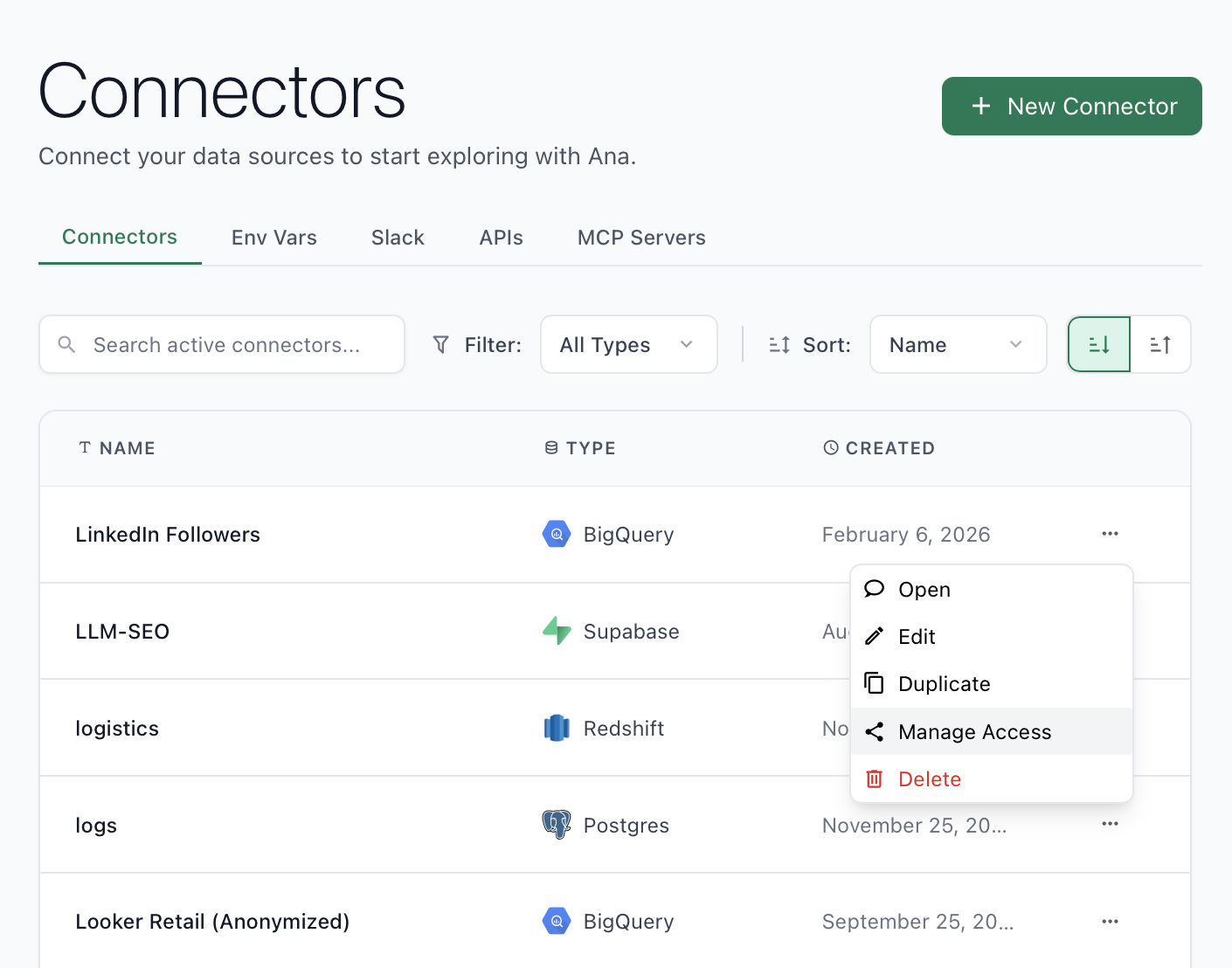 2. Set to **Restricted Access**, then add the specific role under **Select roles to share with** and set the permission level to **Viewer**.
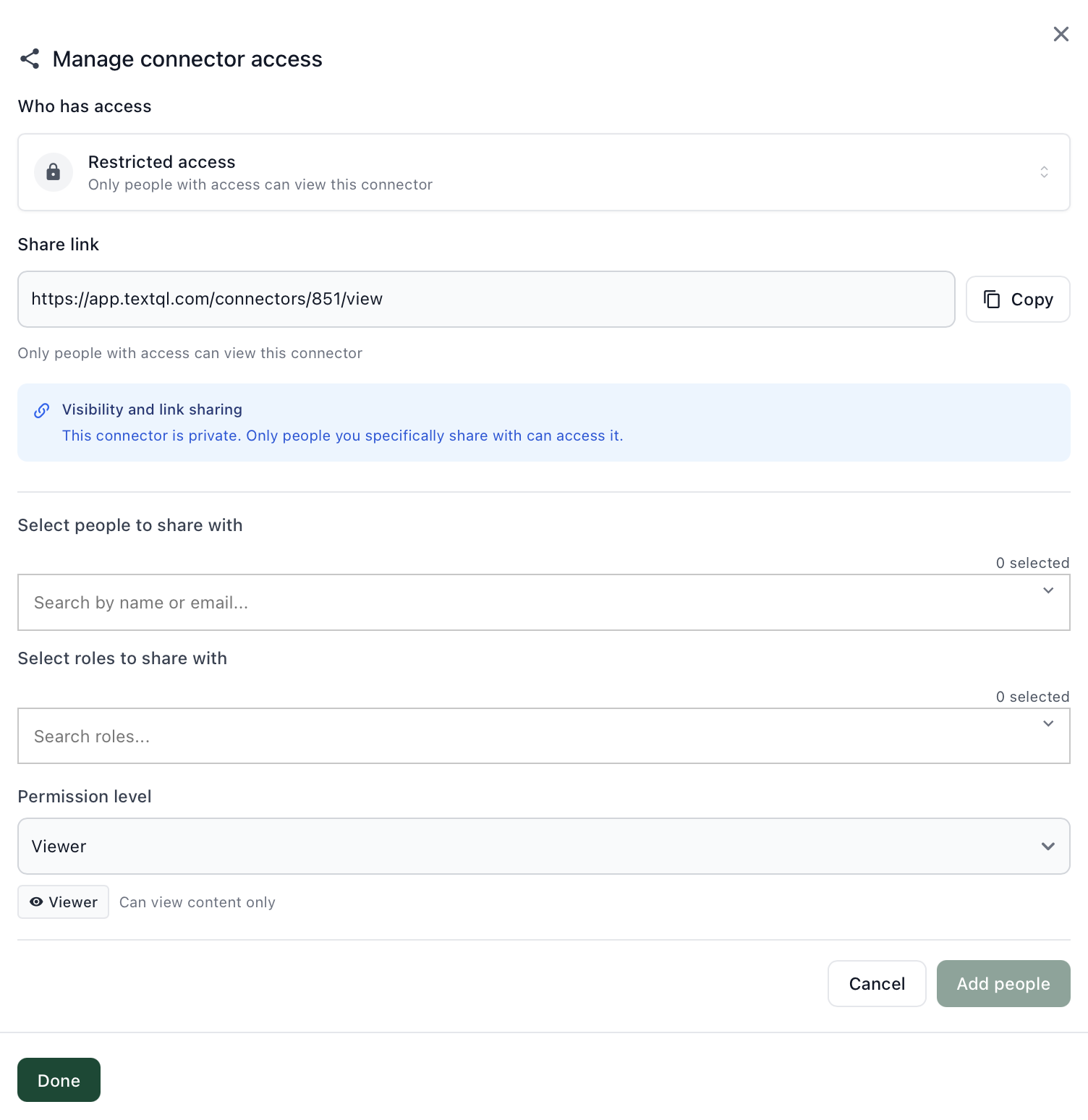 Users with that role will only see connectors explicitly shared with them. Note: users can still start chats without selecting a connector.
* **Ontology mode:** Only fields marked as dimensions or measures are exposed to Ana. Remove or don't add sensitive fields (e.g., password, SSN) as attributes. Alternatively, define the ontology object with a custom SELECT query that excludes sensitive columns.
* **Text-to-SQL mode:** Restrict the connector's database user permissions at the database level, or use database views that exclude sensitive columns.
For deterministic security, ontology mode is recommended over text-to-SQL. See [Ontology Overview](/core/ontology/overview).
Temporarily grant the user admin access, have them generate the key in **Settings → Developers → API Keys**, then revert their role back to member. The API key will continue to work.
Audit logs record admin-level changes such as connector updates, user additions, and role changes.
**Solution:**
1. Go to **Settings** in the TextQL console.
2. Click the **Audit Log** tab.
The log covers connector updates, user and role changes, and other admin actions.
Audit logs record admin-level changes such as connector updates, user additions, and role changes.
**Solution:**
1. Go to **Settings** in the TextQL console.
2. Click the **Audit Log** tab.
The log covers connector updates, user and role changes, and other admin actions.
## Sharing & Collaboration
All three content types use the same sharing model.
1. When created, the item is **private** (only the creator can see it).
2. You can share it with specific teammates as **viewer** (read-only) or **editor** (can modify).
3. You can make it **public** so everyone in the organization can access it.
Use the **Share** button in the top-right corner of any thread, playbook, or dashboard.
In the playbook's **Share** settings (top-right corner):
1. Set the playbook to **Restricted Access**.
2. Add specific users or roles with **Viewer** access.
Viewers can see the playbook and its results but cannot modify the prompt, schedule, or configuration.
There is no self-serve user export in the UI. Contact your TextQL account manager or email [support@textql.com](mailto:support@textql.com) to request a user list export.
## Authentication & SSO
Users with that role will only see connectors explicitly shared with them. Note: users can still start chats without selecting a connector.
* **Ontology mode:** Only fields marked as dimensions or measures are exposed to Ana. Remove or don't add sensitive fields (e.g., password, SSN) as attributes. Alternatively, define the ontology object with a custom SELECT query that excludes sensitive columns.
* **Text-to-SQL mode:** Restrict the connector's database user permissions at the database level, or use database views that exclude sensitive columns.
For deterministic security, ontology mode is recommended over text-to-SQL. See [Ontology Overview](/core/ontology/overview).
Temporarily grant the user admin access, have them generate the key in **Settings → Developers → API Keys**, then revert their role back to member. The API key will continue to work.
Audit logs record admin-level changes such as connector updates, user additions, and role changes.
**Solution:**
1. Go to **Settings** in the TextQL console.
2. Click the **Audit Log** tab.
The log covers connector updates, user and role changes, and other admin actions.
Audit logs record admin-level changes such as connector updates, user additions, and role changes.
**Solution:**
1. Go to **Settings** in the TextQL console.
2. Click the **Audit Log** tab.
The log covers connector updates, user and role changes, and other admin actions.
## Sharing & Collaboration
All three content types use the same sharing model.
1. When created, the item is **private** (only the creator can see it).
2. You can share it with specific teammates as **viewer** (read-only) or **editor** (can modify).
3. You can make it **public** so everyone in the organization can access it.
Use the **Share** button in the top-right corner of any thread, playbook, or dashboard.
In the playbook's **Share** settings (top-right corner):
1. Set the playbook to **Restricted Access**.
2. Add specific users or roles with **Viewer** access.
Viewers can see the playbook and its results but cannot modify the prompt, schedule, or configuration.
There is no self-serve user export in the UI. Contact your TextQL account manager or email [support@textql.com](mailto:support@textql.com) to request a user list export.
## Authentication & SSO
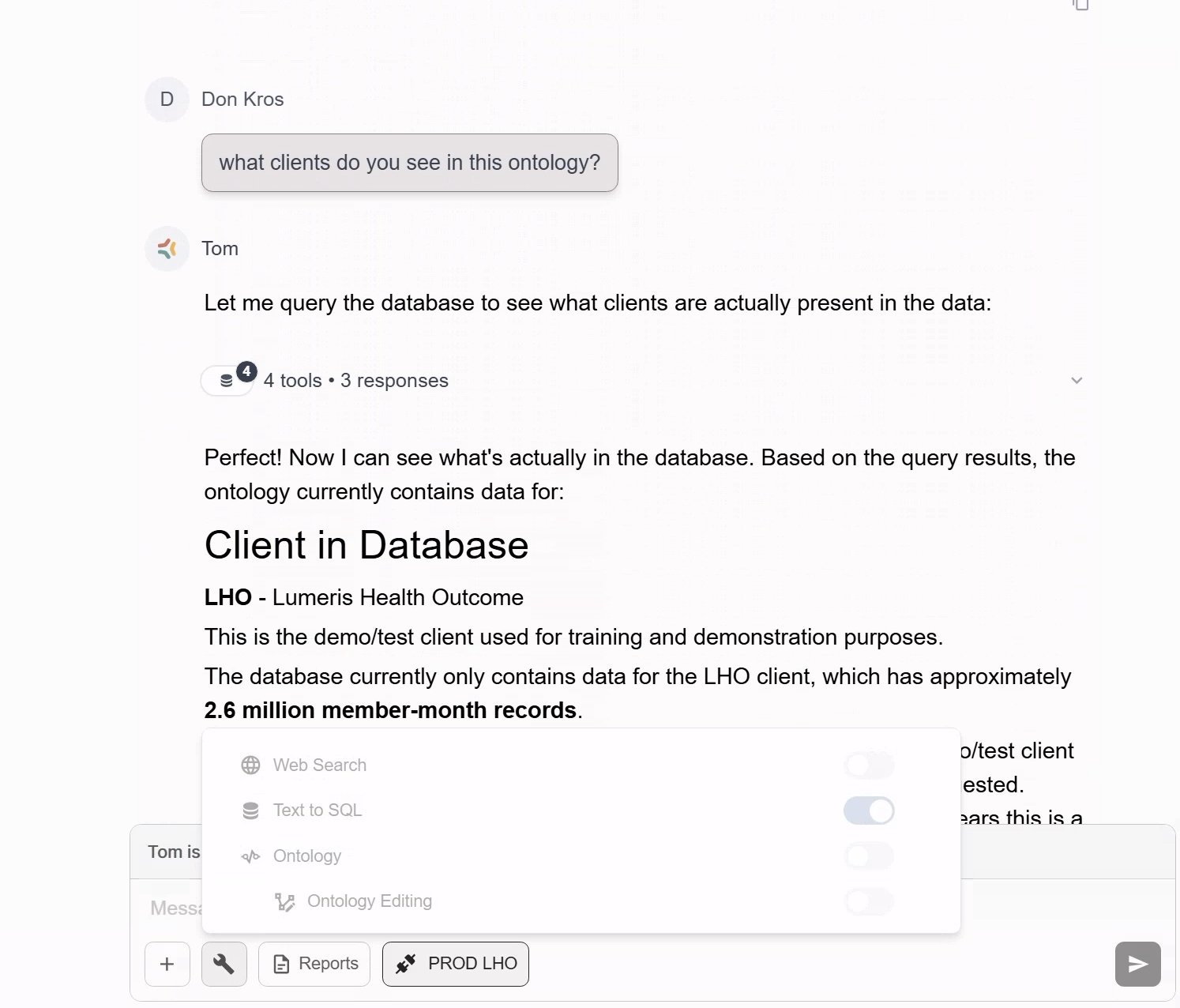 This typically means the email on the Google account does not match the email registered to the TextQL account. Common causes:
* The account was originally created with one email and later switched to a different one.
* Google auth was never linked during initial setup.
To check which email the TextQL account is registered under, use the magic link login method. The login email will display the registered email:
This typically means the email on the Google account does not match the email registered to the TextQL account. Common causes:
* The account was originally created with one email and later switched to a different one.
* Google auth was never linked during initial setup.
To check which email the TextQL account is registered under, use the magic link login method. The login email will display the registered email:
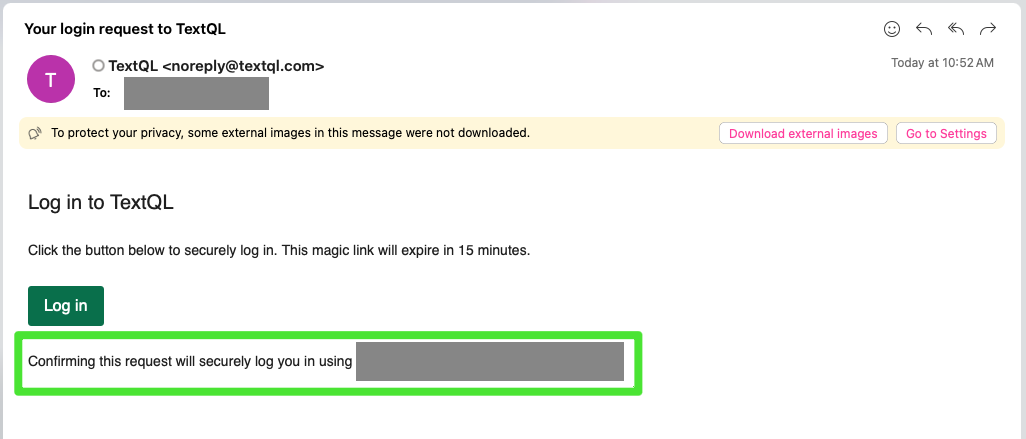 **Solution:** Contact [support@textql.com](mailto:support@textql.com) with your Google email and the TextQL account email to get them re-linked. For SSO configuration, see [Single Sign-On (SSO)](https://docs.textql.com/core/admin/sso).
This happens when billing information has not been set up for the organization. The onboarding flow prompts you to choose a plan and confirm payment.
**Solution:** Complete the onboarding steps (plan selection and billing). If you are on a paid plan and still seeing this, contact [support@textql.com](mailto:support@textql.com) — your billing configuration may need to be re-linked.
Two common issues with SCIM setup:
* **Wrong base URL:** The correct path is `/v2/scim`, not `/scim/v2`. Using the wrong path returns a 404.
* **Missing 'Bearer' prefix:** Identity providers require the Authorization header to be `Bearer `, not the token alone.
**Solution:**
1. Set the SCIM base URL to `https://app.textql.com/v2/scim`.
2. In your identity provider, set the Authorization header to `Bearer ` — include the word `Bearer` followed by a space, then the token.
3. Ensure at least one user has been provisioned in the TextQL admin console before testing the endpoint.
4. See [SCIM Provisioning](https://docs.textql.com/core/admin/scim) for full setup guidance.
SCIM handles create, update, and deactivate operations going forward from when it is enabled. It does not retroactively deprovision users who were manually added before SCIM was configured.
**Solution:**
1. After enabling SCIM, manually audit your member list in **Settings → Members** and remove any users who should not have access.
2. Going forward, SCIM will handle provisioning and deprovisioning automatically.
3. To test deprovisioning: remove a test user from the identity provider group assigned to the TextQL SCIM app, trigger a sync, and verify the user loses access in TextQL.
TextQL supports SSO via Okta, Microsoft Entra ID, Google, Ping, and generic OIDC providers. Follow the Okta-specific setup guide at [SSO - Okta](https://docs.textql.com/core/admin/sso-okta). For general SSO configuration, see [Single Sign-On (SSO)](https://docs.textql.com/core/admin/sso).
## OIDC
When attempting to log in via SSO, you see a "Processing OIDC Login" screen with the following error:
**Solution:** Contact [support@textql.com](mailto:support@textql.com) with your Google email and the TextQL account email to get them re-linked. For SSO configuration, see [Single Sign-On (SSO)](https://docs.textql.com/core/admin/sso).
This happens when billing information has not been set up for the organization. The onboarding flow prompts you to choose a plan and confirm payment.
**Solution:** Complete the onboarding steps (plan selection and billing). If you are on a paid plan and still seeing this, contact [support@textql.com](mailto:support@textql.com) — your billing configuration may need to be re-linked.
Two common issues with SCIM setup:
* **Wrong base URL:** The correct path is `/v2/scim`, not `/scim/v2`. Using the wrong path returns a 404.
* **Missing 'Bearer' prefix:** Identity providers require the Authorization header to be `Bearer `, not the token alone.
**Solution:**
1. Set the SCIM base URL to `https://app.textql.com/v2/scim`.
2. In your identity provider, set the Authorization header to `Bearer ` — include the word `Bearer` followed by a space, then the token.
3. Ensure at least one user has been provisioned in the TextQL admin console before testing the endpoint.
4. See [SCIM Provisioning](https://docs.textql.com/core/admin/scim) for full setup guidance.
SCIM handles create, update, and deactivate operations going forward from when it is enabled. It does not retroactively deprovision users who were manually added before SCIM was configured.
**Solution:**
1. After enabling SCIM, manually audit your member list in **Settings → Members** and remove any users who should not have access.
2. Going forward, SCIM will handle provisioning and deprovisioning automatically.
3. To test deprovisioning: remove a test user from the identity provider group assigned to the TextQL SCIM app, trigger a sync, and verify the user loses access in TextQL.
TextQL supports SSO via Okta, Microsoft Entra ID, Google, Ping, and generic OIDC providers. Follow the Okta-specific setup guide at [SSO - Okta](https://docs.textql.com/core/admin/sso-okta). For general SSO configuration, see [Single Sign-On (SSO)](https://docs.textql.com/core/admin/sso).
## OIDC
When attempting to log in via SSO, you see a "Processing OIDC Login" screen with the following error:
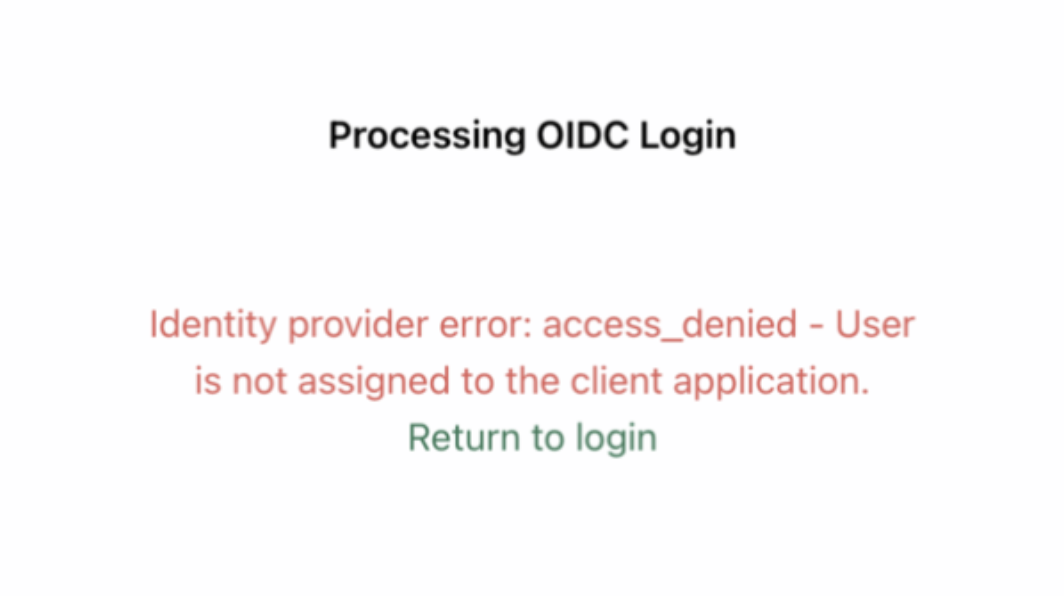 Your identity provider (e.g., Okta, Azure AD) has not assigned your user account to the TextQL application. This means your IdP is blocking the login before it ever reaches TextQL.
**Solution:** Ask your organization's Okta (or IdP) admin to assign your user account to the TextQL application within the identity provider. Once you've been added, retry logging in.
## Pricing & ACU Consumption
TextQL is usage-based, not seat-based. Most active power users consume approximately $1,100/month. A proof-of-concept with 5–10 users typically fits within a $5,000 credit budget.
Contact your account manager for an estimate based on your expected query volume.
Proof-of-concepts typically run 2–4 weeks. Most teams have a clear signal on fit within the first two weeks.
Contact your account manager or email [support@textql.com](mailto:support@textql.com) to get started.
ACU pricing is token-based and varies by model. The table below shows the ACU cost per 1M tokens (input and output) and the context window size for each available model:
Your identity provider (e.g., Okta, Azure AD) has not assigned your user account to the TextQL application. This means your IdP is blocking the login before it ever reaches TextQL.
**Solution:** Ask your organization's Okta (or IdP) admin to assign your user account to the TextQL application within the identity provider. Once you've been added, retry logging in.
## Pricing & ACU Consumption
TextQL is usage-based, not seat-based. Most active power users consume approximately $1,100/month. A proof-of-concept with 5–10 users typically fits within a $5,000 credit budget.
Contact your account manager for an estimate based on your expected query volume.
Proof-of-concepts typically run 2–4 weeks. Most teams have a clear signal on fit within the first two weeks.
Contact your account manager or email [support@textql.com](mailto:support@textql.com) to get started.
ACU pricing is token-based and varies by model. The table below shows the ACU cost per 1M tokens (input and output) and the context window size for each available model:
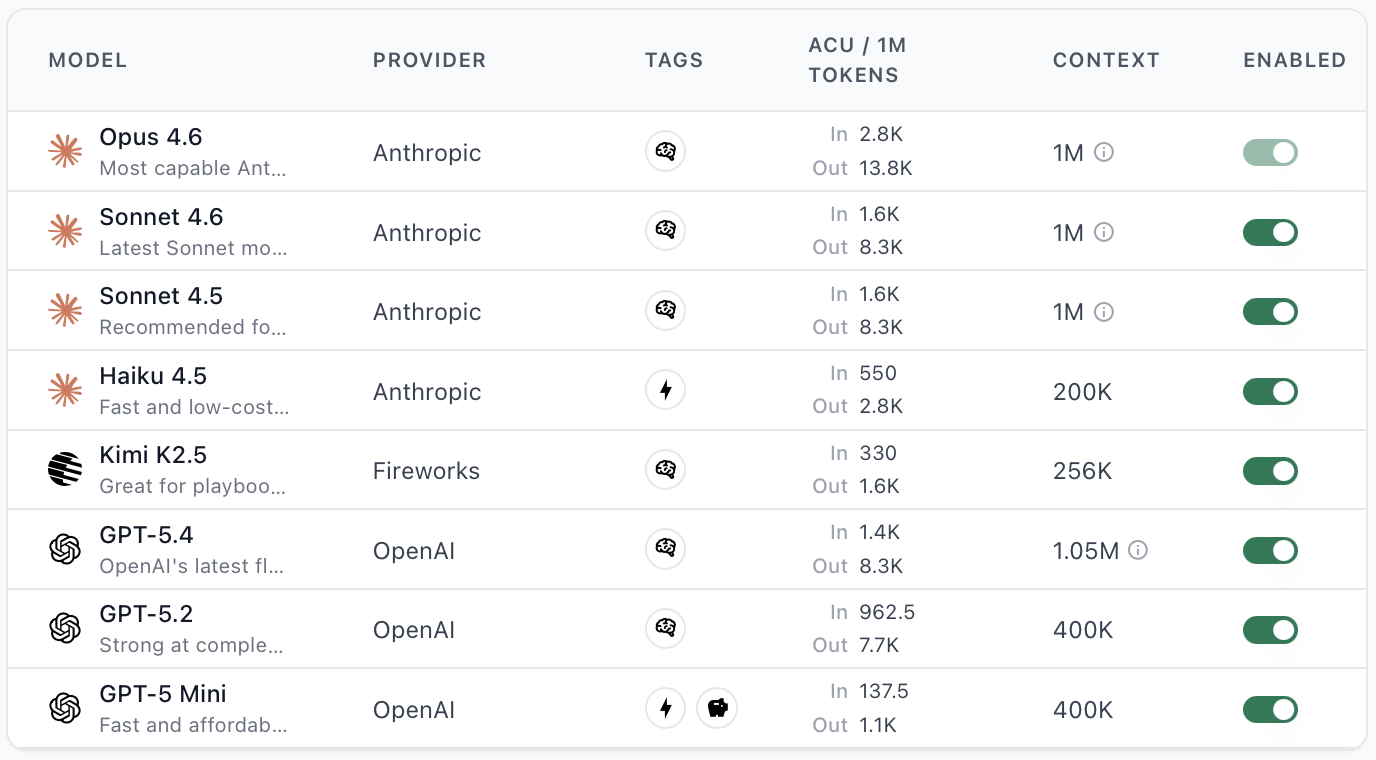 Key things to keep in mind:
* More powerful models tend to generate **more tool calls per completion**, which increases total tokens consumed and therefore cost per thread.
* The default model (Sonnet 5) is the most cost-efficient for most use cases.
* When testing a new model, start with shorter threads to gauge cost before committing to long analyses.
**Solution:** Use the default model (Sonnet 5) for most use cases to minimize costs. For the full pricing breakdown, see [Pricing and Consumption Table](https://docs.textql.com/core/admin/pricing#inference).
By default, there is no guardrail preventing users from asking questions unrelated to your data. Any prompt that Ana processes will consume ACUs.
**Solution:** Add instructions to your organization context that restrict Ana to only answering questions relevant to your business data. Contact your TextQL account manager if you need help setting this up.
If your organization's credit balance is exceeded, the organization is suspended and users cannot access the service.
**Solution:** Contact your TextQL account manager or email [support@textql.com](mailto:support@textql.com). Options include adding buffer credits while a contract renewal is in progress, or switching to unlimited usage pay-as-you-go billing with an invoice at end of month.
Yes. The Slack integration spins up a TextQL thread in the background — the interface is through Slack, but the underlying computation is identical to using the TextQL app directly. All usage through Slack counts toward your ACU drawdown.
Use the [Usage API](/core/admin/usage-api) to pull ACU consumption data programmatically — by time period, user, or usage category. The API supports filtering, pagination, and multiple output granularities (hour, day, month).
Alternatively, query usage data directly in Ana using the built-in **TextQL Usage** connector — no API setup required.
For real-time ACU balance information, see [Pricing](https://docs.textql.com/core/admin/pricing). If you need a custom report or have questions about your bill, contact your TextQL account manager or email [support@textql.com](mailto:support@textql.com).
## API & Documentation
The API authentication header format has changed from `Authorization: ApiKey ` to `Authorization: Bearer `.
**Solution:** Update all API calls to use the `Bearer` prefix instead of `ApiKey`. No changes to the key itself are needed.
The TextQL API does not support direct browser-to-API calls from arbitrary origins. Calling the API directly from a frontend app triggers CORS enforcement.
**Solution:** Proxy all TextQL API calls through your own backend server rather than calling the API directly from the browser. Your frontend calls your backend, your backend calls TextQL, and the response is returned to the frontend. This also keeps your API key server-side, which is the recommended security posture.
Chat sessions older than approximately 30 days have their compute environment archived. Sending new messages to an archived chat via the API triggers this error.
**Solution:** Create a new chat session via `POST /v1/chat` instead of reusing the old chat ID. If you need to continue a prior conversation, copy the relevant context into the new chat. See the [API Reference](https://docs.textql.com/api-reference/chat/chat/create) for details.
The TextQL API supports programmatic query submission — pass a prompt, receive the generated SQL, and retrieve the output data without using the chat interface. This is commonly used for automated testing workflows and integration into external pipelines.
See the [API Reference](https://docs.textql.com/api-reference/introduction) for available endpoints.
Tenant-specific endpoints (e.g., `/CreateApiKey`, `/ListRoles`, `/UpdateApiKey`) are provisioned per organization and not listed in the public docs. Contact your TextQL account manager or email [support@textql.com](mailto:support@textql.com). The public API reference is at [docs.textql.com/api-reference](https://docs.textql.com/api-reference/introduction).
Use the `ListRoles` endpoint:
```
POST https://app.textql.com/rpc/public/textql.rpc.public.rbac.RBACService/ListRoles
```
Pass an empty body `{}` with your API key in the `Authorization: Bearer ` header. The response will include all roles with their UUIDs.
## Data Storage & Security
TextQL is SOC 2 compliant. For teams working with healthcare, financial, or other regulated data, contact your account manager or [support@textql.com](mailto:support@textql.com) for the security whitepaper and to discuss your specific requirements. See also [Security Whitepaper](https://docs.textql.com/core/admin/compliance/security).
For cloud deployments, TextQL processes queries in real-time and does not persist raw query results beyond the session. Thread history (prompts and responses) is stored for the user's convenience.
For detailed answers on data storage, retention, processing location, and compliance, see [Security Whitepaper](https://docs.textql.com/core/admin/compliance/security) or contact [support@textql.com](mailto:support@textql.com) for a formal data processing questionnaire.
Currently, each Snowflake role requires a separate connector. TextQL does not support dynamic `USE ROLE` switching within a single connection.
**Solution:** Use **Snowflake OAuth** (user-level authentication via popup) for deployments where each user has their own Snowflake role. This allows per-user access control without creating a connector per role.
## VPC / Self-Hosted Deployments
In VPC/EKS deployments, the database migration pod may fail silently with no log output.
**Solution:** Contact TextQL support at [support@textql.com](mailto:support@textql.com) for the latest Helm chart version, which includes updated logging for migration pods. Not applicable to cloud-hosted customers.
If pods are stuck in `ImagePullBackOff`, the Docker credentials used to pull TextQL images may have expired.
**Solution:** Contact TextQL support at [support@textql.com](mailto:support@textql.com) for updated Docker credentials or the latest Helm chart. Apply the updated credentials and restart the affected pods.
Key things to keep in mind:
* More powerful models tend to generate **more tool calls per completion**, which increases total tokens consumed and therefore cost per thread.
* The default model (Sonnet 5) is the most cost-efficient for most use cases.
* When testing a new model, start with shorter threads to gauge cost before committing to long analyses.
**Solution:** Use the default model (Sonnet 5) for most use cases to minimize costs. For the full pricing breakdown, see [Pricing and Consumption Table](https://docs.textql.com/core/admin/pricing#inference).
By default, there is no guardrail preventing users from asking questions unrelated to your data. Any prompt that Ana processes will consume ACUs.
**Solution:** Add instructions to your organization context that restrict Ana to only answering questions relevant to your business data. Contact your TextQL account manager if you need help setting this up.
If your organization's credit balance is exceeded, the organization is suspended and users cannot access the service.
**Solution:** Contact your TextQL account manager or email [support@textql.com](mailto:support@textql.com). Options include adding buffer credits while a contract renewal is in progress, or switching to unlimited usage pay-as-you-go billing with an invoice at end of month.
Yes. The Slack integration spins up a TextQL thread in the background — the interface is through Slack, but the underlying computation is identical to using the TextQL app directly. All usage through Slack counts toward your ACU drawdown.
Use the [Usage API](/core/admin/usage-api) to pull ACU consumption data programmatically — by time period, user, or usage category. The API supports filtering, pagination, and multiple output granularities (hour, day, month).
Alternatively, query usage data directly in Ana using the built-in **TextQL Usage** connector — no API setup required.
For real-time ACU balance information, see [Pricing](https://docs.textql.com/core/admin/pricing). If you need a custom report or have questions about your bill, contact your TextQL account manager or email [support@textql.com](mailto:support@textql.com).
## API & Documentation
The API authentication header format has changed from `Authorization: ApiKey ` to `Authorization: Bearer `.
**Solution:** Update all API calls to use the `Bearer` prefix instead of `ApiKey`. No changes to the key itself are needed.
The TextQL API does not support direct browser-to-API calls from arbitrary origins. Calling the API directly from a frontend app triggers CORS enforcement.
**Solution:** Proxy all TextQL API calls through your own backend server rather than calling the API directly from the browser. Your frontend calls your backend, your backend calls TextQL, and the response is returned to the frontend. This also keeps your API key server-side, which is the recommended security posture.
Chat sessions older than approximately 30 days have their compute environment archived. Sending new messages to an archived chat via the API triggers this error.
**Solution:** Create a new chat session via `POST /v1/chat` instead of reusing the old chat ID. If you need to continue a prior conversation, copy the relevant context into the new chat. See the [API Reference](https://docs.textql.com/api-reference/chat/chat/create) for details.
The TextQL API supports programmatic query submission — pass a prompt, receive the generated SQL, and retrieve the output data without using the chat interface. This is commonly used for automated testing workflows and integration into external pipelines.
See the [API Reference](https://docs.textql.com/api-reference/introduction) for available endpoints.
Tenant-specific endpoints (e.g., `/CreateApiKey`, `/ListRoles`, `/UpdateApiKey`) are provisioned per organization and not listed in the public docs. Contact your TextQL account manager or email [support@textql.com](mailto:support@textql.com). The public API reference is at [docs.textql.com/api-reference](https://docs.textql.com/api-reference/introduction).
Use the `ListRoles` endpoint:
```
POST https://app.textql.com/rpc/public/textql.rpc.public.rbac.RBACService/ListRoles
```
Pass an empty body `{}` with your API key in the `Authorization: Bearer ` header. The response will include all roles with their UUIDs.
## Data Storage & Security
TextQL is SOC 2 compliant. For teams working with healthcare, financial, or other regulated data, contact your account manager or [support@textql.com](mailto:support@textql.com) for the security whitepaper and to discuss your specific requirements. See also [Security Whitepaper](https://docs.textql.com/core/admin/compliance/security).
For cloud deployments, TextQL processes queries in real-time and does not persist raw query results beyond the session. Thread history (prompts and responses) is stored for the user's convenience.
For detailed answers on data storage, retention, processing location, and compliance, see [Security Whitepaper](https://docs.textql.com/core/admin/compliance/security) or contact [support@textql.com](mailto:support@textql.com) for a formal data processing questionnaire.
Currently, each Snowflake role requires a separate connector. TextQL does not support dynamic `USE ROLE` switching within a single connection.
**Solution:** Use **Snowflake OAuth** (user-level authentication via popup) for deployments where each user has their own Snowflake role. This allows per-user access control without creating a connector per role.
## VPC / Self-Hosted Deployments
In VPC/EKS deployments, the database migration pod may fail silently with no log output.
**Solution:** Contact TextQL support at [support@textql.com](mailto:support@textql.com) for the latest Helm chart version, which includes updated logging for migration pods. Not applicable to cloud-hosted customers.
If pods are stuck in `ImagePullBackOff`, the Docker credentials used to pull TextQL images may have expired.
**Solution:** Contact TextQL support at [support@textql.com](mailto:support@textql.com) for updated Docker credentials or the latest Helm chart. Apply the updated credentials and restart the affected pods.
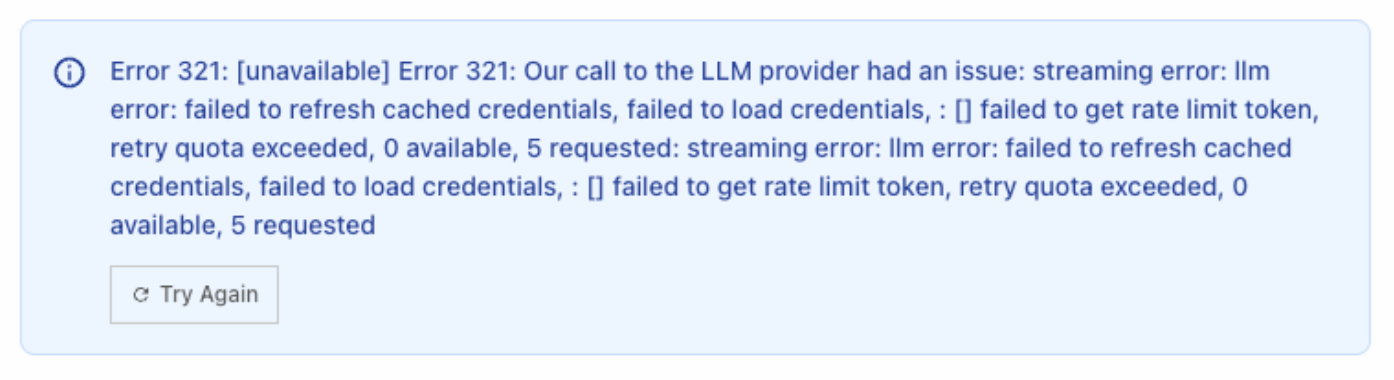 This error indicates an IAM role misconfiguration for AWS Bedrock access in the hosting AWS account.
**Solution:** Check the IAM role attached to the EKS nodes (typically named `tql-eks-node-role` or `tql-eks-cluster-role`) and verify:
* The role has valid Bedrock permissions.
* Credentials have not expired.
* Rate limit / quota on the IAM role has not been exceeded.
Not applicable to cloud-hosted customers.
At minimum, ensure the following are reachable from the VPC:
* **Docker Hub** — for pulling container images
* **console.textql.com** — for usage data reporting
* **Any domains allowlisted in the TextQL proxy** (e.g., codecommit for sandbox operations)
Contact TextQL support for the full list specific to your deployment configuration.
Contact your TextQL account manager to configure your VPC deployment to use your own Anthropic or OpenAI endpoints.
Invite a user from the new domain via the Settings page. Once they log in, they can add their domain to the OIDC configuration. If this creates a deadlock (the user can't log in without the domain being whitelisted first), contact [support@textql.com](mailto:support@textql.com) to have the domain added directly in the database.
Note: a user with an email on the target domain must be the one to add it — this is a security feature to prevent unauthorized domain claims.
VPC deployments generate `member_id` and `identity_id` UUIDs in the hosted Postgres database, which serve as pseudonymous identifiers. Contact TextQL support to discuss rewiring the console to display UUIDs instead of email addresses, and to review what telemetry data is sent from your deployment. Not applicable to cloud-hosted customers.
By default, sandbox worker pods do not carry any Kubernetes tolerations. If your cluster uses tainted node groups for sandbox workloads (for example, to isolate compute-intensive pods onto dedicated nodes), you can pass a list of tolerations via the Helm chart.
In your `values.yaml`, add a `tolerations` list under the `sandbox` key:
```yaml theme={null}
sandbox:
tolerations:
- key: "dedicated"
operator: "Equal"
value: "sandbox"
effect: "NoSchedule"
```
Each entry supports the standard Kubernetes toleration fields: `key`, `operator`, `value`, and `effect`. If `operator` is omitted it defaults to `Equal`. If the list is empty or the key is absent, no tolerations are applied.
This setting is only relevant for VPC/EKS deployments. Not applicable to cloud-hosted customers.
This error indicates an IAM role misconfiguration for AWS Bedrock access in the hosting AWS account.
**Solution:** Check the IAM role attached to the EKS nodes (typically named `tql-eks-node-role` or `tql-eks-cluster-role`) and verify:
* The role has valid Bedrock permissions.
* Credentials have not expired.
* Rate limit / quota on the IAM role has not been exceeded.
Not applicable to cloud-hosted customers.
At minimum, ensure the following are reachable from the VPC:
* **Docker Hub** — for pulling container images
* **console.textql.com** — for usage data reporting
* **Any domains allowlisted in the TextQL proxy** (e.g., codecommit for sandbox operations)
Contact TextQL support for the full list specific to your deployment configuration.
Contact your TextQL account manager to configure your VPC deployment to use your own Anthropic or OpenAI endpoints.
Invite a user from the new domain via the Settings page. Once they log in, they can add their domain to the OIDC configuration. If this creates a deadlock (the user can't log in without the domain being whitelisted first), contact [support@textql.com](mailto:support@textql.com) to have the domain added directly in the database.
Note: a user with an email on the target domain must be the one to add it — this is a security feature to prevent unauthorized domain claims.
VPC deployments generate `member_id` and `identity_id` UUIDs in the hosted Postgres database, which serve as pseudonymous identifiers. Contact TextQL support to discuss rewiring the console to display UUIDs instead of email addresses, and to review what telemetry data is sent from your deployment. Not applicable to cloud-hosted customers.
By default, sandbox worker pods do not carry any Kubernetes tolerations. If your cluster uses tainted node groups for sandbox workloads (for example, to isolate compute-intensive pods onto dedicated nodes), you can pass a list of tolerations via the Helm chart.
In your `values.yaml`, add a `tolerations` list under the `sandbox` key:
```yaml theme={null}
sandbox:
tolerations:
- key: "dedicated"
operator: "Equal"
value: "sandbox"
effect: "NoSchedule"
```
Each entry supports the standard Kubernetes toleration fields: `key`, `operator`, `value`, and `effect`. If `operator` is omitted it defaults to `Equal`. If the list is empty or the key is absent, no tolerations are applied.
This setting is only relevant for VPC/EKS deployments. Not applicable to cloud-hosted customers.