> ## Documentation Index
> Fetch the complete documentation index at: https://docs.textql.com/llms.txt
> Use this file to discover all available pages before exploring further.
# Ontology
> Query data using your semantic layer
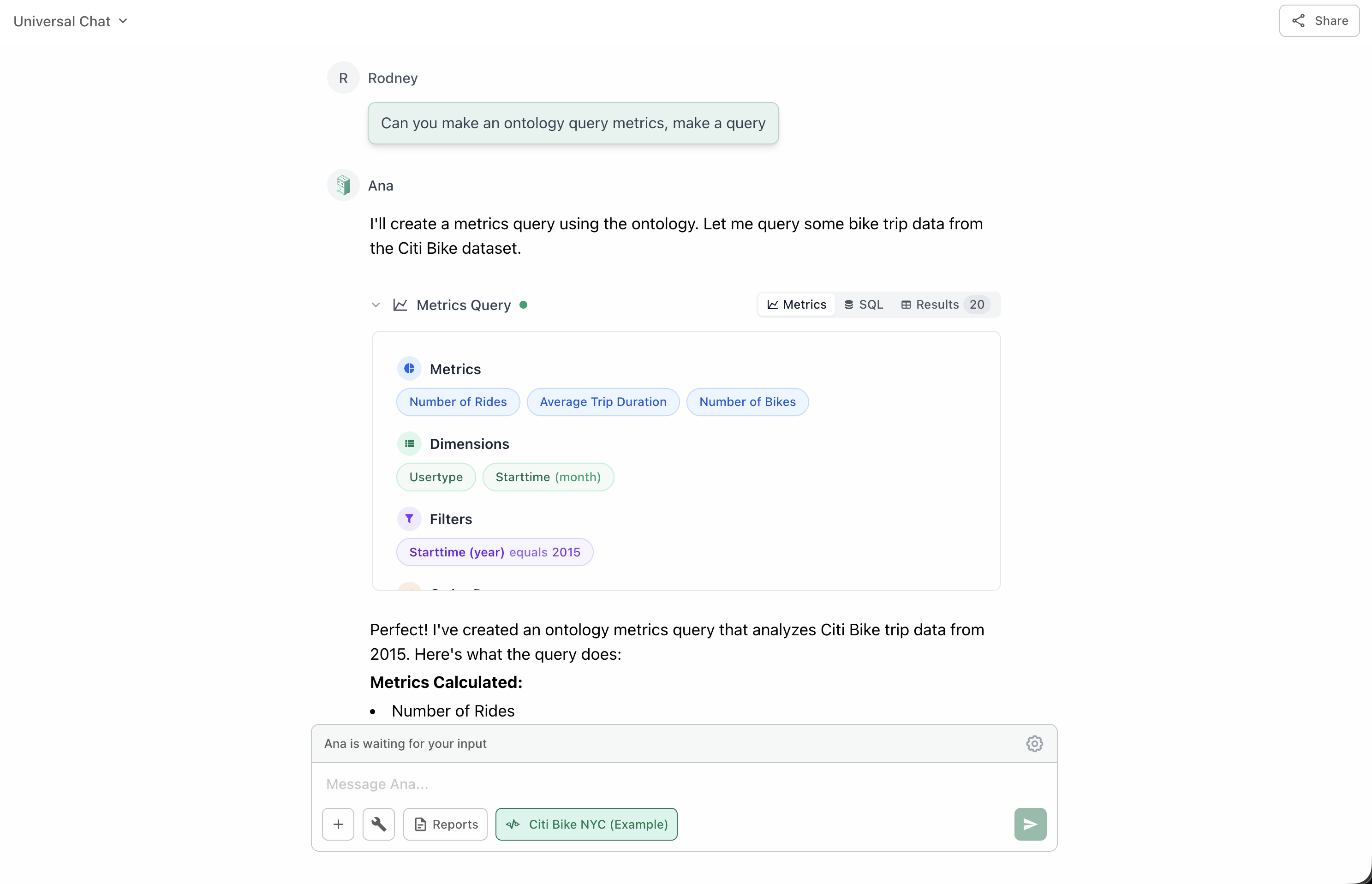
When enabled, Ana uses your configured ontology (semantic layer) to understand your data relationships, business definitions, and pre-configured joins. Instead of writing raw SQL, Ana can query using business-friendly concepts like "metrics" and "dimensions" that you've pre-defined.
**Consistency Guaranteed:** With Ontology enabled, the same metric always produces the same calculation—ensuring everyone in your organization gets aligned results.
 ## You Define the Structure
Users create and customize their own ontology by defining these core components:
Your business entities that map to database tables
**Example:** Customers, Orders, Products
Pre-defined calculations with exact SQL logic
**Example:** "Total Revenue", "Customer Lifetime Value"
Attributes for grouping and filtering data
**Example:** "Order Date", "Customer Region"
Relationships between different objects
**Example:** "Orders belong to Customers"
**Quality Matters:** The more accurately you define your ontology, the more fine-tuned and consistent your results will be. Each metric includes the exact SQL logic needed to calculate it.
## How It Differs from Text to SQL
| Feature | Text to SQL | Ontology |
| -------------------- | ------------------------------------ | ------------------------------------- |
| **Query Generation** | Generates SQL from scratch each time | Uses pre-defined metric SQL |
| **Consistency** | May vary between queries | Same metric = same calculation always |
| **Business Logic** | Ana figures it out on the fly | Pre-configured by you |
| **Complexity** | Can handle simple queries well | Excels with complex data models |
| **Setup Required** | None | Requires ontology configuration |
### How It Works
Generates SQL queries directly from natural language, requiring Ana to figure out table joins, column names, and business logic on the fly. Every query is generated from scratch.
### Best For
* Ad-hoc exploration
* Simple queries
* Quick analysis
* When you don't have an ontology
### Limitations
* May interpret metrics differently each time
* Requires Ana to infer business logic
* Can be inconsistent across queries
### How It Works
Uses your pre-configured semantic layer where you've already defined business objects, metrics (like "Total Revenue"), dimensions (like "Date"), and relationships. Ana queries using these high-level concepts through "Metrics Queries" that execute only the specific SQL logic you've associated with each metric.
### Best For
* Consistent reporting
* Complex data models
* Organization-wide metrics
* Enforcing business definitions
### Advantages
* Same metric = same calculation always
* Pre-configured business logic
* Handles complex joins automatically
* Scales with data model complexity
## When to Use
Enable the Ontology tool when:
An ontology must be built and configured for your data warehouse before you can use this tool.
When metric calculations must be consistent across your organization and over time.
Your data model has many tables with intricate relationships that are hard to explain each time.
You want to ensure everyone uses the same definitions and calculation methods.
You're asking questions about metrics that have already been defined in your ontology.
**Investment Pays Off:** The more effort you invest in defining your ontology, the more reliable and business-aligned your results will be.
## Benefits
Everyone gets the same numbers for the same metrics—no more "version of the truth" debates
No need to explain complex joins and calculations repeatedly—they're pre-configured
Control how metrics are calculated and ensure compliance with business rules
Non-technical users can query using business terms without knowing SQL
Your ontology serves as living documentation of your data model
As your data model grows, the ontology handles increased complexity gracefully
## Building Your Ontology
Ready to create or enhance your ontology? Check out these resources:
Learn the fundamentals of ontologies and how they work in TextQL
Define your business entities and map them to database tables
Create calculations with business logic that everyone can use
Configure relationships between your objects
Learn how to query your ontology effectively
Language reference for writing parameterized ontology queries in TQL
Understand the value proposition and use cases
## Best Practices
Begin by defining your organization's most important and frequently-used metrics. Don't try to model everything at once.
**Examples:**
* Revenue metrics (MRR, ARR, Total Revenue)
* Customer metrics (CAC, LTV, Churn Rate)
* Operational metrics (Conversion Rate, Average Order Value)
Name your objects, metrics, and dimensions using familiar business terminology that everyone understands.
**Good:** "Monthly Recurring Revenue", "Customer Lifetime Value"
**Avoid:** "mrr\_calc\_v2", "ltv\_formula"
Add descriptions to your metrics explaining what they calculate and when to use them. This helps users understand which metric to choose.
When updating metric definitions, consider the impact on historical reports. Document changes and communicate them to your team.
Periodically review your ontology with business stakeholders to ensure it still reflects current business logic and requirements.
## You Define the Structure
Users create and customize their own ontology by defining these core components:
Your business entities that map to database tables
**Example:** Customers, Orders, Products
Pre-defined calculations with exact SQL logic
**Example:** "Total Revenue", "Customer Lifetime Value"
Attributes for grouping and filtering data
**Example:** "Order Date", "Customer Region"
Relationships between different objects
**Example:** "Orders belong to Customers"
**Quality Matters:** The more accurately you define your ontology, the more fine-tuned and consistent your results will be. Each metric includes the exact SQL logic needed to calculate it.
## How It Differs from Text to SQL
| Feature | Text to SQL | Ontology |
| -------------------- | ------------------------------------ | ------------------------------------- |
| **Query Generation** | Generates SQL from scratch each time | Uses pre-defined metric SQL |
| **Consistency** | May vary between queries | Same metric = same calculation always |
| **Business Logic** | Ana figures it out on the fly | Pre-configured by you |
| **Complexity** | Can handle simple queries well | Excels with complex data models |
| **Setup Required** | None | Requires ontology configuration |
### How It Works
Generates SQL queries directly from natural language, requiring Ana to figure out table joins, column names, and business logic on the fly. Every query is generated from scratch.
### Best For
* Ad-hoc exploration
* Simple queries
* Quick analysis
* When you don't have an ontology
### Limitations
* May interpret metrics differently each time
* Requires Ana to infer business logic
* Can be inconsistent across queries
### How It Works
Uses your pre-configured semantic layer where you've already defined business objects, metrics (like "Total Revenue"), dimensions (like "Date"), and relationships. Ana queries using these high-level concepts through "Metrics Queries" that execute only the specific SQL logic you've associated with each metric.
### Best For
* Consistent reporting
* Complex data models
* Organization-wide metrics
* Enforcing business definitions
### Advantages
* Same metric = same calculation always
* Pre-configured business logic
* Handles complex joins automatically
* Scales with data model complexity
## When to Use
Enable the Ontology tool when:
An ontology must be built and configured for your data warehouse before you can use this tool.
When metric calculations must be consistent across your organization and over time.
Your data model has many tables with intricate relationships that are hard to explain each time.
You want to ensure everyone uses the same definitions and calculation methods.
You're asking questions about metrics that have already been defined in your ontology.
**Investment Pays Off:** The more effort you invest in defining your ontology, the more reliable and business-aligned your results will be.
## Benefits
Everyone gets the same numbers for the same metrics—no more "version of the truth" debates
No need to explain complex joins and calculations repeatedly—they're pre-configured
Control how metrics are calculated and ensure compliance with business rules
Non-technical users can query using business terms without knowing SQL
Your ontology serves as living documentation of your data model
As your data model grows, the ontology handles increased complexity gracefully
## Building Your Ontology
Ready to create or enhance your ontology? Check out these resources:
Learn the fundamentals of ontologies and how they work in TextQL
Define your business entities and map them to database tables
Create calculations with business logic that everyone can use
Configure relationships between your objects
Learn how to query your ontology effectively
Language reference for writing parameterized ontology queries in TQL
Understand the value proposition and use cases
## Best Practices
Begin by defining your organization's most important and frequently-used metrics. Don't try to model everything at once.
**Examples:**
* Revenue metrics (MRR, ARR, Total Revenue)
* Customer metrics (CAC, LTV, Churn Rate)
* Operational metrics (Conversion Rate, Average Order Value)
Name your objects, metrics, and dimensions using familiar business terminology that everyone understands.
**Good:** "Monthly Recurring Revenue", "Customer Lifetime Value"
**Avoid:** "mrr\_calc\_v2", "ltv\_formula"
Add descriptions to your metrics explaining what they calculate and when to use them. This helps users understand which metric to choose.
When updating metric definitions, consider the impact on historical reports. Document changes and communicate them to your team.
Periodically review your ontology with business stakeholders to ensure it still reflects current business logic and requirements.