> ## Documentation Index
> Fetch the complete documentation index at: https://docs.textql.com/llms.txt
> Use this file to discover all available pages before exploring further.
# Web Search
> Search the web for current information
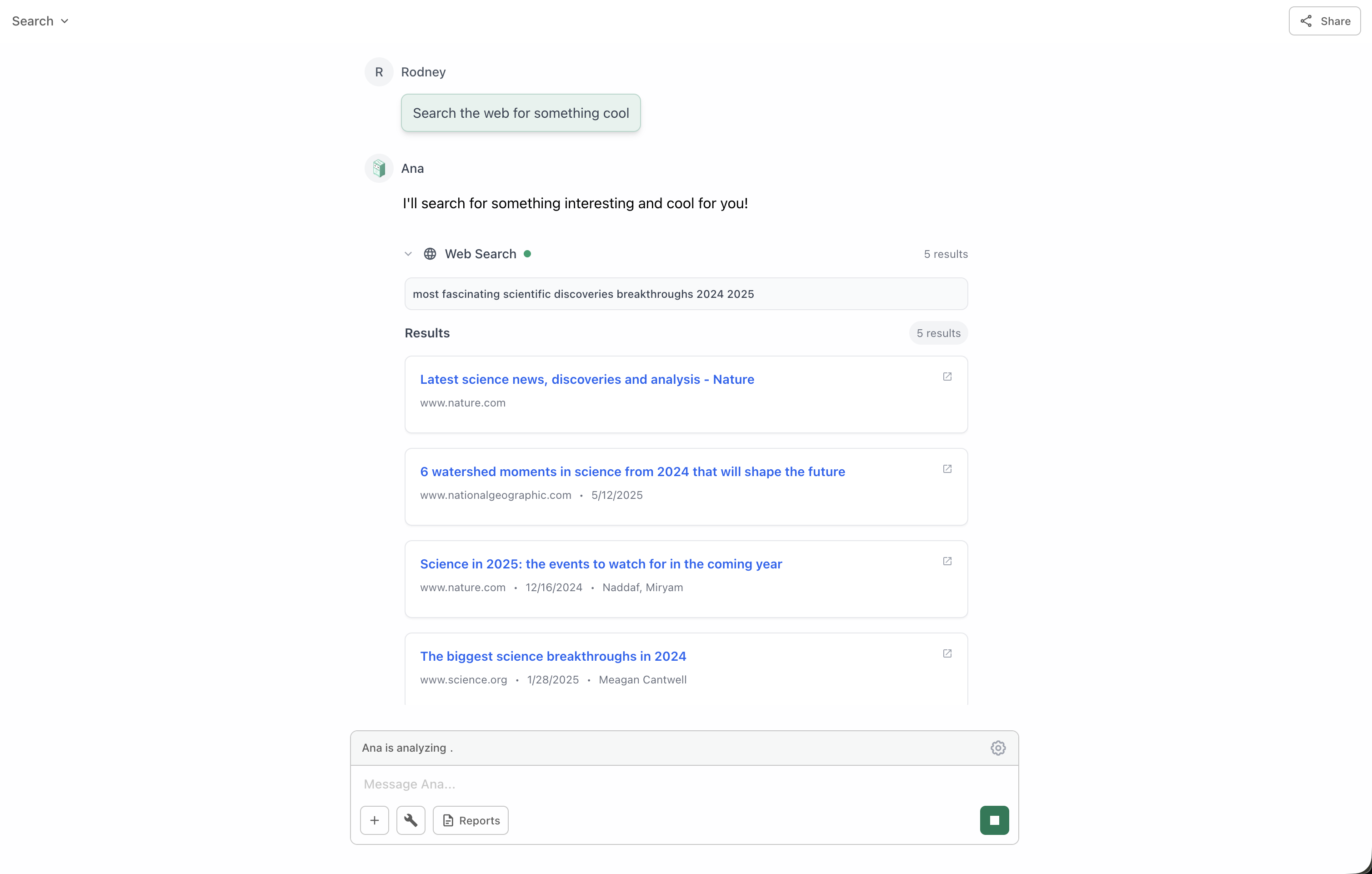
Search the web to answer questions about current events, recent data, or information not available in your connected data sources. Powered by Exa.
**Powered by Exa:** Ana uses Exa's advanced search capabilities to find the most relevant and up-to-date information from across the web.
**Availability:** Web search is only available when an Exa API key has been configured for your deployment. If you don't see the web search tool in your workspace, contact your administrator or refer to the [deployment configuration](/core/admin/compliance/deployment-types) docs.
 ## How It Works
When you ask a question that requires external information, Ana:
Ana determines that the information isn't available in your data warehouse.
Creates an optimized search query based on your question.
Uses Exa to search the web for relevant, recent information.
Gathers the most relevant results from authoritative sources.
Combines and summarizes the information into a coherent answer.
## When to Use
Stock prices, weather conditions, current events, live data feeds
Industry news, competitor information, market analysis, emerging trends
Breaking news, company announcements, product launches, press releases
Information not in your warehouse, definitions, research papers
Public data to enrich your internal analysis, benchmarks, industry standards
Competitor pricing, market positioning, feature comparisons
## Combining with Other Tools
Web Search becomes even more powerful when combined with other tools:
**Enrich warehouse data with external context**
```text Example Query theme={null}
"Compare our Q4 revenue to industry trends reported in the news"
```
Ana will:
1. Query your warehouse for Q4 revenue
2. Search the web for industry trends
3. Combine both datasets for comparison
**Analyze external data alongside internal data**
```text Example Query theme={null}
"Get current exchange rates and convert our international sales to USD"
```
Ana will:
1. Search for current exchange rates
2. Query your sales data
3. Use Python to perform conversions
**Add external benchmarks to business metrics**
```text Example Query theme={null}
"How does our customer acquisition cost compare to industry averages?"
```
Ana will:
1. Calculate CAC from your ontology
2. Search for industry benchmarks
3. Provide comparative analysis
## Best Practices
**Source Credibility:** Always review the sources Ana cites to ensure they're authoritative and relevant to your needs.
If you want information from specific websites or domains, mention them explicitly in your question.
**Example:** "Search TechCrunch and VentureBeat for AI startup funding trends"
For time-sensitive queries, mention the time period you're interested in.
**Example:** "Find news about cloud computing from the past 30 days"
Use web search to add context to your warehouse data for richer insights.
**Example:** "Compare our growth rate to what analysts are saying about the industry"
Request Ana to summarize findings from multiple sources.
**Example:** "Summarize the top 5 articles about remote work trends in 2024"
**Verification Recommended:** While Exa provides high-quality results, always verify critical information from multiple sources, especially for business-critical decisions.
## Use Cases
* Monitor competitor announcements and product launches
* Track pricing changes and market positioning
* Identify competitor strengths and weaknesses
* Discover new entrants in your market
* Identify industry trends and forecasts
* Gather market size and growth data
* Find customer sentiment and reviews
* Research regulatory changes
* Add external demographics to customer data
* Enrich company records with public information
* Append industry classifications
* Include economic indicators in analysis
* Track stock prices and financial markets
* Monitor social media trends
* Follow breaking news in your industry
* Watch for PR crises or brand mentions
## How It Works
When you ask a question that requires external information, Ana:
Ana determines that the information isn't available in your data warehouse.
Creates an optimized search query based on your question.
Uses Exa to search the web for relevant, recent information.
Gathers the most relevant results from authoritative sources.
Combines and summarizes the information into a coherent answer.
## When to Use
Stock prices, weather conditions, current events, live data feeds
Industry news, competitor information, market analysis, emerging trends
Breaking news, company announcements, product launches, press releases
Information not in your warehouse, definitions, research papers
Public data to enrich your internal analysis, benchmarks, industry standards
Competitor pricing, market positioning, feature comparisons
## Combining with Other Tools
Web Search becomes even more powerful when combined with other tools:
**Enrich warehouse data with external context**
```text Example Query theme={null}
"Compare our Q4 revenue to industry trends reported in the news"
```
Ana will:
1. Query your warehouse for Q4 revenue
2. Search the web for industry trends
3. Combine both datasets for comparison
**Analyze external data alongside internal data**
```text Example Query theme={null}
"Get current exchange rates and convert our international sales to USD"
```
Ana will:
1. Search for current exchange rates
2. Query your sales data
3. Use Python to perform conversions
**Add external benchmarks to business metrics**
```text Example Query theme={null}
"How does our customer acquisition cost compare to industry averages?"
```
Ana will:
1. Calculate CAC from your ontology
2. Search for industry benchmarks
3. Provide comparative analysis
## Best Practices
**Source Credibility:** Always review the sources Ana cites to ensure they're authoritative and relevant to your needs.
If you want information from specific websites or domains, mention them explicitly in your question.
**Example:** "Search TechCrunch and VentureBeat for AI startup funding trends"
For time-sensitive queries, mention the time period you're interested in.
**Example:** "Find news about cloud computing from the past 30 days"
Use web search to add context to your warehouse data for richer insights.
**Example:** "Compare our growth rate to what analysts are saying about the industry"
Request Ana to summarize findings from multiple sources.
**Example:** "Summarize the top 5 articles about remote work trends in 2024"
**Verification Recommended:** While Exa provides high-quality results, always verify critical information from multiple sources, especially for business-critical decisions.
## Use Cases
* Monitor competitor announcements and product launches
* Track pricing changes and market positioning
* Identify competitor strengths and weaknesses
* Discover new entrants in your market
* Identify industry trends and forecasts
* Gather market size and growth data
* Find customer sentiment and reviews
* Research regulatory changes
* Add external demographics to customer data
* Enrich company records with public information
* Append industry classifications
* Include economic indicators in analysis
* Track stock prices and financial markets
* Monitor social media trends
* Follow breaking news in your industry
* Watch for PR crises or brand mentions