> ## Documentation Index
> Fetch the complete documentation index at: https://docs.textql.com/llms.txt
> Use this file to discover all available pages before exploring further.

# Module 5 · Automate It

> A playbook is a saved analysis instruction that runs on a schedule and delivers to email or Slack — a weekly report that writes itself. (~20 min)

## 5.1 · Playbooks — the scheduled report, reinvented

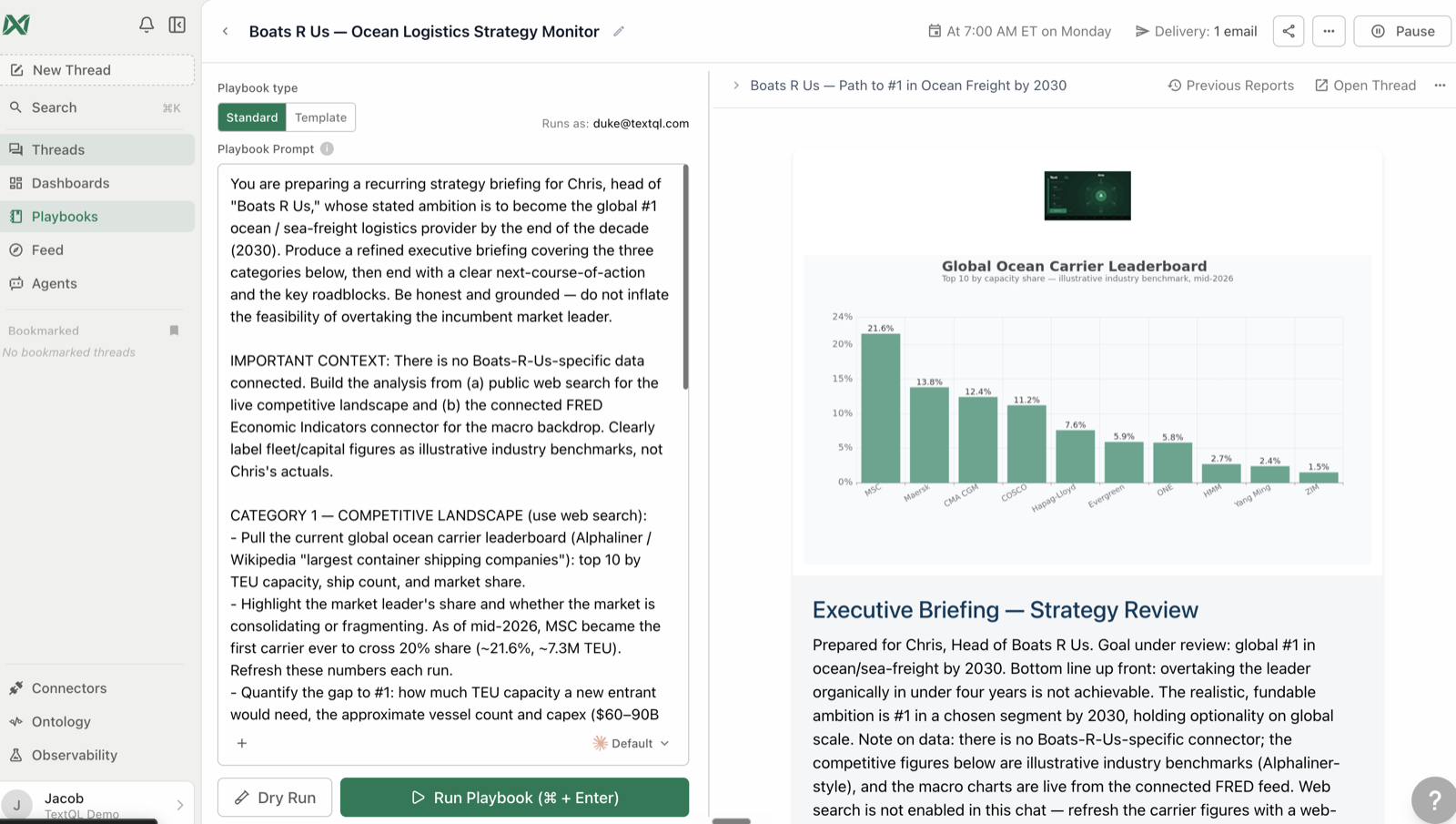
A **playbook** is a saved analysis instruction that runs on a schedule and delivers to email or Slack — a weekly report that writes itself.

```text Prompt theme={null}
Create a playbook called "[Team] Weekly Snapshot" that runs every Monday at 9am: [metric 1] and [metric 2] for last week vs the week before, the segment breakdown, and anything unusual flagged at the top. Email it to me.
```

<Check>
  **You'll see:** the playbook created and visible under Playbooks in the sidebar. Confirm the schedule and delivery before relying on it.
</Check>

<Warning>
  **Delivery prerequisites** —

  Slack/Teams delivery requires the **org-wide integration** (admin, set up once) — no channel option means that's the missing piece. Email recipients must be **org members**; external addresses are silently dropped.
</Warning>

<Frame caption="The Monday report that writes itself.">
  <img src="https://textqllabs.github.io/workshops/self-service-analytics/assets/m5-playbook.png" alt="A scheduled playbook" />
</Frame>

## 5.2 · Tune the output

```text Prompt theme={null}
Make that playbook's report style concise — headline numbers and flags only, no methodology section. Also send it to our team Slack channel [#channel-name].
```

<Check>
  **You'll see:** delivery and style updated. Playbooks support email recipients, Slack channels, and executive / verbose / concise styles.
</Check>

## 5.3 · Feed agents — analysis that comes to you

Playbooks answer a **known question** on a schedule. **Feed agents** investigate a *domain*, remember what they found before, and post anything noteworthy to your org's feed — including things you didn't think to ask.

```text Prompt theme={null}
Create a feed agent that keeps an eye on [your domain — e.g., "our sales pipeline" / "product usage" / "support tickets"]. Every morning, look for meaningful changes, anomalies, or trends worth knowing about, and post only when there's something genuinely interesting. Build on what you found in previous runs.
```

<Check>
  **You'll see:** the agent created. Its posts appear in the Feed, where teammates can comment — and the agent responds.
</Check>

<Note>
  **Go deeper** —

  Reliable prompts that survive autopilot, batch templates, delivery options, and operating your automations: the [**Automation Deep-Dive**](/workshops/automation/overview) workshop.
</Note>

## 5.4 · Playbook or feed agent?

<table>
  <tr><th /><th>Playbook</th><th>Feed agent</th></tr>
  <tr><td>Question</td><td>Known, fixed</td><td>Open-ended domain</td></tr>
  <tr><td>Output</td><td>Same report each run</td><td>Posts only when noteworthy</td></tr>
  <tr><td>Memory</td><td>Stateless</td><td>Remembers prior findings</td></tr>
  <tr><td>Audience</td><td>Email/Slack recipients</td><td>Org feed (+ optional relay)</td></tr>
  <tr><td>Use for</td><td>"Send me the weekly numbers"</td><td>"Keep an eye on this for me"</td></tr>
</table>

## 5.5 · One-off reminders

```text Prompt theme={null}
Remind me next Friday at 3pm to review the Q2 dashboard before the leadership meeting.
```

<Check>
  **You'll see:** a one-time future message scheduled to you.
</Check>

## Troubleshooting

<table>
  <tr><th>Symptom</th><th>Fix</th></tr>
  <tr><td>Playbook created but never runs</td><td>Check it has a schedule AND is Active — ask Ana to confirm both</td></tr>
  <tr><td>Report goes to the wrong people</td><td>Recipients replace, not append — restate the full list</td></tr>
  <tr><td>Feed agent posts too much noise</td><td>Tighten its prompt: "post only when \[specific threshold] changes"</td></tr>
</table>

### ✅ Checkpoint

* [ ] You created a playbook with a schedule and a delivery target
* [ ] You adjusted its style and/or added a Slack channel
* [ ] You created (or scoped out) a feed agent for a domain you care about
* [ ] You can explain playbook vs. feed agent in one sentence each