Documentation Index
Fetch the complete documentation index at: https://docs.textql.com/llms.txt
Use this file to discover all available pages before exploring further.
Setup
Starting from your Salesforce Enterprise or Developer Edition welcome page, open the Setup Menu with the gear icon on the right, then click “Setup for current app”.
Search for “App Manager” in the Quick Find menu on the top left.
Click “New External Connected App”.
Name your app and enter a valid contact email into the required field.
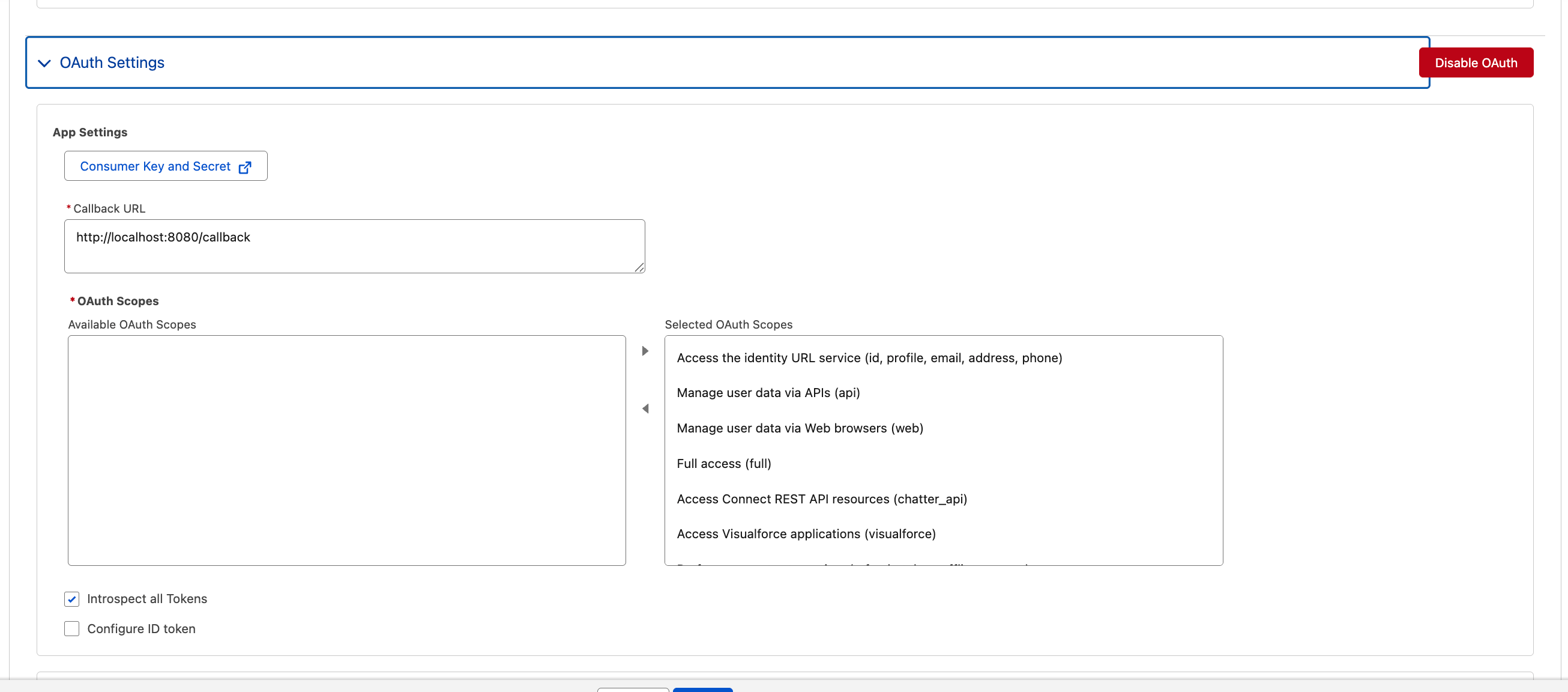
Enable OAuth and grant access to scopes. We recommend starting in a sandbox org and granting “All scopes”. Check “Introspect all Tokens” to True.
Use the following Flow Enablement and Security settings:
Click “Save” to create the app.
Navigate to the “External Client App Manager” page to find your app and all connected apps.
Find the OAuth settings for your app.
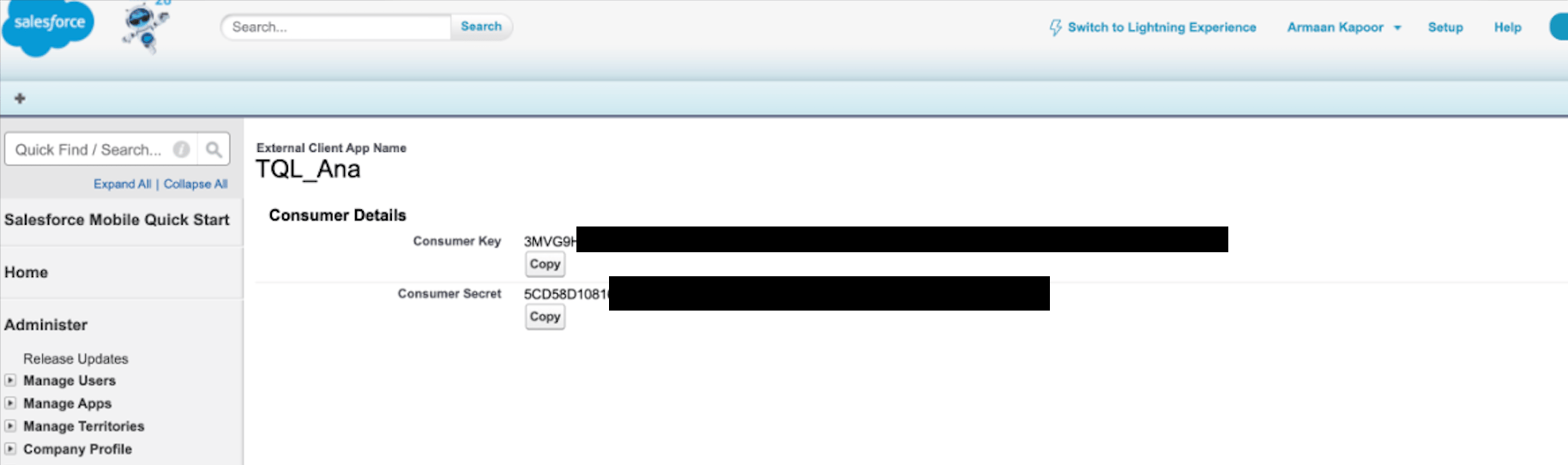
Click “Consumer Key and Secret”.
Authenticate as prompted.
Copy the Consumer Key and Consumer Secret—you’ll need them for the following script.
Generate Refresh Token
Now that you have your Consumer Key and Consumer Secret, you’ll need to generate a refresh token. This token is what TextQL will use to authenticate with your Salesforce org. The refresh token’s validity period is determined by the settings you configured earlier in the connected app.
Run the following Python script, replacing YOUR_CONSUMER_KEY and YOUR_CONSUMER_SECRET with the values you copied:
import http.server
import urllib.parse
import webbrowser
import requests

CLIENT_ID = "YOUR_CONSUMER_KEY"
CLIENT_SECRET = "YOUR_CONSUMER_SECRET"

REDIRECT_URI = "http://localhost:8080/callback"
LOGIN_URL = "https://login.salesforce.com"


def _get_oauth_base(login_url):
    if not login_url:
        return "https://login.salesforce.com"
    if "test.salesforce.com" in login_url.lower() or ".sandbox." in login_url.lower():
        return "https://test.salesforce.com"
    return "https://login.salesforce.com"


OAUTH_BASE = _get_oauth_base(LOGIN_URL)


class CallbackHandler(http.server.BaseHTTPRequestHandler):
    def do_GET(self):
        if self.path.startswith("/callback"):
            query = urllib.parse.urlparse(self.path).query
            params = urllib.parse.parse_qs(query)
            code = params.get("code", [None])[0]

            if code:
                token_url = f"{OAUTH_BASE}/services/oauth2/token"
                data = {
                    "grant_type": "authorization_code",
                    "code": code,
                    "client_id": CLIENT_ID,
                    "client_secret": CLIENT_SECRET,
                    "redirect_uri": REDIRECT_URI,
                }
                resp = requests.post(token_url, data=data)
                tokens = resp.json()

                self.send_response(200)
                self.send_header("Content-type", "text/html")
                self.end_headers()

                if "refresh_token" in tokens:
                    print("\n" + "=" * 50)
                    print("SUCCESS! Copy this refresh token:\n")
                    print(tokens["refresh_token"])
                    print("\n" + "=" * 50)
                    print(f"\nInstance URL: {tokens.get('instance_url')}")
                    self.wfile.write(
                        b"<h1>Success! Check your terminal for the refresh token.</h1>"
                    )
                else:
                    print(f"\nError: {tokens}")
                    self.wfile.write(f"<h1>Error</h1><pre>{tokens}</pre>".encode())
            else:
                self.send_response(400)
                self.end_headers()
                self.wfile.write(b"No code received")

    def log_message(self, format, *args):
        pass


auth_url = (
    f"{OAUTH_BASE}/services/oauth2/authorize"
    f"?response_type=code"
    f"&client_id={CLIENT_ID}"
    f"&redirect_uri={REDIRECT_URI}"
    f"&scope=api%20refresh_token"
)

print("Opening browser for Salesforce login...")
print(f"\nIf browser doesn't open, go to:\n{auth_url}\n")
webbrowser.open(auth_url)

server = http.server.HTTPServer(("localhost", 8080), CallbackHandler)
print("Waiting for callback on http://localhost:8080...")
server.handle_request()
- Open your browser to the Salesforce login page
- Start a local server on
localhost:8080 to receive the OAuth callback
- Exchange the authorization code for a refresh token
- Display the refresh token and instance URL in your terminal
If you’re using a sandbox org, update LOGIN_URL to your sandbox URL (e.g., https://test.salesforce.com or your custom domain).
Test Your Connection
Once you have your refresh token, you can verify the connection with this test script. Fill in the values from the previous steps:
CLIENT_ID: Your Consumer KeyCLIENT_SECRET: Your Consumer SecretREFRESH_TOKEN: The refresh token from the script aboveINSTANCE_URL: The instance URL from the script outputLOGIN_URL: Your Salesforce login URL
import requests

CLIENT_ID = ""
CLIENT_SECRET = ""
REFRESH_TOKEN = ""
INSTANCE_URL = ""
LOGIN_URL = "https://login.salesforce.com"

try:
    oauth_base = "https://test.salesforce.com" if "sandbox" in LOGIN_URL.lower() else "https://login.salesforce.com"

    response = requests.post(
        f"{oauth_base}/services/oauth2/token",
        data={
            "grant_type": "refresh_token",
            "client_id": CLIENT_ID,
            "client_secret": CLIENT_SECRET,
            "refresh_token": REFRESH_TOKEN,
        }
    )
    access_token = response.json()["access_token"]
    print(f"Connected. Token: {access_token[:20]}...")

    response = requests.get(
        f"{INSTANCE_URL}/services/data/v60.0/query",
        headers={"Authorization": f"Bearer {access_token}"},
        params={"q": "SELECT Id, Name FROM Account LIMIT 3"}
    )
    records = response.json()["records"]
    print(f"Found {len(records)} accounts:")
    for r in records:
        print(f"  {r['Name']}")

    print("\nSuccess: Connection verified")
except Exception as e:
    print(f"\nFailed: {e}")
Add Salesforce to Ana
Now that you have all your credentials, you can configure Ana to work with your Salesforce org.
Step 1: Store Refresh Token as an API Connector
In Ana, navigate to API Connectors and create a new connector:
- Name:
salesforce_refresh_token
- Value: Paste your refresh token from the earlier step
Paste the following prompt into Ana. Replace YOUR_CONSUMER_KEY, YOUR_CONSUMER_SECRET, and YOUR_INSTANCE_URL with your actual values. The {{salesforce_refresh_token}} will automatically be replaced with your secret.
You have access to Salesforce APIs. Use these credentials:

CLIENT_ID = "YOUR_CONSUMER_KEY"
CLIENT_SECRET = "YOUR_CONSUMER_SECRET"
REFRESH_TOKEN = "{{salesforce_refresh_token}}"
INSTANCE_URL = "YOUR_INSTANCE_URL"
LOGIN_URL = "https://login.salesforce.com"

When writing Salesforce scripts, always use this pattern:

import requests

# Determine OAuth base URL
if "test.salesforce.com" in LOGIN_URL.lower() or ".sandbox." in LOGIN_URL.lower():
    oauth_base = "https://test.salesforce.com"
else:
    oauth_base = "https://login.salesforce.com"

# Get access token
resp = requests.post(
    f"{oauth_base}/services/oauth2/token",
    data={
        "grant_type": "refresh_token",
        "client_id": CLIENT_ID,
        "client_secret": CLIENT_SECRET,
        "refresh_token": REFRESH_TOKEN,
    }
)
access_token = resp.json()["access_token"]

# Query Salesforce
resp = requests.get(
    f"{INSTANCE_URL}/services/data/v60.0/query",
    headers={"Authorization": f"Bearer {access_token}"},
    params={"q": "YOUR_SOQL_QUERY"}
)
data = resp.json()
If you’re using a sandbox org, update LOGIN_URL to https://test.salesforce.com or your custom sandbox domain.