

Understanding Context Scopes
Context scoping determines who sees your context and when they see it. TextQL offers flexible scoping options that let you provide the right context to the right people at the right time.Key Concept: Context can be scoped to your entire organization, specific roles, specific connectors, or combinations of roles and connectors.
The Three Scoping Dimensions
Context in TextQL operates across three dimensions:Organization
Context that applies to everyone in your organization, regardless of role or connector.
Role
Context that applies to users with specific assigned roles.
Connector
Context that applies when querying specific data sources.
Organization-Level Context
Organization context is the broadest scope and applies to every user in your organization across all connectors.When to Use Organization Context
Use organization-level context for:- Company-wide business rules and policies
- Universal terminology and definitions
- General data interpretation guidelines
- Organization-wide best practices
Example Organization Context
Important Limitation
Role-Based Context
Role-based context applies to users who have been assigned specific roles in your organization.When to Use Role-Based Context
Use role-based context for:- Department-specific terminology or processes
- Persona-based customization of Ana’s behavior
- Skill-level appropriate guidance
- Team-specific best practices
Example Role Contexts
For “Sales Team” Role:How Roles Work
Roles in TextQL are part of the RBAC (Role-Based Access Control) system. They:- Control access to features like dashboards and playbooks
- Enable custom context for different user personas
- Are assigned by administrators
Connector-Based Context
Connector-based context applies when users are actively querying a specific data source.When to Use Connector-Based Context
Use connector-based context for:- Database-specific schema information
- Data source-specific business logic
- Connector-specific query patterns
- Data quality notes or caveats
Example Connector Context
For “Salesforce Production” Connector:Best Practices for Connector Context
Limit Schema Information
Limit Schema Information
Don’t document your entire schema in context. Focus on:
- Non-obvious table relationships
- Important business logic in the data
- Common query patterns
Document Data Quirks
Document Data Quirks
Use connector context to highlight:
- Known data quality issues
- Unusual field meanings
- Important filters or exclusions
Role + Connector Intersection
The most targeted form of context applies only when a user with a specific role queries a specific connector.When to Use Intersection Context
Use role + connector context for:- Highly specialized use cases
- Role-specific views of particular data sources
- Advanced users who need detailed technical context
- Compliance or security-sensitive scenarios
Example Intersection Context
For “Finance Team” Role + “Salesforce Production” Connector:How Intersection Works
For intersection context to apply, both conditions must be true:- The user must have the specified role assigned
- The user must be actively chatting with the specified connector
Context Priority and Layering
When multiple context documents apply to a user, Ana considers all of them. Context is layered from broadest to most specific:Role Context
Applies if the user has the specified role assigned. Adds role-specific information on top of organization context.
Connector Context
Applies when the user is actively querying the specified data source. Adds data-specific information.
All Applicable Context is Used: Ana doesn’t choose one context over another. She considers all context that applies to the current user and situation.
Scoping Strategy
The best way to build context for a new connector is to let Ana learn it with you:Query Naturally
Ask Ana questions about the data. She’ll explore the schema, run SQL queries, and sometimes fail as she learns the shape of your data — that’s expected.
Ask Ana to Write Your Context
Once you’ve had a successful chat, ask Ana: “Can you write me a context document as markdown that I can copy back to your context library?” She’ll produce a well-structured context document based on what she learned.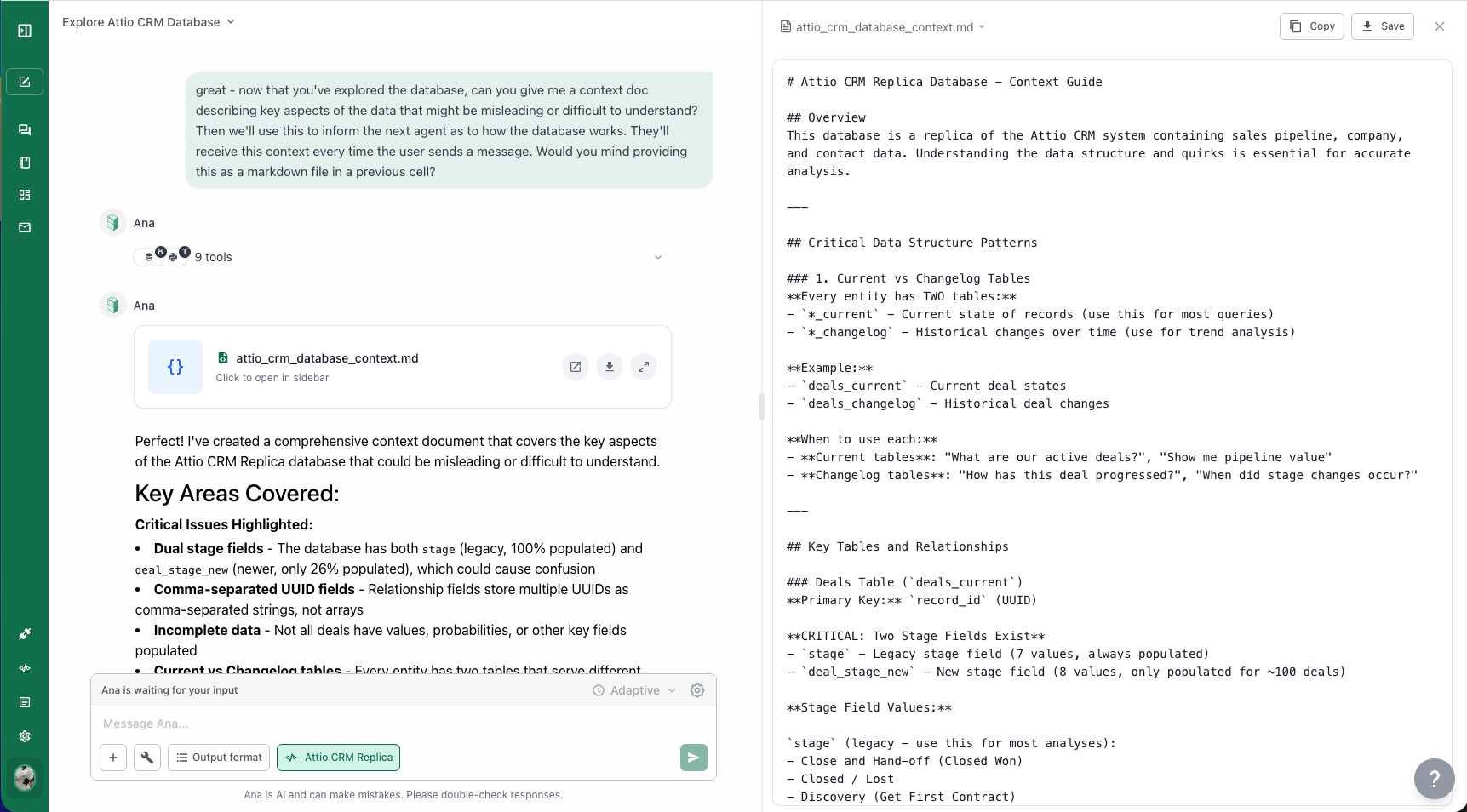
Copy It to the Context Library
Open the Context Library, create a new context document scoped to that connector, and paste in what Ana wrote. Currently, context must be manually copied from the chat — there is no automatic context updating from conversations, except through the GitHub integration.
What’s Next?
Context Editor
Return to the editor guide to create your scoped context documents
GitHub Integration
Manage context documents through version-controlled GitHub repositories