Context scoping determines who sees your context and when they see it. TextQL offers flexible scoping options that let you provide the right context to the right people at the right time.
Key Concept: Context can be scoped to your entire organization, specific roles, specific connectors, or combinations of roles and connectors.
# Acme Corp Business Context## Fiscal Calendar- Our fiscal year runs from July 1 to June 30- Q1: July-September, Q2: October-December, Q3: January-March, Q4: April-June## Currency Standards- All financial reporting should be in USD- Use 2 decimal places for currency values## Key Business Rules- Revenue is recognized at time of shipment, not order- Refunds are excluded from revenue calculations
Only One Organization Context AllowedYou can only have one organization-level context document. If you need to add more organization-wide information, edit your existing organization context rather than creating a new one.
# Sales Team Context## CRM Fields- **Stage**: Current position in sales pipeline- **Close Date**: Expected contract signature date- **ARR**: Annual Recurring Revenue## Reporting Preferences- Focus on pipeline velocity and conversion rates- Always include win/loss analysis
# Salesforce Production Database Context## Schema Information- **Account**: Customer organizations- **Opportunity**: Sales deals in pipeline- **Contact**: Individual people at customer organizations## Important Notes- Closed-Won opportunities have Stage = "Closed Won"- Amount field is in USD- Data is synced hourly at :15 past the hour## Common Queries- Pipeline value: SUM(Amount) WHERE Stage != "Closed Lost"- Win rate: COUNT(Closed Won) / COUNT(All Opportunities)
For “Finance Team” Role + “Salesforce Production” Connector:
# Finance Team - Salesforce Context## Revenue Recognition RulesWhen analyzing Salesforce data for financial reporting:- Only include opportunities with Stage = "Closed Won"- Use CloseDate for revenue period assignment- Exclude opportunities with Type = "Internal"## Required FiltersAlways apply these filters for financial reports:- IsDeleted = false- Amount > 0- CloseDate within reporting period
The best way to build context for a new connector is to let Ana learn it with you:
1
Connect Your Data Source
Set up a new connector in TextQL and start a chat with it.
2
Query Naturally
Ask Ana questions about the data. She’ll explore the schema, run SQL queries, and sometimes fail as she learns the shape of your data — that’s expected.
3
Ask Ana to Write Your Context
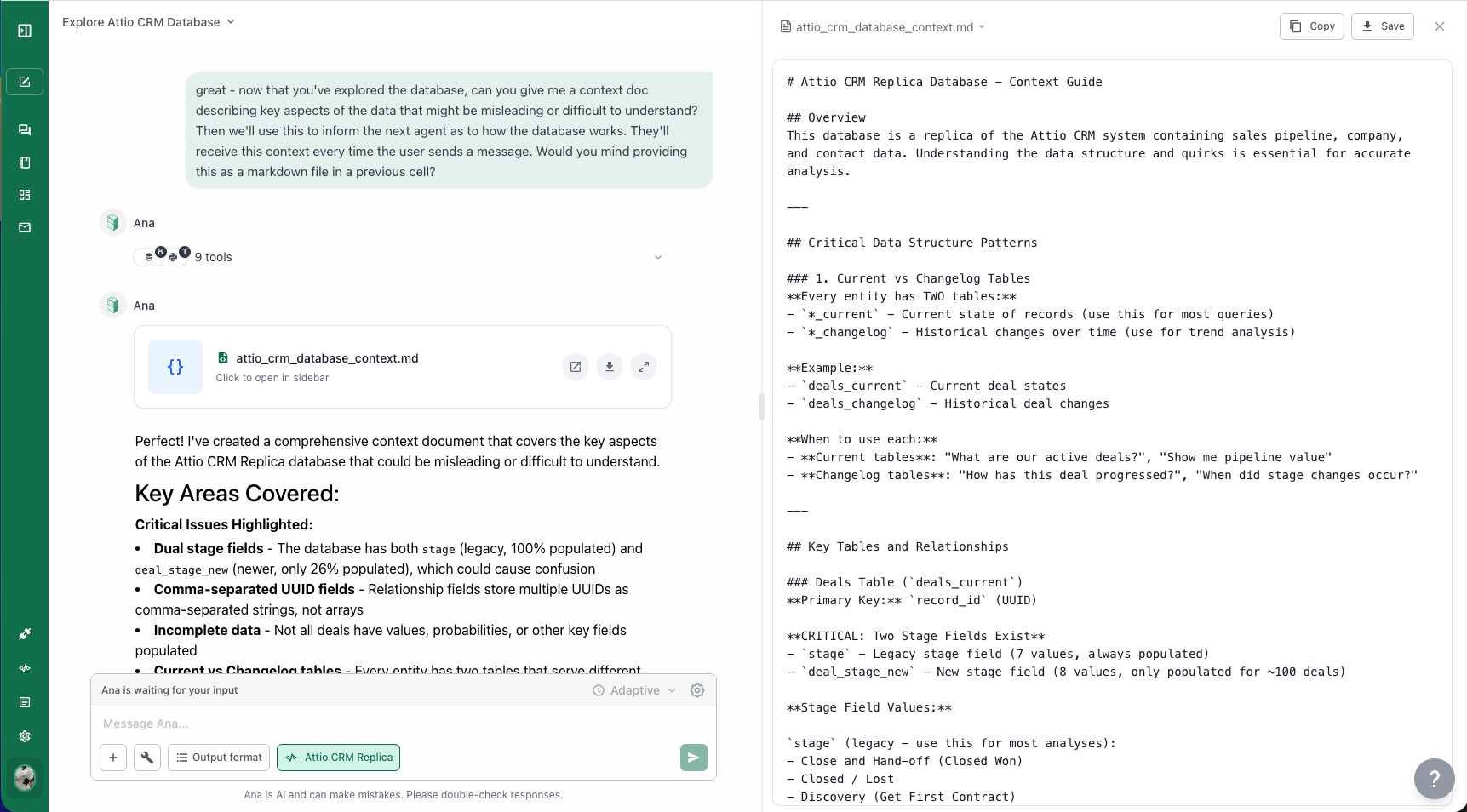
Once you’ve had a successful chat, ask Ana: “Can you write me a context document as markdown that I can copy back to your context library?” She’ll produce a well-structured context document based on what she learned.
Asking Ana to generate a context document after exploring a new connector
4
Copy It to the Context Library
Open the Context Library, create a new context document scoped to that connector, and paste in what Ana wrote. Currently, context must be manually copied from the chat — there is no automatic context updating from conversations, except through the GitHub integration.