

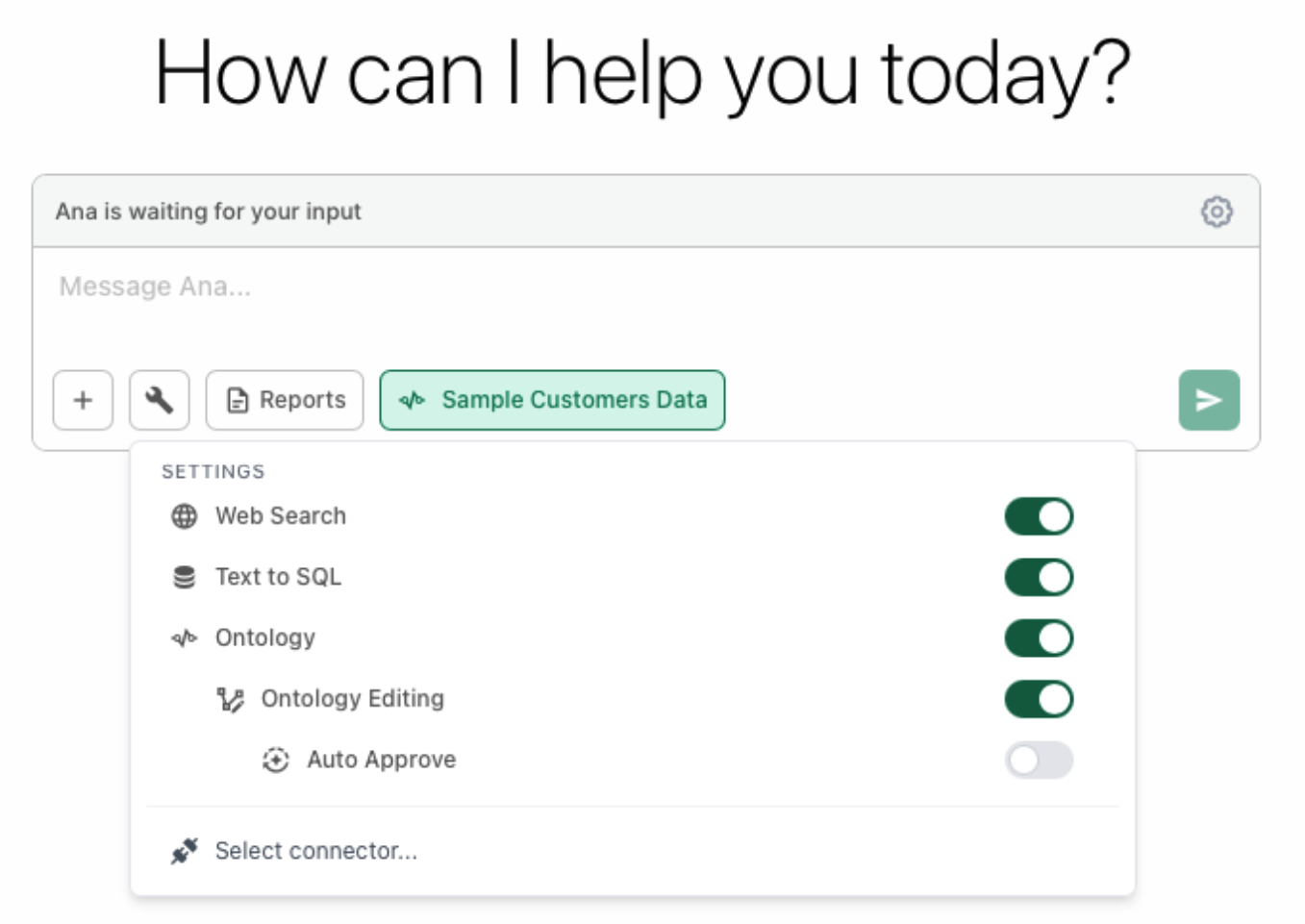
You don’t have to build ontology manually! Ana can help you create objects, attributes, links, and metrics directly in threads (chat). After you have your database connected, Ana can edit the ontology directly. Before Ana can build your ontology, you need to enable three settings in your chat:Documentation Index
Fetch the complete documentation index at: https://docs.textql.com/llms.txt
Use this file to discover all available pages before exploring further.
Step 1: Enable Ontology and Text to SQL
- Open the tool settings dropdown (click on the tool icon)
- Toggle “Ontology” to ON and select the Ontology you want to Edit
- Toggle “Text2SQL” to ON and select
Step 2: Enable Ontology Editing
- In the same settings panel, toggle “Ontology Editing” to ON
- This gives Ana permission to create and modify your ontology
Step 3: (Optional) Enable Auto Approve
- Toggle “Auto Approve” to ON if you want Ana to make changes without asking for approval each time
- Leave it OFF if you want to review each change before it’s applied (recommended for beginners)
- Select the database connector you want to build an ontology for
Recommended Workflow
We recommend the following workflow for building an Ontology with the in-chat editor:- Work with Ana in Text2SQL mode until you arrive at an interesting definition, data export, or plot
- Ask Ana in the same thread to add this metric to its ontology